
eSewa in Nepal (2026): How to Open, Verify KYC, Load Money, Limits and Fees
Updated 28 October 2026. Steps, limits and fees are from eSewa's own pages (tariffs updated Bhadra 3, 2083, about 19 August 2026) and news reports, with dates. eSewa can change them at any time.
Short answer: Register free in the eSewa app with your mobile number, an SMS OTP and an MPIN, then complete KYC with your citizenship, passport, driving licence or voter ID, a live selfie and photos of the ID; verification usually takes up to 24 hours. Verified users can send up to Rs 25,000 per transaction (Rs 50,000 a day) and withdraw to a bank up to Rs 50,000 per transaction (Rs 2 lakh a day, Rs 10 lakh a month). Sending money is free for the first 3 transfers a day; after that it is Rs 10, the same as a bank withdrawal. Loading by card costs 1.75%.
How to open an eSewa account
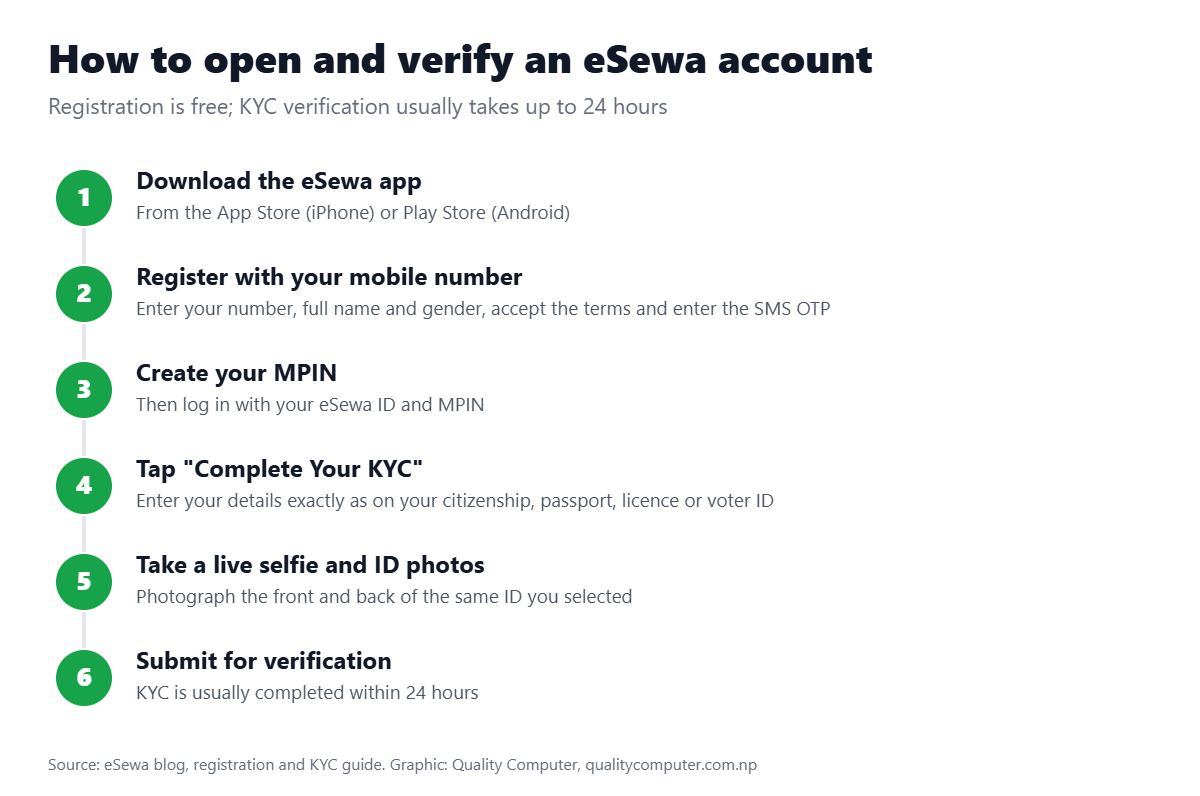
- Download the eSewa app from the App Store or Play Store (you can also register on the website).
- Tap Register and enter your mobile number, full name and gender; accept the terms.
- Enter the OTP sent by SMS, then create and confirm your MPIN.
- Log in with your eSewa ID and MPIN.
Registration is free. You need a nationality document such as citizenship, a driving licence, a passport or a voter ID card. You can add up to 5 extra mobile numbers or emails and use your account on up to 3 devices.
How to complete eSewa KYC
- Tap Complete Your KYC.
- Choose your nationality and enter your details (name, date of birth, gender, parents' names, marital status, occupation) exactly as on your ID. PAN and email are optional.
- Enter your current and permanent address, down to tole and ward number.
- Take a live selfie: well lit, full face, eyes open, no shadows.
- Photograph the front and back of the ID you chose; it must be valid and readable.
- Tap Submit for Verification. KYC is usually completed within 24 hours.
Until your KYC is verified you can't send money to other users or withdraw to a bank.
How to load money in eSewa
| Method | How | Cost |
|---|---|---|
| Linked bank account | Link your bank once (bank mobile banking login and OTP), then tap Load | Free from eSewa (bank charges may apply) |
| Mobile banking | In your bank's app, tap the eSewa icon and enter your eSewa ID | Free from eSewa |
| Internet banking | In eSewa: Load Fund > Internet Banking > your bank | Free from eSewa |
| Debit or credit card | On esewa.com.np: Load Fund > Load via Card (Nepali 3D Secure Visa or Mastercard) | 1.75% |
| eSewa cash point (agent) | Pay cash at one of 5,000+ cash points; find one in the app map or call 1660-01-02121 | Rs 5 up to Rs 5,000; Rs 15 up to Rs 15,000; Rs 25 up to Rs 25,000 |
| From another user | Another eSewa user sends money to your eSewa ID | Free for them up to 3 a day |
You can also pay a bill straight from a linked bank account without loading the wallet first: choose Linked Bank Account at checkout.
eSewa transaction limits (2026)
| Transaction | Verified user | Unverified user |
|---|---|---|
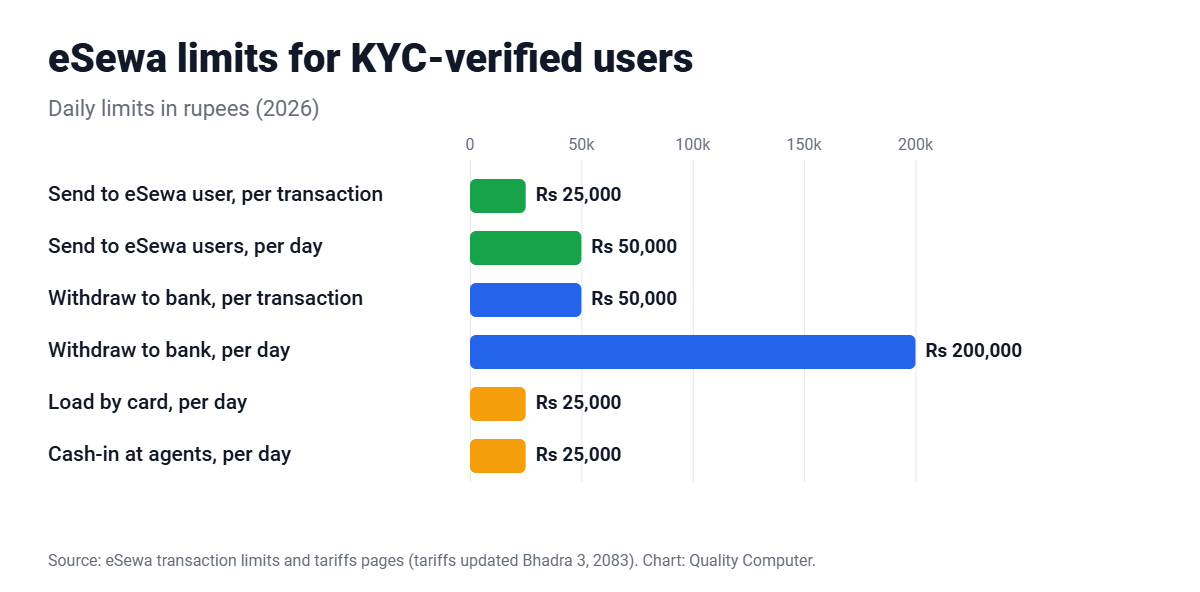
| Send to another eSewa user | Rs 25,000 per transaction; Rs 50,000 and 10 transactions a day; Rs 5 lakh and 100 a month | Not allowed |
| Withdraw to a bank | Rs 50,000 per transaction; Rs 2 lakh and 10 a day; Rs 10 lakh and 50 a month | Not allowed |
| Bank transfer per transaction (tariffs page) | Up to Rs 1 lakh to your own linked account; Rs 50,000 to other accounts | Not allowed |
| Load by card | Rs 10,000 per transaction; Rs 25,000 a day; Rs 50,000 a month | — |
| Cash-in at agents | Rs 10,000 per transaction; Rs 25,000 a day; Rs 1 lakh a month | — |
| Payments from a linked bank | Rs 50,000 per transaction; Rs 1 lakh or 10 a day; Rs 10 lakh or 100 a month | — |
| Wallet balance | Up to Rs 5 lakh; end-of-day balance cap Rs 50,000 | — |
Festival change: Nepal Rastra Bank temporarily raised the number of deposits a person's wallet can receive in a day from 10 to 50 during Dashain and Tihar/Chhath 2083; the amount limits did not change (ShareSansar, 16 October 2026). NRB's April 2026 payment directive kept wallet-to-bank transfers at Rs 10 lakh a month (ShareSansar, 17 April 2026).
eSewa charges (2026)
| Service | Charge |
|---|---|
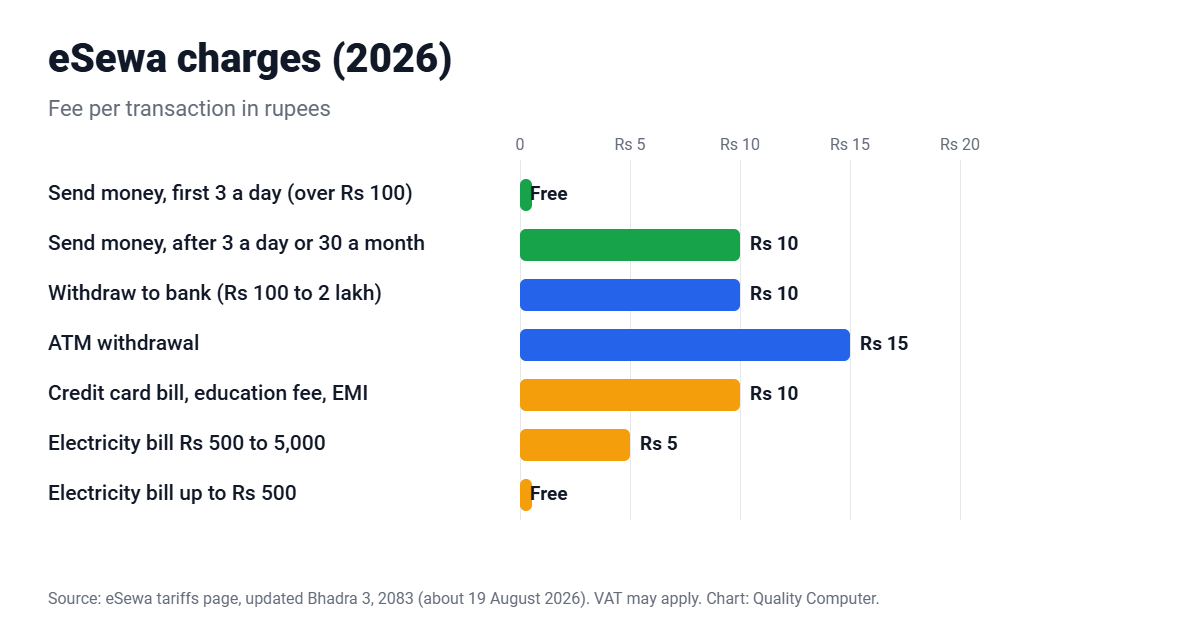
| Send money to an eSewa user | Free under Rs 100; above Rs 100, free for 3 a day and 30 a month, then Rs 10 each |
| Withdraw to bank (Rs 100 to Rs 2 lakh) | Rs 10 |
| ATM withdrawal | Rs 15 |
| Load by card | 1.75% |
| Electricity (NEA) bill | Free up to Rs 500; Rs 5 up to Rs 5,000; Rs 8 up to Rs 10,000; Rs 10 above (+VAT) |
| Credit card bill, education fee, EMI | Rs 10 + VAT |
| Government payments | Rs 5 up to Rs 5,000; Rs 8 up to Rs 10,000; Rs 10 above (+VAT) |
| Bluebook renewal | Rs 250 (from 1 September 2026) |
The send-money fee started on Shrawan 17, 2081 (1 August 2024) (Nepali Telecom). 13% VAT applies to service charges where applicable.
What you can pay with eSewa
- Mobile recharge, electricity and water bills, internet and TV, air and bus tickets, school fees, insurance, government payments, Mero Share and more: more than 6,000 digital services (ShareSansar, May 2026).
- QR payments: use Scan and Pay on shops with a "fonepay accepted" sticker.
- Pay with eSewa online: since January 2026 you can approve some merchant payments with your fingerprint or Face ID instead of an MPIN or OTP (Nepali Telecom, 25 January 2026).
eSewa had 10.8 million users, 560,000+ merchants and 280,000+ agents at its 17th anniversary in January 2026 (Nepali Telecom).
Paying Quality Computer online
At checkout on qualitycomputer.com.np you can pay with connectIPS or Fonepay. New to connectIPS? Read our connectIPS guide. iPhones are also available on 0% interest EMI: see iPhone price in Nepal.
Customer reviews
Why buyers choose Quality Computer
Real reviews from our Google Business Profile, unedited.
“…Recently got my Iphone 15 pm, and am really happy and satisfied with competitive pricing, knowledgeable staff, excellent customer service and overall shopping experience…”
Bought an iPhone 15 Pro Max on Google
“Quality computer is providing and serving with genuine product and services. Authorized apple reseller in birtamod jhapa , Nepal”
Apple customer on Google
“I recently bought a laptop from Quality Computer, and I’m really happy with my purchase. The staff were friendly and helpful, and they explained the laptop’s features clearly before I bought it.”
Bought a laptop on Google
Frequently asked questions
How do I open an eSewa account?
Download the eSewa app, tap Register, enter your mobile number, name and gender, enter the SMS OTP and create an MPIN. Registration is free.
How long does eSewa KYC verification take?
eSewa says KYC is usually completed within 24 hours after you submit your details, a live selfie and photos of your ID.
What is the eSewa send money limit?
For verified users: Rs 25,000 per transaction, Rs 50,000 and 10 transactions a day, and Rs 5 lakh and 100 transactions a month. Unverified users can't send money.
Is sending money in eSewa free?
Transfers under Rs 100 are free. Above Rs 100, the first 3 a day (30 a month) are free and each extra transfer costs Rs 10.
How much does eSewa charge to withdraw to a bank?
Rs 10 per transaction for Rs 100 to Rs 2 lakh, according to eSewa's tariffs page updated Bhadra 3, 2083.
Can I load eSewa with a card?
Yes, with a Nepali 3D Secure Visa or Mastercard debit or credit card on the eSewa website. The fee is 1.75%, with limits of Rs 10,000 per transaction and Rs 25,000 a day.
Sources
- eSewa tariffs, eSewa, updated Bhadra 3, 2083
- Revision in transaction limits, eSewa
- Register and complete KYC in the eSewa app, eSewa
- How to load money in eSewa, eSewa
- eSewa FAQ, eSewa
- NRB raises daily wallet deposit count for festivals, ShareSansar, 16 October 2026
- eSewa marks 17th anniversary, Nepali Telecom, 25 January 2026