
connectIPS in Nepal (2026): How to Register, Link Your Bank, Limits and Fees
Updated 28 October 2026. Steps and limits are from the official connectIPS pages; fees are from NCHL's fee schedule effective 30 May 2025. Banks can set lower limits.
Short answer: connectIPS is Nepal Clearing House's system for paying straight from your bank account; it is not a wallet, so there is nothing to load. Register free on connectips.com or the app, verify your mobile and email, link your bank account and verify it (by OTP and two test deposits at 22 banks, or at your branch). On the website you can send up to Rs 20 lakh per transaction and in the app up to Rs 2 lakh. Transfers up to Rs 500 are free; above that they cost Rs 4 or Rs 8.
What is connectIPS?
connectIPS is a payment platform built and run by Nepal Clearing House Ltd (NCHL), which Nepal Rastra Bank licenses as a payment system operator. It works 24 hours a day through the connectIPS website and app, as a payment gateway on websites, and inside the mobile and internet banking of most banks. You can:
- Send money to your own accounts, other bank accounts or other connectIPS users by mobile number.
- Pay government fees, schools and colleges, insurance and other billers.
- Pay online shops, airlines and government portals at checkout.
Between mid-July 2025 and mid-June 2026 (fiscal year 2082/83 to the end of Jestha), connectIPS handled 127.7 million transactions worth Rs 8,066,914 million (NCHL).
How to register on connectIPS
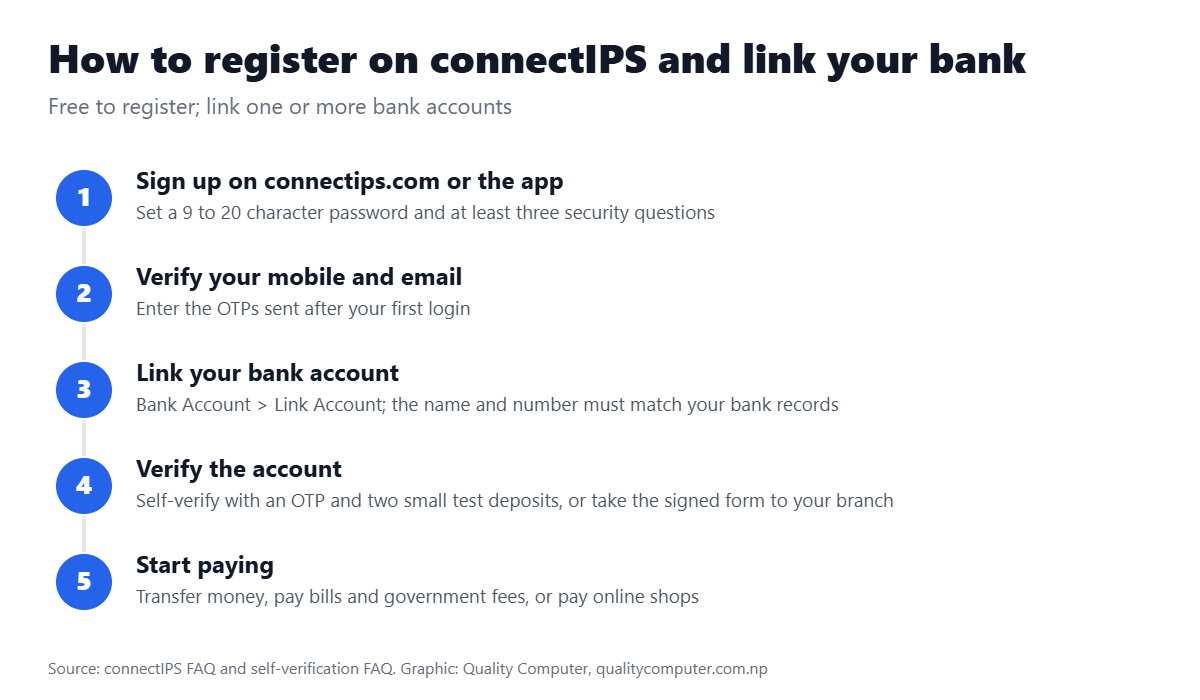
- Sign up on connectips.com or in the connectIPS app. The password needs 9 to 20 characters with upper and lower case letters, a number and a special character, and you must set at least three security questions.
- After your first login, verify your mobile number and email with the OTPs.
- Go to Bank Account > Link Account. The account name and number must match your bank records. You can link accounts at several banks.
If you already use connectIPS inside your bank's mobile banking app, you don't need separate connectIPS login details.
Video: connectIPS registration, by Nepal Clearing House
Posted in August 2020; the website and app may look different now.
How to verify your bank account (self-verification)
- Open the pending account under Bank Account > Manage Account and choose self-verify.
- Enter the OTP sent to the mobile or email registered at your bank. If the mobile number at your bank differs from the one in connectIPS, update one of them first.
- Your bank sends two small test deposits; enter both amounts from your bank statement.
Self-verification works at 22 banks, including Nabil, NIC Asia, Global IME, Himalayan, Everest, Laxmi Sunrise, Machhapuchchhre, NMB, Prabhu, Sanima, Standard Chartered and Nepal Bank. Otherwise, download the signed form and take it to your branch. Self-verified accounts are limited to about Rs 1 lakh per transaction; for full limits, complete verification at the branch.
Video: connectIPS self-verification, by Nepal Clearing House
Posted in August 2020; the website and app may look different now.
connectIPS limits
| Channel | Per transaction | Per day |
|---|---|---|
| connectIPS website | Rs 20 lakh | 10 transactions, Rs 20 lakh |
| Website at night (9 PM to 7 AM) | Rs 2 lakh | 5 transactions, Rs 10 lakh |
| connectIPS mobile app | Rs 2 lakh | 20 transactions, Rs 2 lakh |
| Through a wallet or other payment service provider | Rs 50,000 | 10 transactions, Rs 2 lakh |
| Self-verified bank account | About Rs 1 lakh (bank policy) | — |
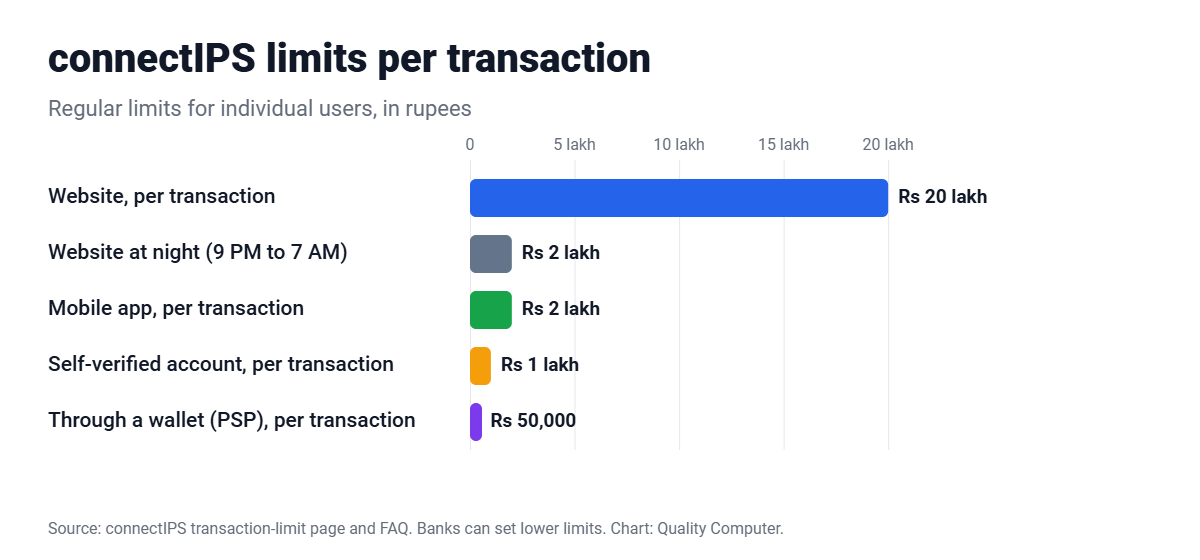
Limits apply per user per bank, banks may set lower limits, and NCHL can change them under NRB directives. One older connectIPS FAQ still lists Rs 10 lakh (web) and Rs 1 lakh (app), so check the limit shown in your account. Payments above your own high-value threshold need an OTP.
connectIPS fees
| Transaction | Up to Rs 500 | Rs 500 to 5,000 | Above Rs 5,000 |
|---|---|---|---|
| Fund transfer by mobile banking, connectIPS app or website, or wallet | Free | Rs 4 | Rs 8 |
| Fund transfer by other channels | Rs 2 | Rs 4 | Rs 8 |
| Payment to a merchant or biller | Rs 2 | Rs 4 | Rs 8 |
| Government payment | Rs 2 (up to Rs 10,000) | Rs 2 (up to Rs 10,000) | Rs 5 (above Rs 10,000) |
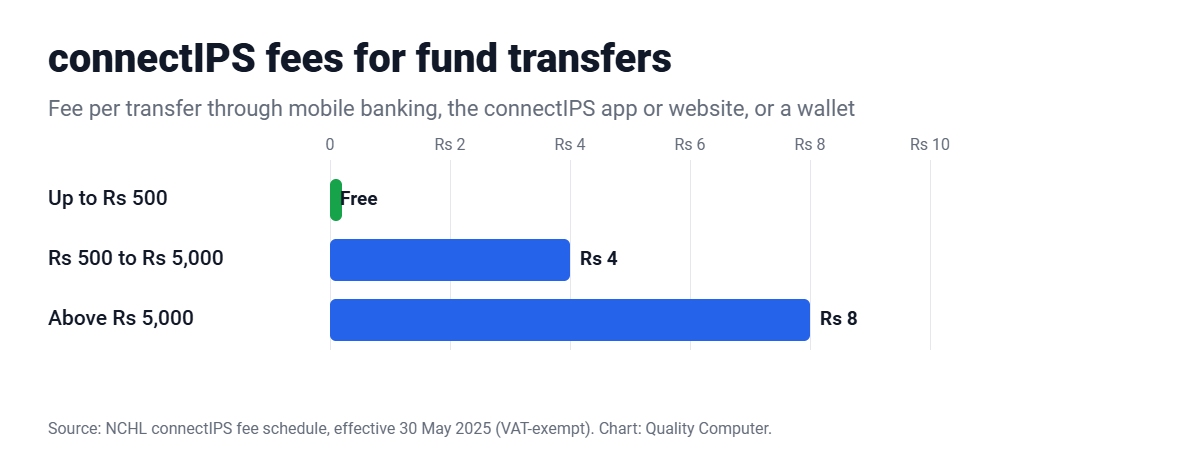
If the merchant or biller pays the fee, you pay nothing; many billers do. Fees are VAT-exempt under the latest schedule (NCHL, effective 30 May 2025).
connectIPS, wallets and QR
- Not a wallet: connectIPS pays from your bank account, so you never load it.
- Wallets: Khalti, IME Pay, Prabhu Pay and other wallets can load and withdraw money through connectIPS (NCHL list).
- QR: QR Pay in the connectIPS app reads NEPALPAY QR codes only.
- Businesses: merchants can add connectIPS to their website through NCHL's APIs (businesssupport@nchl.com.np).
Pay Quality Computer with connectIPS
At checkout on qualitycomputer.com.np, choose connectIPS (or Fonepay) to pay straight from your bank account. Looking for a wallet instead? Read our eSewa guide. Popular buys: iPhones (0% interest EMI) and laptops.
Customer reviews
Why buyers choose Quality Computer
Real reviews from our Google Business Profile, unedited.
“…Recently got my Iphone 15 pm, and am really happy and satisfied with competitive pricing, knowledgeable staff, excellent customer service and overall shopping experience…”
Bought an iPhone 15 Pro Max on Google
“Quality computer is providing and serving with genuine product and services. Authorized apple reseller in birtamod jhapa , Nepal”
Apple customer on Google
“I recently bought a laptop from Quality Computer, and I’m really happy with my purchase. The staff were friendly and helpful, and they explained the laptop’s features clearly before I bought it.”
Bought a laptop on Google
Frequently asked questions
What is connectIPS?
connectIPS is a payment system by Nepal Clearing House Ltd (NCHL) for transferring money and paying bills, shops and government fees directly from your bank account. It is not a wallet.
How do I register on connectIPS?
Sign up on connectips.com or the connectIPS app, verify your mobile and email with OTPs, then link your bank account under Bank Account > Link Account and verify it.
What is the connectIPS limit?
On the website, Rs 20 lakh per transaction and per day; in the app, Rs 2 lakh per transaction and per day; through a wallet, Rs 50,000 per transaction. Banks can set lower limits.
How much does connectIPS charge?
Transfers up to Rs 500 are free through mobile banking, the connectIPS app or website, or a wallet; Rs 500 to Rs 5,000 costs Rs 4 and above Rs 5,000 costs Rs 8.
Can I self-verify my bank account in connectIPS?
Yes, at 22 banks, using an OTP and two small test deposits. Self-verified accounts have a limit of about Rs 1 lakh per transaction.
Can I scan any QR code with connectIPS?
The connectIPS app's QR Pay reads NEPALPAY QR codes only.
Sources
- connectIPS FAQ, connectIPS
- connectIPS transaction limits, connectIPS
- connectIPS self-verification FAQs, connectIPS
- connectIPS fee schedule, NCHL, effective 30 May 2025
- connectIPS in mobile banking and wallets, NCHL
- Monthly transaction report, Jestha 2083, NCHL, June 2026