NEA Bill Check Online (2026): SC No, Customer ID, Payment and Fines
Short answer: For an NEA bill check, open nea.org.np and click Check Bill, then choose your NEA counter and enter the SC No. and Customer ID printed on your bill. You can pay the same bill in eSewa, Khalti, your bank's app or connectIPS. Pay within 7 days of the meter reading for a 2% rebate. From day 16 you pay 5% extra, rising to 25% after day 40, and an unpaid line can be cut after day 60.
Shop at Quality Computer
Inverters and UPS for power cuts View all →
What you need for an NEA bill check
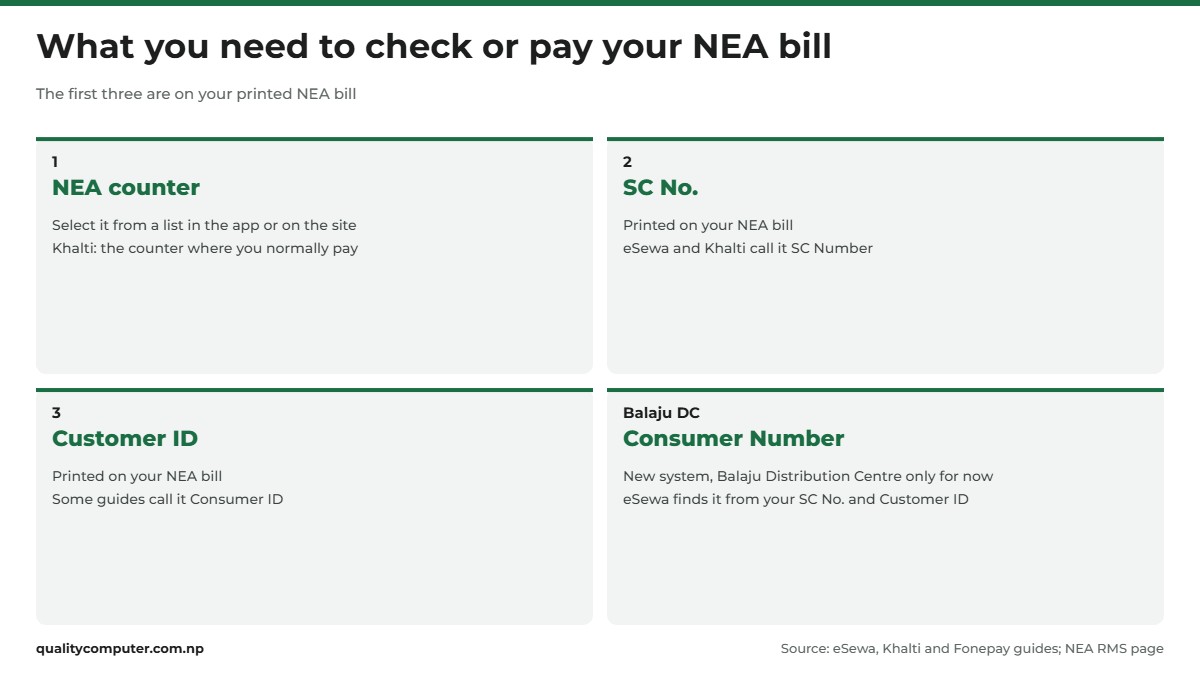
Every NEA bill check starts with the same three details, whether you use NEA's website, a wallet or your bank's app. All three are on your printed NEA bill. Fonepay's own guide puts it plainly: the physical bill you receive has the information you need (Fonepay).
- NEA counter: the counter for your area. You select it from a list. Khalti tells you to choose the counter where you normally pay your bills (Khalti).
- SC No.: eSewa and Khalti label it SC Number.
- Customer ID: some guides call it Consumer ID.
Keep the bill, or take a clear photo of it on your phone. Type the numbers exactly as they're printed.
The new 10-digit Consumer Number
NEA is moving customers to a new Consumer Number. Its FAQ already says you'll need your 10-digit consumer number to pay (NEA FAQ). At the time of writing (November 2026), though, the new system covers only customers of the Balaju Distribution Centre. NEA says other distribution centres will follow in phases (NEA RMS Consumer Web Portal).
If you're under Balaju, eSewa asks for your NEA Counter, Charge Type and Consumer Number. Don't know the number? Tap Get your consumer number and enter your SC Number and Customer ID to find it (eSewa). Everyone else still uses counter, SC No. and Customer ID.
How to check your electricity bill online
The simplest NEA bill check is on NEA's own website. For an electricity bill check in Nepal it needs no app, and it doesn't ask you to log in first.
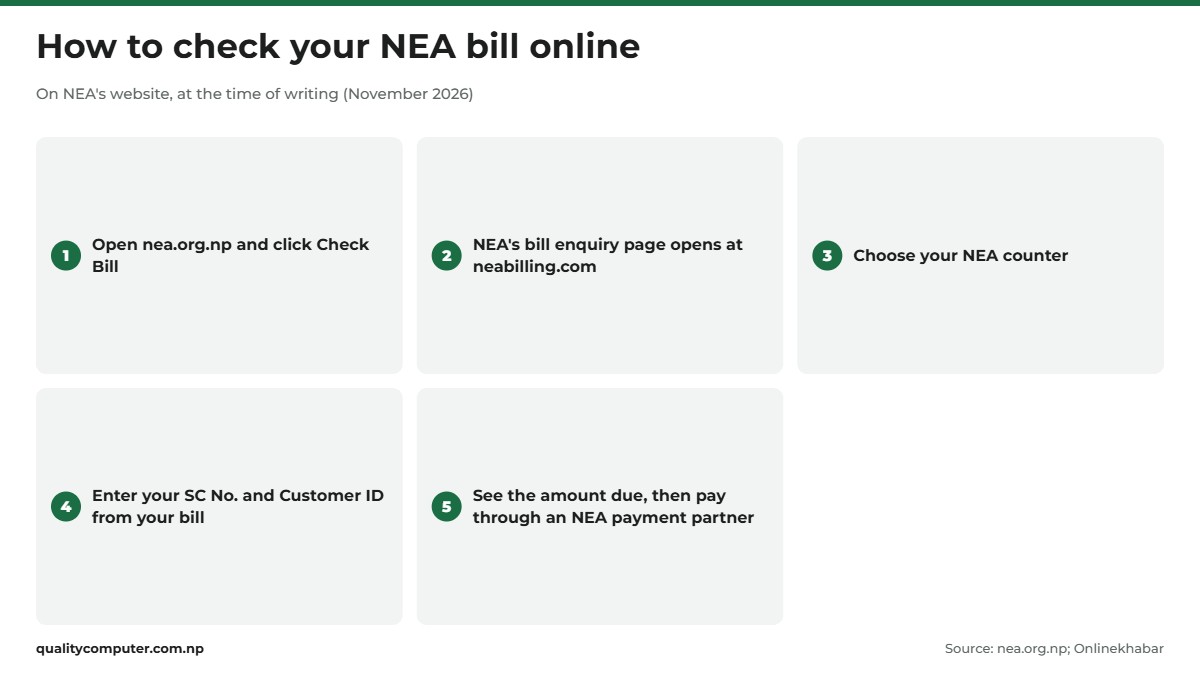
- Open nea.org.np and click Check Bill. It opens NEA's bill enquiry page at neabilling.com (NEA).
- Choose your NEA counter.
- Enter your SC No. and Customer ID from your bill, pick the period if the page asks for one, and submit. Onlinekhabar's 2020 walkthrough of the page lists the same details: location, SC number, consumer ID and the billing period (Onlinekhabar).
- Note the amount due and the bill date, then pay through any of NEA's payment partners.
Check it inside eSewa or Khalti
You don't have to use the website. In eSewa, once you enter your details and tap Proceed, your bill details are displayed before you pay (eSewa). Khalti shows them when you tap Get Details (Khalti). Nothing is paid until you confirm, so you can look and leave.
The NEA Official app
NEA's own app is called NEA Official, from the Nepal Electricity Authority, on Google Play and the App Store. Its listing says customers can "manage their meters and billings" with it. Recent versions added payment from inside the app and a transaction history, and the iPhone version's notes mention paying through eSewa and IME Pay. It has more than 100,000 downloads on Google Play, but at least one user review says the due amount often doesn't show. Keep the website or a wallet as your backup.
NEA bill payment online: eSewa, Khalti and bank apps
NEA lists ten online payment partners on its Bill Payment page: eSewa, Khalti, Prabhu Bank, Mahalaxmi Bank, NIMB, Himalayan Bank, Cell Pay, IME Pay, CorporatePay and connectIPS. Its FAQ adds mobile banking and NEA's own counters (NEA FAQ). Here are the steps for eSewa, Khalti and bank apps.
eSewa
- Log in to the eSewa app.
- Go to Utility & Bills Payment and tap Electricity.
- On NEA's page, enter your NEA Counter, SC Number and Customer ID, then tap Proceed.
- Check the bill details, tap Confirm and enter your MPIN.
These are eSewa's own steps from April 2026 (eSewa). Our eSewa guide covers KYC, loading money and limits.
Khalti
- Open Khalti and tap the NEA (electricity) icon on the home screen.
- Select the counter where you normally pay.
- Enter your SC Number and Customer ID, then tap Get Details.
- Confirm the details and tap Pay Bill.
Those steps come from Khalti's guide. If you're new to the wallet, start with our Khalti guide.
Your bank's mobile app (Fonepay)
In a bank app that uses Fonepay, open the Fonepay bills section, choose NEA service/Electricity, and enter your counter, SC number and consumer ID. Check the amount, then confirm with your fingerprint or transaction PIN (Fonepay). Menu names may differ from bank to bank. Our Fonepay guide explains how Fonepay works across banks.
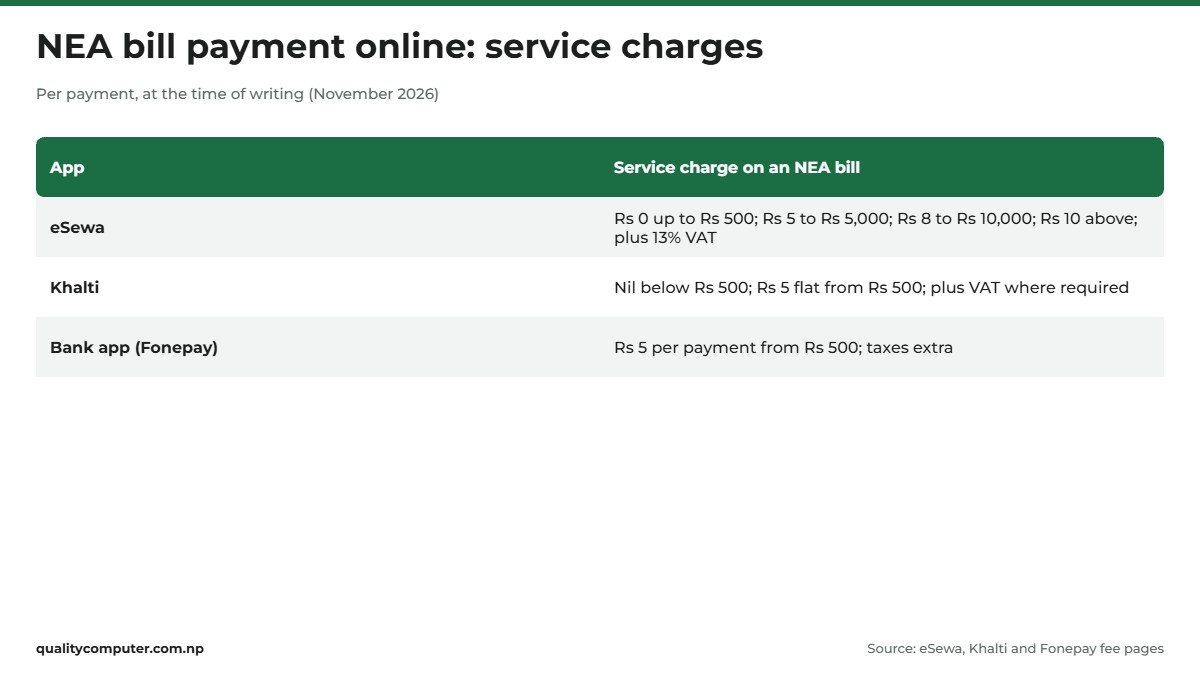
Service charges
At the time of writing (November 2026):
- eSewa: nothing up to Rs 500, Rs 5 up to Rs 5,000, Rs 8 up to Rs 10,000 and Rs 10 above that, plus 13% VAT on the charge, from 19 August 2026 (eSewa tariffs).
- Khalti: nothing below Rs 500, then a flat Rs 5, plus VAT where required (Khalti charges, updated 10 July 2026).
- Bank apps through Fonepay: Rs 5 per payment from Rs 500, with taxes on top (Fonepay fees).
Check the total on the confirm screen before you enter your PIN.

Pay within 7 days: rebate, late fines and disconnection
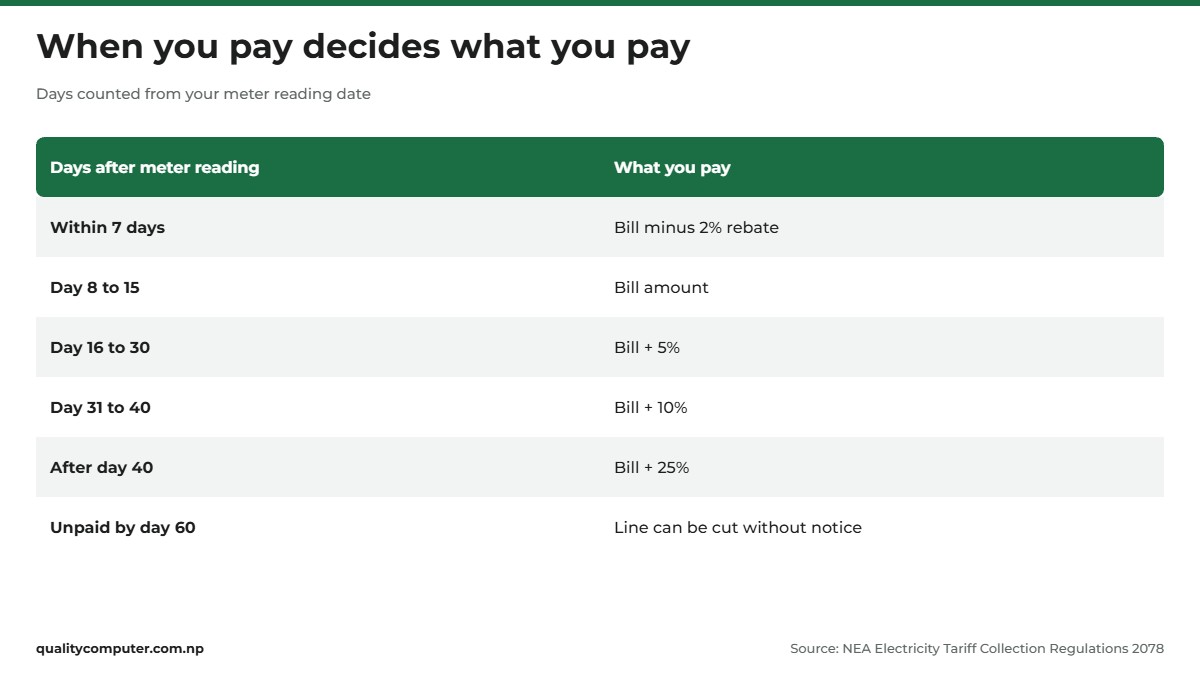
The date that matters is the day your meter was read, not the day the bill reaches you. NEA's Electricity Tariff Collection Regulations 2078, in force since 1 Poush 2078, count every deadline from the meter reading (NEA regulations, PDF in Nepali):
- Within 7 days: 2% off the bill. The Electricity Regulatory Commission's tariff order says the same (ERC tariff order).
- Day 8 to 15: you pay the bill amount.
- Day 16 to 30: 5% extra.
- Day 31 to 40: 10% extra.
- After day 40: 25% extra.
- Still unpaid by day 60: NEA can cut your line at any time, without notice.
The tariff order also lists service fees of Rs 250 when a line has to be cut and Rs 500 to reconnect it (ERC). A phone reminder for seven days after the reading date is worth setting.
The extra 0.5% for paying online
In October 2026, Kantipur reported that NEA had decided to give household customers an extra 0.5% "Smart Pay Reward" when they pay digitally, on top of the 2% rebate, for six months in the first phase (Kantipur). Sharesansar reports the energy ministry as saying online payers get the reward whenever they pay, not only in the first seven days (Sharesansar). We couldn't find the notice on NEA's own website, and neither report gives a start date, so look at your payment receipt to see whether it was applied.
How to read your bill: units, minimum charge and VAT
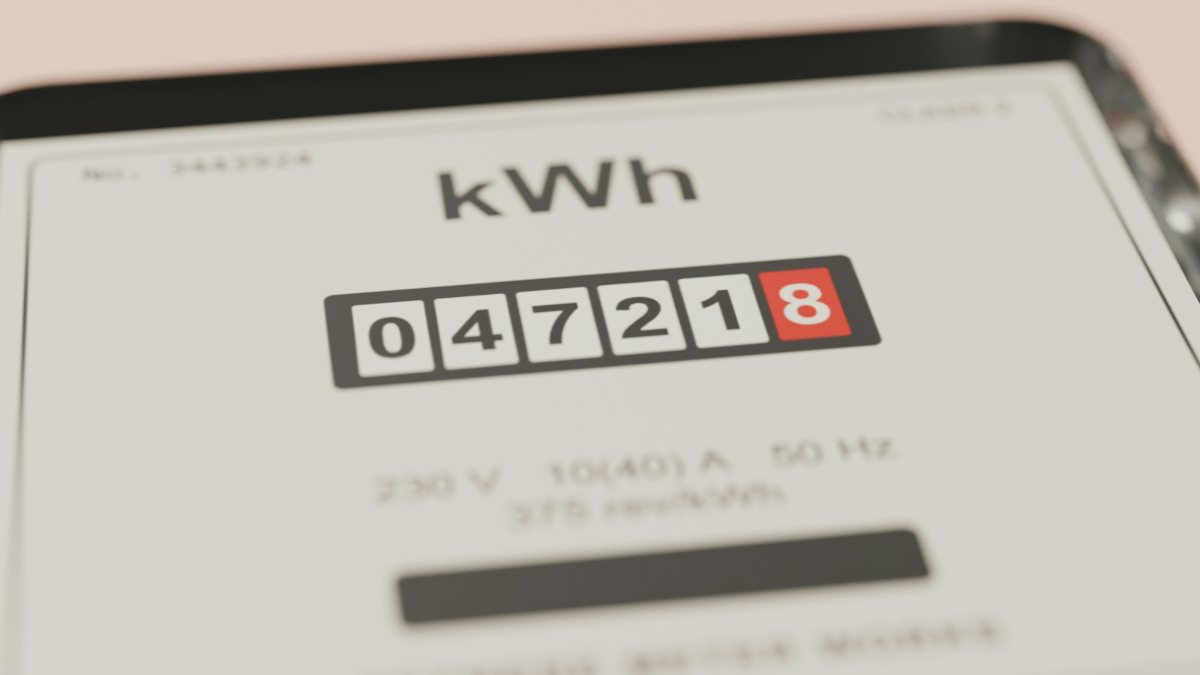
Your electricity bill in Nepal is worked out from the units you used that month. One unit is one kilowatt-hour (kWh). The charge has two parts (NEA consumer tariff):
- A minimum charge for the month. It depends on your meter's rating in amperes (5, 15, 30 or 60 A) and on the band your monthly use falls in.
- An energy charge per unit, applied slab by slab. The first units are charged at the lowest rate, the next ones at the next rate, and so on.
The table below shows the household single-phase rates in the Electricity Regulatory Commission's 2078 tariff order, billed from Poush 2078 (ERC). In August 2026 the commission issued new guidelines for setting future tariffs, and Kantipur reported that the current rates stay until a new tariff is set (Kantipur).
| Units a month | 5 A | 15 A | 30 A | 60 A |
|---|---|---|---|---|
| 0 to 20 | Rs 30 / Rs 0 | Rs 50 / Rs 4.00 | Rs 75 / Rs 5.00 | Rs 125 / Rs 6.00 |
| 21 to 30 | Rs 50 / Rs 6.50 | Rs 75 / Rs 6.50 | Rs 100 / Rs 6.50 | Rs 125 / Rs 6.50 |
| 31 to 50 | Rs 50 / Rs 8.00 | Rs 75 / Rs 8.00 | Rs 100 / Rs 8.00 | Rs 125 / Rs 8.00 |
| 51 to 100 | Rs 75 / Rs 9.50 | Rs 100 / Rs 9.50 | Rs 125 / Rs 9.50 | Rs 150 / Rs 9.50 |
| 101 to 250 | Rs 100 / Rs 9.50 | Rs 125 / Rs 9.50 | Rs 150 / Rs 9.50 | Rs 200 / Rs 9.50 |
| Above 250 | Rs 150 / Rs 11.00 | Rs 175 / Rs 11.00 | Rs 200 / Rs 11.00 | Rs 250 / Rs 11.00 |
Each cell: minimum charge a month / energy charge per unit. On a 5 A meter, up to 20 units you pay only the Rs 30 minimum. If you use more than 20 units, those first 20 are charged at Rs 3 each (ERC).
A worked example from NEA's tariff sheet: a 15 A meter using 55 units pays the Rs 100 minimum, plus 20 units at Rs 4, 10 at Rs 6.50, 20 at Rs 8 and 5 at Rs 9.50. That comes to Rs 452.50, before any rebate, fine or VAT.
VAT on your bill
The Kathmandu Post reported that from 1 Shrawan 2083 (17 July 2026), households pay 5% VAT, but only on units above 50 a month. Use 60 units and VAT applies to just 10 of them. Industrial, commercial, institutional and other non-household customers pay 13% on the whole bill (The Kathmandu Post). On 21 September Kantipur reported the energy minister as saying the government was reviewing VAT on electricity, with the 50-unit rule unchanged for now (Kantipur). A day later it reported the Finance Ministry saying there was no in-principle agreement to restore the exemption (Kantipur). If your bill shows VAT you don't expect, ask your counter.
If your bill looks wrong, or the power is out
Start with the meter. Compare the reading on your bill with the number on your meter's display. Do it quickly, because the rebate and fine clock runs from the reading date. Then contact NEA:
- Your distribution centre: take the bill to your local NEA distribution centre. NEA lists office numbers by province on its DCS Number page.
- Online complaint: use Post Your Complaint on NEA's homepage, which opens NEA's complaint form.
- Phone 1150: NEA's hotline for outages, and the customer service number it gives for help with the new consumer portal (NEA FAQ, NEA RMS page).
- Email: NEA's homepage lists its nodal officer's email, gunaso@nea.org.np ("gunaso" means complaint) (NEA).
Before you call or visit, note your counter, SC No., Customer ID and the meter reading date. Take the bill, or its photo, and a photo of your meter.
Power cuts and voltage drops
Report outages on 1150 or to your local NEA distribution centre (NEA FAQ). NEA also lists "No Light" numbers for each provincial office (No Light numbers). If cuts are frequent where you live, an inverter can keep a few lights and your router running until power comes back. Our Luminous vs Su-Kam inverter comparison explains how to choose one.
Quick verdict
- Check: nea.org.np, then Check Bill, with your counter, SC No. and Customer ID.
- Balaju Distribution Centre customers now use the new Consumer Number.
- Pay: eSewa, Khalti, your bank app (Fonepay) or connectIPS. eSewa and Khalti charge nothing below Rs 500.
- Pay within 7 days of the meter reading for 2% off. From day 16 you pay 5% extra, and 25% after day 40.
- Unpaid by day 60: the line can be cut without notice, and a Rs 500 reconnection fee applies.
- Wrong bill or no power: your distribution centre, NEA's online complaint form, or 1150.
Inverters, UPS and stabilisers in our store
Your bill shows how much power you used. Power cuts and voltage swings are a different problem, and an inverter, UPS or stabiliser helps protect your TV, router and computer from them.
| Product | What it is | Our price |
|---|---|---|
| Su-Kam Falcon 1100VA/12V pure sine wave home UPS | Home UPS, pure sine wave, 1100VA | Rs 11,500 |
| Durasol 1250/12V pure sine wave home UPS | Home UPS, pure sine wave, 1250VA | Rs 10,500 |
| Su-Kam Falcon Plus 1600VA/24V inverter | Inverter, 1600VA, 24V | Rs 17,900 |
| Uniline Smartline 600VA UPS (SL-600) | 600VA UPS for a desktop computer | Rs 4,400 |
| Marsriva KP1 mini DC UPS for routers (8,000mAh) | Mini DC UPS that keeps a router running | Rs 2,750 |
Prices checked on 14 November 2026 on our website.
In our store
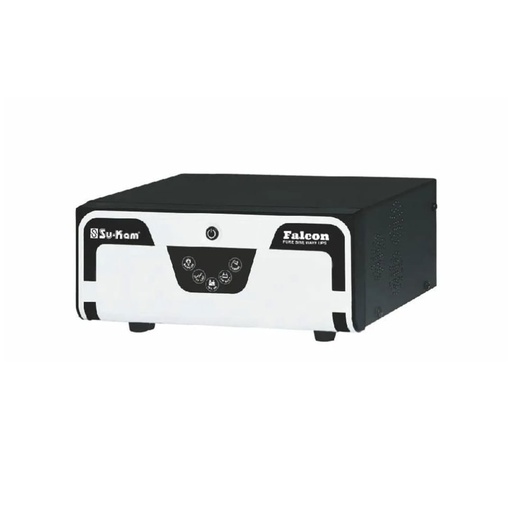
Su-Kam Falcon 1100VA
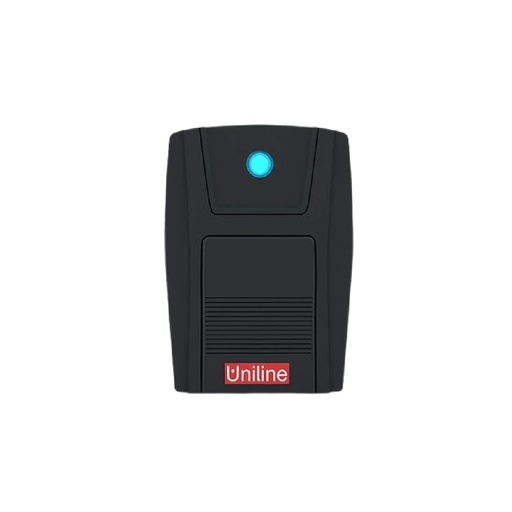
Uniline 600VA
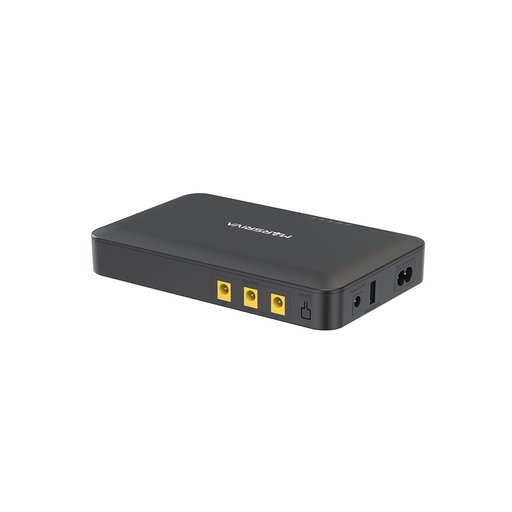
Marsriva KP1
Frequently asked questions
How can I check my NEA bill online?
Open nea.org.np and click Check Bill, which opens NEA's bill enquiry page at neabilling.com. Choose your NEA counter and enter the SC No. and Customer ID printed on your bill to see what you owe. eSewa and Khalti also show your bill details before you pay.
Where do I find my NEA SC No. and Customer ID?
Both are on your printed NEA bill, along with your NEA counter. Wallets label them SC Number and Customer ID. If you're a Balaju Distribution Centre customer, eSewa can find your new Consumer Number from your SC Number and Customer ID.
How do I make an NEA bill payment online?
Use eSewa (Utility & Bills Payment, then Electricity), Khalti (the NEA icon), a bank app through Fonepay, or another NEA partner such as IME Pay or connectIPS. Enter your counter, SC No. and Customer ID, check the amount and confirm with your PIN.
Is there a discount for paying the NEA bill early?
Yes. If you pay within 7 days of the meter reading, you get 2% off the bill under NEA's Electricity Tariff Collection Regulations 2078. News reports in October 2026 said NEA had also decided on an extra 0.5% for household customers who pay digitally, for six months in the first phase, but gave no start date.
What is the late fine on an electricity bill in Nepal?
Counting from the meter reading date, you pay the normal bill from day 8 to 15, 5% extra from day 16 to 30, 10% extra from day 31 to 40 and 25% extra after day 40. If the bill is still unpaid by day 60, NEA can cut the line without notice.
What is NEA's 1150 number for?
1150 is NEA's hotline for reporting power outages. NEA also gives it as the customer service number for help with its new consumer portal. For a wrong bill, you can also contact your distribution centre or use the complaint form on NEA's website.
Is there an official NEA app?
Yes. NEA Official, from the Nepal Electricity Authority, is on Google Play and the App Store. Its listing says it lets customers manage their meters and bills, and recent versions support paying from inside the app.
Sources
- Online Payments (Check Bill and Bill Payment links, payment partners), Nepal Electricity Authority
- Frequently Asked Questions, Nepal Electricity Authority
- RMS Consumer Web Portal, Nepal Electricity Authority, updated 13 November 2026
- Electricity Tariff Collection Regulations, 2078 (in Nepali), Nepal Electricity Authority, in force from 1 Poush 2078
- Full text of the decision on NEA consumer electricity tariffs, 2078 (in Nepali), Electricity Regulatory Commission, decided 2078/07/08
- Consumer tariff rates (in Nepali), Nepal Electricity Authority
- Contact information of distribution offices, Nepal Electricity Authority
- NEA electricity bill payment process in eSewa, eSewa, 13 April 2026
- eSewa tariffs, eSewa, NEA charges effective 19 August 2026
- Pay electricity bill online in Nepal, Khalti
- Standard tariff and charges, Khalti, updated 10 July 2026
- How to pay electricity bill online in Nepal, Fonepay, 5 May 2025
- Fees and charges, Fonepay, effective Shrawan 1, 2082
- NEA Official, Google Play
- NEA Official, App Store
- How to check utility bills online in Nepal, Onlinekhabar English, 25 August 2020
- Customers who pay electricity bills online will get an extra discount (in Nepali), Kantipur, 8 October 2026
- Nepal Electricity Authority to offer additional 0.50% reward for online bill payments, Sharesansar, 9 October 2026
- Households using over 50 electricity units to pay five percent VAT, others face 13 percent, The Kathmandu Post, 18 July 2026
- VAT on electricity being reviewed (in Nepali), Kantipur, 21 September 2026
- Finance Ministry clarifies there is no in-principle agreement to reinstate VAT exemption on electricity, Kantipur, 22 September 2026
- New guidelines for electricity tariff determination (in Nepali), Kantipur, 6 August 2026