Buying a Second-Hand Laptop in Nepal: 12 Checks Before You Pay (2026)
Short answer: Before you buy a second-hand laptop in Nepal, check four things first: that it can run Windows 11 (Windows 10 support ended on 14 October 2025), the battery's real capacity from a Windows battery report, that it has an SSD and at least 8GB of RAM, and that the seller has the original bill. Then test the screen, keyboard, ports, Wi-Fi and charger in person. On a used MacBook, make sure Find My Mac is turned off.
Shop at Quality Computer
Laptops with warranty View all →
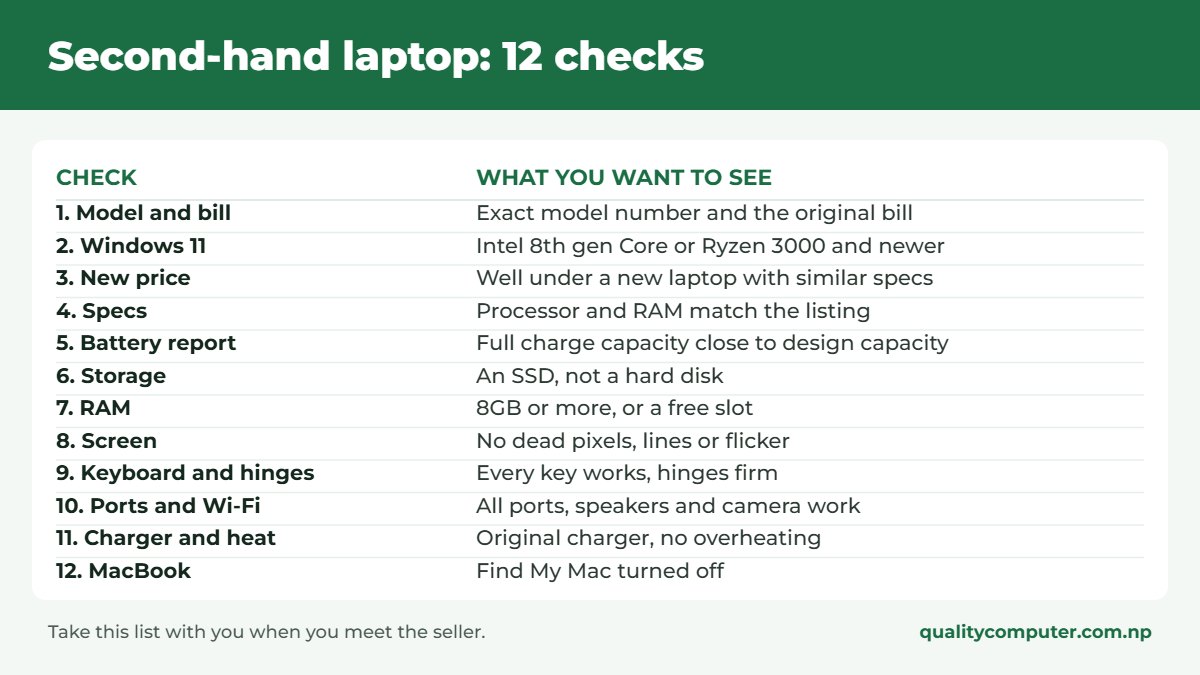
The 12-point checklist
We repair a lot of used laptops, so we see what goes wrong. Take this list with you.
Checks 1 to 3: before you meet the seller
1. Ask for the exact model number and the original bill
"Dell i5 laptop" is not enough. Ask for the full model name printed on the bottom sticker, then look up its specs and launch year. Ask for the original purchase bill too. A bill helps show the laptop wasn't stolen, tells you its real age, and tells you whether it was sold through an authorised channel. Our guide to refurbished and grey laptops in Nepal explains why that matters for warranty.
2. Make sure it can run Windows 11
Windows 10 reached end of support on 14 October 2025, so it no longer gets security updates unless it is enrolled in Microsoft's Extended Security Updates programme, which needs a Microsoft account and runs only until 12 October 2027 (Microsoft). A laptop that can't move to Windows 11 has a short safe life.
Windows 11 needs TPM 2.0, UEFI with Secure Boot, 4GB of RAM, 64GB of storage and a processor on Microsoft's supported list (Microsoft). In practice, for laptops, that list starts at Intel 8th generation Core and AMD Ryzen 3000 series (Intel list, AMD list). So an i5-8250U qualifies, but an i5-7200U or a Ryzen 5 2500U does not. If the laptop already runs Windows 11 and shows as activated in Settings > System > Activation, that is a good sign. Still check the processor yourself.
3. Compare with the price of a new laptop
Know what a new one costs before you negotiate. The cheapest new laptop we have in stock right now is Rs 72,900, with warranty. If a four-year-old laptop is priced close to that, walk away.
Checks 4 to 7: specs, battery and storage
4. Confirm the specs yourself
Open Settings > System > About and read the processor and installed RAM. Don't trust a sticker or the listing. Our guide on how to check RAM in a laptop shows each screen, and how to tell if the RAM can be upgraded.
5. Run a battery report
This takes one minute and tells you more than the seller will.
- Right-click Start and open Terminal (or Command Prompt).
- Type
powercfg /batteryreportand press Enter (Microsoft Learn). - Open the battery-report.html file from the folder it names.
- Compare Design capacity with Full charge capacity.
If full charge capacity is, say, 30,000 mWh against a design capacity of 50,000 mWh, the battery holds 60% of what it did when new. That isn't a reason to refuse the laptop, but a replacement battery is a cost, so bring the price down.
6. Check that it has an SSD, and how healthy it is
Open Task Manager > Performance > Disk. It shows SSD or HDD under the disk's name. A laptop still on a hard disk will feel slow whatever the processor. Swapping in an SSD is the best upgrade you can make, and our SSD buying guide explains which type fits.
For an NVMe SSD, Windows 11 can also show the drive's health: Settings > System > Storage > Advanced storage settings > Disks & volumes > Properties.
7. Look at the RAM and whether it can be upgraded
8GB is the minimum we would buy today, and 16GB is better. If the laptop has 4GB, find out whether it has a free slot or soldered memory before you pay. Our RAM guide covers DDR4 and DDR5 for laptops.
Checks 8 to 11: test it with your hands
8. Screen
Open a plain white page, then a plain black one, at full brightness. Look for dead pixels, bright spots, lines and yellow patches. Move the lid gently and watch for flicker, which points to a worn display cable or hinge.
9. Keyboard, touchpad and hinges
Type every key in Notepad, including the function row. Click both corners of the touchpad. Open and close the lid: hinges should feel firm and even, with no cracking sound or gap in the body.
10. Ports, Wi-Fi, speakers and camera
Bring a pen drive and earphones. Test every USB port, the HDMI port if you can, the headphone jack, Wi-Fi, Bluetooth, both speakers and the webcam. A dead port can mean liquid damage.
11. Charger and heat
Check that it charges with its own charger and that the charger is the original one for that model. Then play a YouTube video at full screen for ten minutes. A loud fan and a hot palm rest mean it needs cleaning at least. Look at the screws underneath as well: chewed screw heads tell you it has been opened.
Check 12: used MacBooks
- Find My Mac must be off. Activation Lock stays on while Find My is on, and the previous owner's Apple Account password is needed to erase or reactivate the Mac. Ask the seller to turn it off in System Settings > their name > iCloud > See All > Find My Mac in front of you, or to remove the Mac from their account (Apple Support).
- Battery cycle count. Hold the Option key, choose System Information from the Apple menu and select Power. Apple lists a maximum of 1,000 cycles for recent MacBook Air and MacBook Pro models (Apple Support).
- Buy Apple silicon. An M1 or later MacBook is a safer used buy than an Intel one, because the current macOS runs on only a couple of Intel MacBook models (Apple Support).
Used phones need their own checks, which are in our second-hand mobile and iPhone guide.
Used or new? Do the maths
Add up the real cost of the used laptop: the asking price, plus a battery if the report is poor, plus an SSD or RAM if it needs them. Then compare that with a new laptop that comes with a warranty and a fresh battery.
A used laptop makes sense when it is two or three years old, has its bill, passes the checks above and costs well under a new one with similar specs. It doesn't make sense when the saving is small, because one repair wipes it out.
Quick verdict
- Get the exact model and the original bill before you meet.
- Skip anything that can't run Windows 11: laptops older than Intel 8th generation Core or Ryzen 3000.
- Run powercfg /batteryreport and compare design capacity with full charge capacity.
- Insist on an SSD and 8GB of RAM, or price in the upgrade.
- On a MacBook, Find My Mac must be turned off in front of you.
- If the total comes close to a new laptop with warranty, buy new.
New laptops and upgrade parts in our store
All in stock when we checked. If you already bought a used laptop, an SSD and more RAM are the two upgrades that help most. Bring the laptop to our store in Birtamode and we'll check which parts it takes.
| Product | What it is | Our price |
|---|---|---|
| Acer Aspire Lite 14 | New laptop: Ryzen 3 5400U, 8GB RAM, 512GB SSD | Rs 72,900 |
| Asus Vivobook Go 15 | New laptop: Ryzen 5, 8GB RAM, 512GB SSD | Rs 89,900 |
| Dell 15 DC15250 | New laptop: Core i5-1334U, 8GB RAM, 512GB SSD | Rs 93,900 |
| Hiksemi E100 256GB SATA SSD | 2.5-inch SSD for older laptops with a hard disk bay | Rs 7,200 |
| Hikvision E1000 256GB NVMe SSD | M.2 NVMe SSD for laptops with an M.2 slot | Rs 8,800 |
| Transcend 8GB DDR4 Laptop RAM | 3200MHz SO-DIMM module | Rs 13,500 |
| Transcend 16GB DDR4 Laptop RAM | 3200MHz SO-DIMM module | Rs 19,900 |
Prices checked on 21 November 2026 on our website. Check which SSD and RAM type your laptop takes before you order.
Frequently asked questions
Is it safe to buy a second-hand laptop in Nepal?
It can be, if the seller has the original bill and the laptop passes the checks: it runs Windows 11, the battery report is reasonable, it has an SSD, and the screen, keyboard and ports all work.
How do I check the battery health of a used laptop?
Open Terminal or Command Prompt, type powercfg /batteryreport and open the report file. Compare Full charge capacity with Design capacity to see how much the battery has worn.
Which processor generation should I avoid?
Avoid laptops with Intel Core processors older than 8th generation or AMD Ryzen older than the 3000 series, because they are not on Microsoft's supported list for Windows 11.
Can I still use a laptop with Windows 10?
It will still run, but Windows 10 support ended on 14 October 2025, so it gets no security updates unless enrolled in Extended Security Updates, which end on 12 October 2027.
What should I check on a used MacBook?
Make sure Find My Mac is turned off so Activation Lock is removed, check the battery cycle count in System Information, and prefer an M1 or later model.
Can a slow second-hand laptop be upgraded?
Often, yes. Replacing a hard disk with an SSD and adding RAM make the biggest difference, as long as the RAM isn't soldered. Bring it to Quality Computer in Birtamode to check which parts it takes.
Sources
- Windows 10 support has ended on October 14, 2025, Microsoft Support
- Windows 11 specs and system requirements, Microsoft
- Windows 11 supported Intel processors, Microsoft Learn
- Windows 11 supported AMD processors, Microsoft Learn
- Windows 10 Extended Security Updates, Microsoft
- macOS Tahoe is compatible with these computers, Apple Support
- Powercfg command-line options, Microsoft Learn
- Activation Lock for Mac, Apple Support
- Determine battery cycle count for Mac laptops, Apple Support
- Product prices: Quality Computer website, 21 November 2026