Nepali Typing on Laptop and Phone (2026): Nepali Unicode Keyboard Guide
Short answer: For Nepali typing in Unicode, add a Nepali keyboard to your device. On Windows 11, go to Settings > Time & language > Language & region > Add a language, install Nepali and switch with Windows key + Spacebar. On Android, add Nepali in Gboard; on iPhone, go to Settings > General > Keyboard > Keyboards > Add New Keyboard. To type words the way they sound in English letters, use the Nepali Unicode Romanized layout or Google's transliteration, because the Nepali layout built into Windows isn't phonetic.
Shop at Quality Computer
Keyboards and laptops for everyday typing View all →
Unicode vs Preeti for Nepali typing
Unicode is the standard that gives every character its own number, whatever the computer, phone or app (Language Technology Kendra). Type in Unicode and you're storing real Nepali letters, so the text reads correctly on Facebook, in Gmail, in Word on someone else's computer and on a government website. You can also search it, sort it and spell-check it.
Preeti, Kantipur and Himali are older fonts. They store each letter as an ordinary English character and only draw it as Nepali when that font is applied, so the reader needs the same font installed (LTK). Anywhere it isn't, your Nepali turns into a jumble of English letters, and find and replace or spell checking don't work. LTK credits the Nepali Unicode released by Madan Puraskar Pustakalaya in 2002 with solving these problems. For old Preeti files, our Preeti font guide covers the fonts and how to convert them.
You need Unicode for messages, office letters and school work, and for government services: the eNID download, for example, asks for your full name in Nepali as well as English (DoNIDCR eNID manual), and the Nagarik App can be used in Nepali too.
Which Nepali keyboard layout to choose
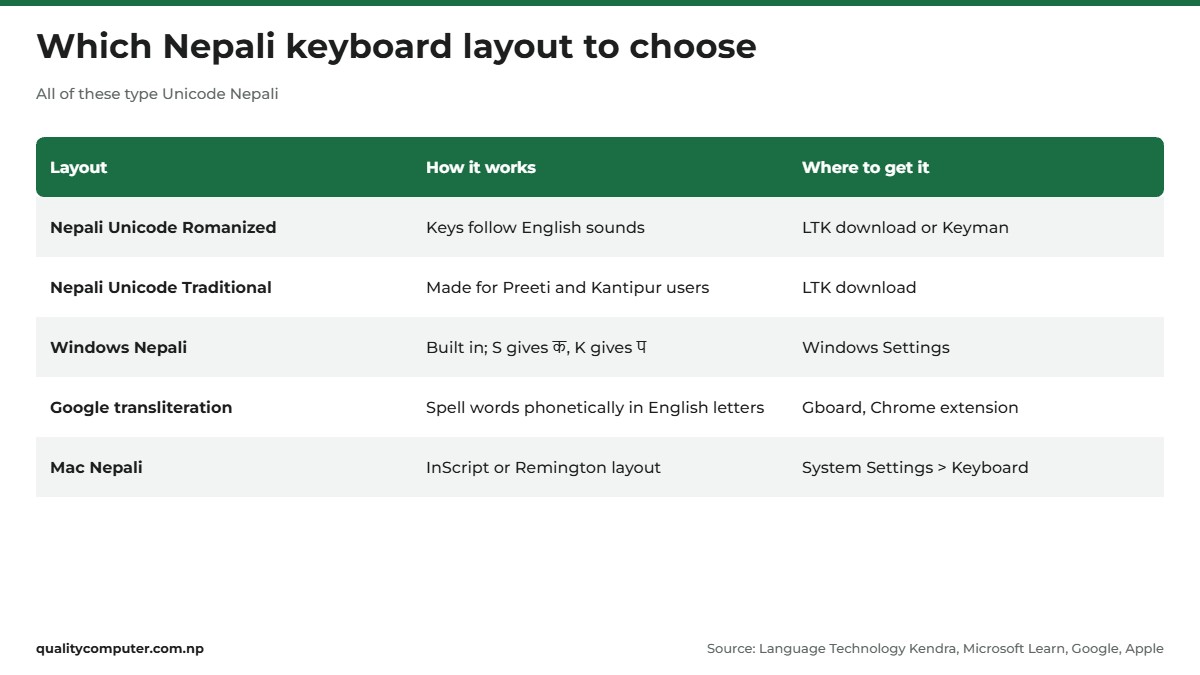
A layout decides which key gives which letter. The result is the same Unicode text whichever you pick, so choose the one that matches how you think about words.
- Nepali Unicode Romanized. Keys follow English sounds. LTK's own example: the A, S, D, F, G and H keys give आ, श, ध, ऊ, घ and अ (LTK keyboard layouts).
- Nepali Unicode Traditional. Designed for people who used Preeti and Kantipur. You type much as you did with the old fonts, with some keys altered and moved.
- The Windows Nepali layout. It comes with Windows, so there's no separate installer to find. Its keys don't follow English sounds: S gives क and K gives प (Microsoft's layout chart).
- Transliteration. You spell whole words phonetically in English letters and they appear in Nepali. Gboard on Android and Google's Chrome extension both do this.
Windows has no Nepali phonetic option of its own. Microsoft lists one Nepali layout, and the phonetic keyboards it announced in 2019 cover ten Indian languages but not Nepali (Microsoft Stories India). To type by sound on a laptop, use Romanized or the Chrome extension.
How to type Nepali on a laptop: Windows 11 and 10
Keep the laptop online, because Windows downloads the language files. These are Microsoft's steps for Windows 11 (Microsoft Support):
- Select Start > Settings > Time & language > Language & region.
- Next to Preferred languages, select Add a language.
- Type Nepali, choose it and select Next.
- In Install language features, only tick Set as my Windows display language if you want Windows menus in Nepali. Select Install and wait.
- When Nepali appears under Language, select the three dots next to it, then Language options. Under Keyboards, check a Nepali keyboard is listed. If not, select Add a keyboard next to Installed keyboards and pick it.
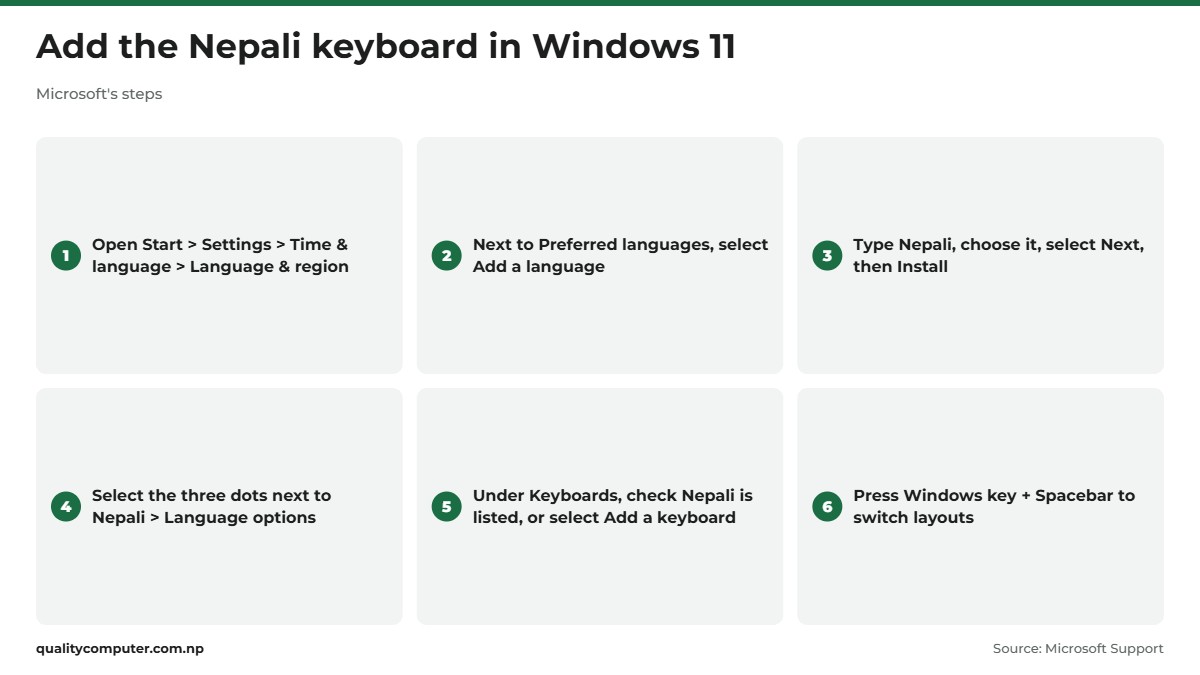
Now hold the Windows key and press Spacebar to move between English and Nepali, or pick a layout from the input language icon in the system tray. If nothing changes, only one layout is installed. More time-savers are in our laptop shortcuts guide.
Windows 10
The menus differ slightly (Microsoft Support, Windows 10 steps). Select Start > Settings > Time & Language > Language, then Add a language. Choose Nepali, select Next, then Install. To add a keyboard to a language you already have, select it under Preferred languages, then Options > Add a keyboard. Windows key + Spacebar works here too.
Romanized and Traditional layouts: where to get them
Madan Puraskar Pustakalaya (MPP) developed both layouts. They're now maintained by Language Technology Kendra, a non-profit run jointly by MPP, Kathmandu University's Department of Computer Science and Engineering and Tribhuvan University's Central Department of Linguistics (Madan Puraskar Pustakalaya). The original files are on LTK's downloads page: Romanized, Traditional, a pack of Unicode fonts, and Mac versions of both layouts.
LTK's install guide was written for Windows XP: it sends you to Regional and Language Options in Control Panel and may ask for the XP installation CD (LTK). The site doesn't say whether the installers work on Windows 10 or 11. Download them only from LTK or MPP, never from file-sharing mirrors, and if an installer won't run, try the next option.
Keyman, a free and open-source keyboard app, offers the same Romanized layout for current systems. Its page describes it as the "Nepali Romanized layout by Madan Puraskar Pratisthan (MPP)", for Windows, macOS, Linux, Android, iPhone and iPad, and the web (Keyman).
Google Input Tools and typing Nepali online
Google Input Tools still works in Chrome, but Google's site no longer has a Windows download. Its home page still says it's available for Windows (Google Input Tools), yet there's no Windows link on it and the old Windows page no longer loads. Google doesn't give a date for the change; Wikipedia dates the desktop app's removal to May 2018. Treat any "Google Input Tools for Windows" download on another website with suspicion.
The Chrome extension is still around. It's on the Chrome Web Store, developed by Google, with about 4 million users (Chrome Web Store), and it works in any web page in Chrome. For Nepali, Google lists a transliteration tool and a Devanagari phonetic on-screen keyboard (Google's language list). To use it (Google):
- Add Google Input Tools to Chrome from the Chrome Web Store.
- Open the extension's options page and select the Nepali input tool you want.
- Click the extension icon and choose the tool from the drop-down menu. Click it again to turn it off.
Don't want to install anything? Google's try-it page lets you pick a language and input tool and type in the browser. Search for "English to Nepali Unicode" and you'll also find many converter websites: you type in English letters, the site shows the Nepali, and you copy and paste it into Facebook, Word or a form. Handy once in a while, but for daily use a keyboard on your own device is quicker.
Typing Nepali on a Mac
macOS has Nepali built in. Apple lists two Nepali layouts for the Mac: Nepali (InScript) and Nepali (Remington) (Apple feature availability). To add one (Apple Support):
- Open the Apple menu, choose System Settings, then click Keyboard in the sidebar.
- Go to Text Input and click Edit.
- Click the Add button, search for Nepali and add the layout you want.
Switch from the Input menu in the menu bar, or press Control-Space to go back to the last input source you used. To see which key gives which letter, choose Show Keyboard Viewer from the Input menu (Apple Support). Prefer the MPP layouts? LTK has Mac versions (labelled for Mac OS X), and Keyman runs on macOS.
Nepali keyboard on Android and iPhone
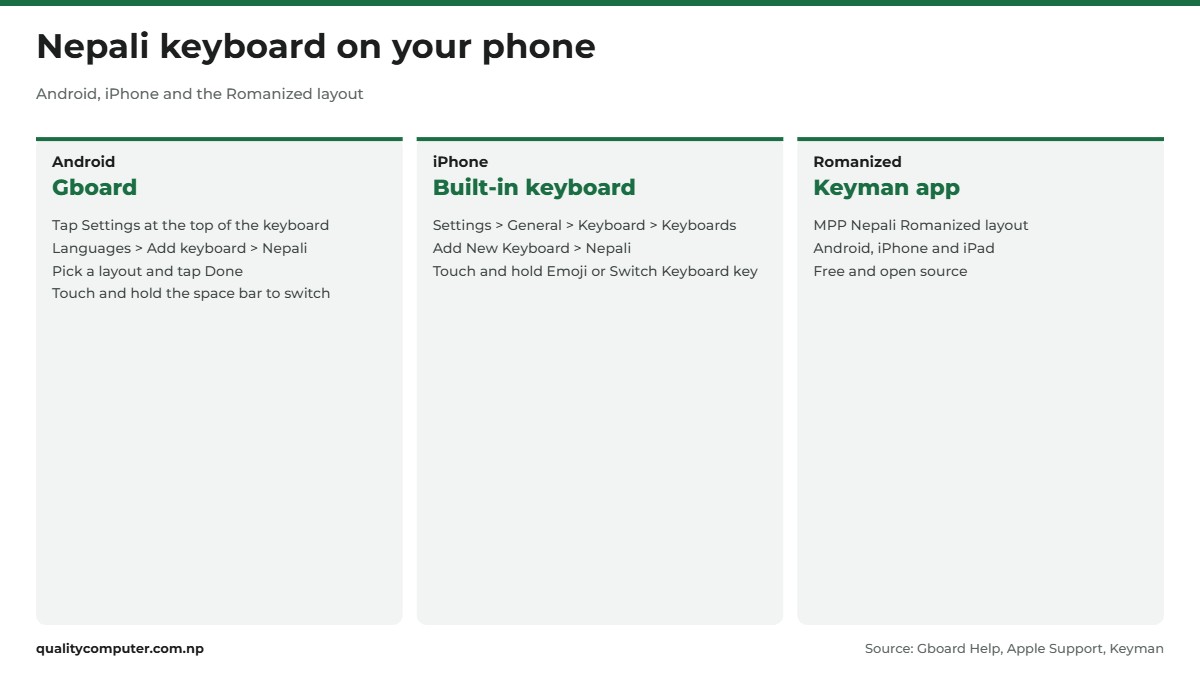
Android: Gboard
Gboard, Google's keyboard app, is already the default on some Android phones; on others, install it first (Gboard Help). Then (Gboard Help):
- Open any app where you can type and tap the text box.
- At the top of the keyboard, tap Settings, then Languages > Add keyboard.
- Pick Nepali, pick the layout you want and tap Done.
Touch and hold the space bar to switch languages. Google added Nepali (Devanagari) to Gboard in 2017, one of 22 Indic languages it announced "with transliteration support", and Gboard's QWERTY transliteration layout lets you spell words phonetically (Google). That's roman typing: you type a word as it sounds and Gboard writes it in Devanagari.
iPhone
Apple lists Nepali among the iPhone's keyboard languages (Apple feature availability). Go to Settings > General > Keyboard > Keyboards > Add New Keyboard and choose Nepali. To switch while typing, touch and hold the Emoji button or the Switch Keyboard key, then tap the keyboard you want (iPhone User Guide). Apple's lists don't include Nepali for predictive typing or autocorrection. For the MPP Romanized layout on an iPhone, use the Keyman app.
Nepali voice typing on phone and computer
In August 2017, Google announced voice typing in Nepali (Nepal) among 30 new languages and locales for Gboard on Android, Voice Search and other products (Google).
On Android, tap a text box, then the microphone at the top of Gboard. When you see "Speak now", say what you want written. If Gboard has more than one language turned on, tap the language abbreviation at the bottom left of the voice toolbar and choose Nepali (Gboard Help).
On a computer, use Google voice typing in Google Docs. Open a document in an up-to-date Chrome, Edge or Safari, click Tools > Voice typing, then click the microphone. Nepali is on Google's list of voice typing languages, but voice commands such as "new line" work only in English (Google Docs Help).
Two gaps: Windows 11's own voice typing (Windows key + H) doesn't list Nepali among its languages (Microsoft Support), and Apple doesn't list Nepali for dictation on the iPhone or the Mac.
Typing tips: halanta, ज्ञ, क्ष and Nepali numbers
Joined letters are built with the halanta (्), which the Unicode chart calls the virama (Unicode Devanagari chart). The sequence is the same on every Unicode layout; only the keys change. LTK's examples (LTK):
- क्ष = क + ् + ष
- त्र = त + ् + र
- ज्ञ = ज + ् + ञ
- श्र = श + ् + र
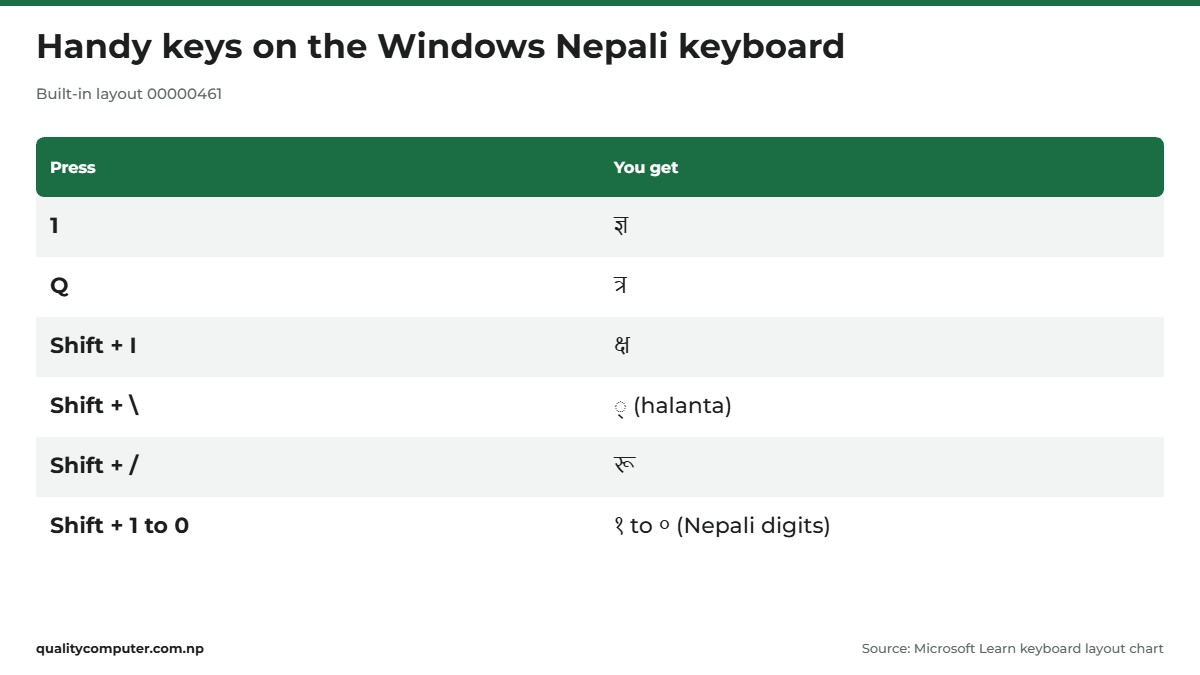
The Windows Nepali layout puts several of these on single keys. On Microsoft's chart, the 1 key gives ज्ञ, Q gives त्र and Shift + I gives क्ष. Shift with the number row types the Nepali digits १ to ०, which are separate characters from English 0 to 9.
On a phone, Keyman's Romanized layout keeps numbers on a separate layer, and long presses save hunting: क्ष sits under छ and ज्ञ under ग (Keyman help).
Learning to touch-type: typeshala
Search for Nepali typeshala and you'll find typing tutors: software and websites with lessons and speed tests in Nepali and English. Check which layout a tutor teaches first. Some drill the old Preeti layout, which is close to Traditional but won't teach you Romanized. Prefer browser-based tutors to software downloads from unknown sites. Typing for hours? Our keyboard buying guide compares the main types.
Fixing common Nepali typing problems
Boxes instead of letters
Empty boxes, sometimes with a question mark inside, usually mean the font in use doesn't contain those characters (Unicode Consortium). Select the text and change it to a font that has Devanagari. On Windows, Nirmala UI supports Devanagari and comes with Windows 7 through Windows 11 (Microsoft Learn).
Letters breaking apart in Word
Vowel signs in the wrong place, or half letters that won't join, often mean the font or app doesn't handle Devanagari properly. Switch the text to a Unicode font with Devanagari, such as Nirmala UI. Don't apply Preeti or Kantipur to Unicode text: those fonts are built around English-letter codes.
The keyboard keeps switching by itself
Check the shortcuts first. Windows key + Spacebar switches through your layouts, and Ctrl + Shift switches the keyboard layout when you have more than one (Microsoft Support). LTK's guide also gives Alt + Shift as the default language toggle on Windows. Glance at the input language icon on the taskbar before you type, and remove keyboards you never use: in Language & region, select the three dots next to the language, then Language options, then the three dots next to the keyboard and Remove (Microsoft Support). On a Mac, Control-Space flips back to the last input source.
Quick verdict
- Use Unicode, not Preeti, for anything you'll share, post or submit online.
- Windows 11: Settings > Time & language > Language & region > Add a language > Nepali, then Windows key + Spacebar.
- Want to type by sound? Use Nepali Unicode Romanized (from LTK or Keyman) or Google transliteration.
- Phones: Gboard on Android, the built-in Nepali keyboard on iPhone.
- Nepali voice typing: Gboard on Android, or Google Docs in a browser on a computer.
- Seeing boxes? Change the text to a Devanagari font such as Nirmala UI.
Keyboards and laptops in our store
Typing long letters and forms in Nepali and English is easier on a keyboard that's comfortable to use for hours. Here are keyboards and laptops to match.
| Product | What it is | Our price |
|---|---|---|
| Rapoo 8200T multi-mode wireless keyboard and mouse | Wireless keyboard and mouse, multi-device | Rs 4,380 |
| Havit KB254GCM wireless keyboard and mouse | Budget wireless keyboard and mouse | Rs 2,275 |
| Logitech MK120 USB keyboard and mouse | Wired USB keyboard and mouse | Rs 2,690 |
| Alcatroz Tetriz Air 3 Bluetooth keyboard | Compact Bluetooth keyboard | Rs 2,800 |
| Lenovo IdeaPad Slim 3 15IRH8 (Core i5-13420H, 8GB, 512GB) | 15.6-inch laptop for office and study | Rs 102,900 |
Prices checked on 14 November 2026 on our website.
In our store
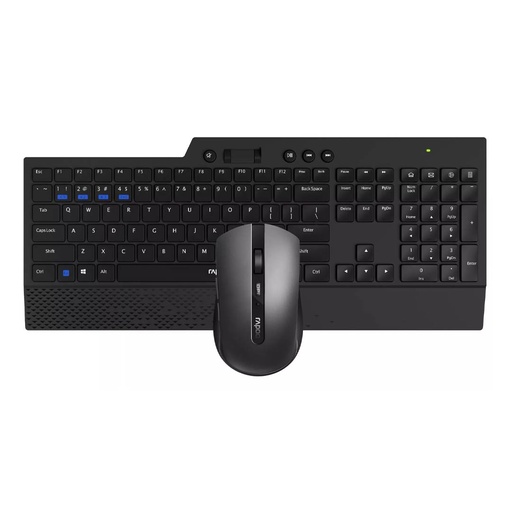
Rapoo 8200T
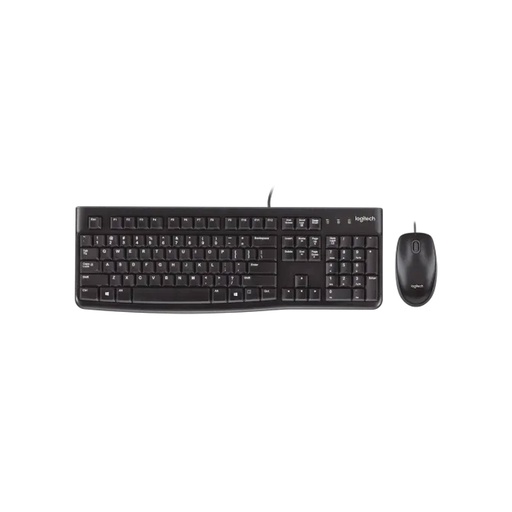
Logitech MK120
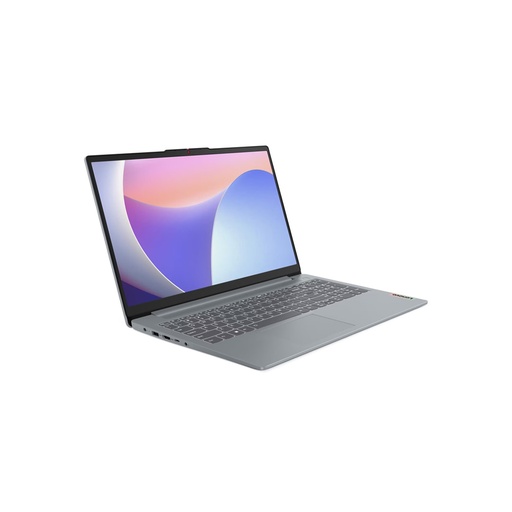
Lenovo IdeaPad Slim 3
Frequently asked questions
How to type Nepali in laptop?
On Windows 11, open Start > Settings > Time & language > Language & region, select Add a language, choose Nepali and install it. Then press the Windows key and Spacebar to switch between English and Nepali.
What is the difference between Nepali Unicode Romanized and Traditional?
Romanized puts letters on keys that match English sounds, so A, S, D, F, G and H give आ, श, ध, ऊ, घ and अ. Traditional was designed for people used to Preeti and Kantipur, with some keys moved. Both type Unicode and are available from Language Technology Kendra.
Is Google Input Tools still available for Nepali?
Yes, as a Chrome extension. It's still on the Chrome Web Store and supports Nepali transliteration and a Devanagari phonetic keyboard. Google's website no longer offers a Windows desktop download.
How do I use Google voice typing in Nepali?
On Android, tap the microphone at the top of Gboard and speak, choosing Nepali from the language abbreviation if you have several languages. On a computer, open Google Docs and click Tools > Voice typing; Nepali is on Google's list of supported languages.
Does iPhone have a Nepali keyboard?
Yes. Go to Settings > General > Keyboard > Keyboards > Add New Keyboard and choose Nepali. Apple doesn't list Nepali for predictive typing or dictation.
Why does Nepali Unicode text show boxes?
Usually because the font being used doesn't contain Devanagari characters. Change the text to a font that does, such as Nirmala UI on Windows.
What is Nepali typeshala?
Typeshala is a name used by Nepali typing tutors, programs and websites with lessons and speed tests in Nepali and English. Check which layout a tutor teaches, because some practise the old Preeti layout rather than Unicode Romanized.
Sources
- Manage the language and keyboard/input layout settings in Windows, Microsoft Support
- Manage the input and display language settings (Windows 10 steps), Microsoft Support
- Windows keyboard layouts, Microsoft Learn
- Nepali keyboard layout (00000461), Microsoft Learn
- Keyboard shortcuts in Windows, Microsoft Support
- Use voice typing to talk instead of type on your PC, Microsoft Support
- Microsoft adds smart Phonetic Indic keyboards in 10 Indian languages for Windows 10, Microsoft Stories India, 17 June 2019
- Nirmala UI font family, Microsoft Learn
- Keyboard layouts, Language Technology Kendra
- Downloads, Language Technology Kendra
- Nepali Unicode, Language Technology Kendra
- Nepali Unicode and other software, Madan Puraskar Pustakalaya
- Nepali Romanized keyboard, Keyman (SIL Global)
- Nepali Romanized keyboard help, Keyman
- Google Input Tools, Google
- Google Input Tools on Chrome, Google
- Google Input Tools: supported languages, Google
- Google Input Tools, Chrome Web Store, checked 13 November 2026
- Google Input Tools, Wikipedia
- Set up Gboard, Gboard Help
- Type in a different language, Gboard Help
- Type with your voice, Gboard Help
- Gboard for Android gets new languages and tools, Google, 26 April 2017
- Type less, talk more, Google, 14 August 2017
- Type and edit with your voice, Google Docs Help
- Add or change keyboards on iPhone, Apple Support
- iOS feature availability, Apple
- Write in another language on Mac, Apple Support
- Use the Keyboard Viewer on Mac, Apple Support
- macOS feature availability, Apple
- Display problems, Unicode Consortium
- Devanagari code chart, Unicode Consortium
- User manual for downloading the eNID, Department of National ID and Civil Registration