
Which Keyboard to Buy? Membrane vs Mechanical, Switches and Wireless
Updated 29 October 2026. Prices are Quality Computer’s website prices that day. Keyboard facts are from Logitech, CHERRY and How-To Geek.
Short answer: For office typing, a basic membrane keyboard is quiet and low-cost. A mechanical keyboard feels crisper, and its switch colour sets the feel: red is light and smooth, brown has a soft bump, and blue clicks. A 2.4 GHz wireless keyboard with a USB receiver is the simplest cordless option. Every keyboard with today's price is on our keyboard price in Nepal page.
Keyboards we stock
Our website prices on 29 October 2026:
| Keyboard | Type | Our price |
|---|---|---|
| ViewSonic KU215 | Wired, membrane | Rs 850 |
| Rapoo NK2600 | Wired, membrane | Rs 950 |
| Dell KB216 | Wired multimedia, membrane | Rs 1,150 |
| Logitech K120 | Wired, membrane | Rs 1,630 |
| Fantech Shikari K515 | Wired gaming, RGB membrane | Rs 1,175 |
| Fantech Hunter-Pro K511 | Wired gaming, backlit | Rs 2,000 |
| Alcatroz Jellybean A200 | Wireless | Rs 1,520 |
| Philips K624 | Bluetooth, multi-device | Rs 2,375 |
| Rapoo 8000M | Wireless and Bluetooth multi-mode | Rs 2,760 |
| Alcatroz Tetriz Air 3 | Bluetooth 5.3 and wireless, 99 keys | Rs 2,800 |
| Rapoo K2800 | Wireless with touchpad | Rs 3,480 |
| Fantech ATOM61 MK211 | Mechanical, compact | Rs 2,699 |
| Fantech ATOM63 MK874v2 | Mechanical, compact | Rs 2,700 |
| Fantech ATOM87 MK876v2 | Mechanical, RGB, 87 keys | Rs 2,950 |
| Fantech ATOM PRO MK917 | Mechanical, wired, 2.4 GHz and Bluetooth | Rs 6,649 |
| Rapoo V700 RGB | Mechanical gaming, RGB | Rs 6,950 |
Call us on 9863609150 to check colours and switch types. Want a keyboard and mouse together? See our wireless keyboard and mouse combo guide.
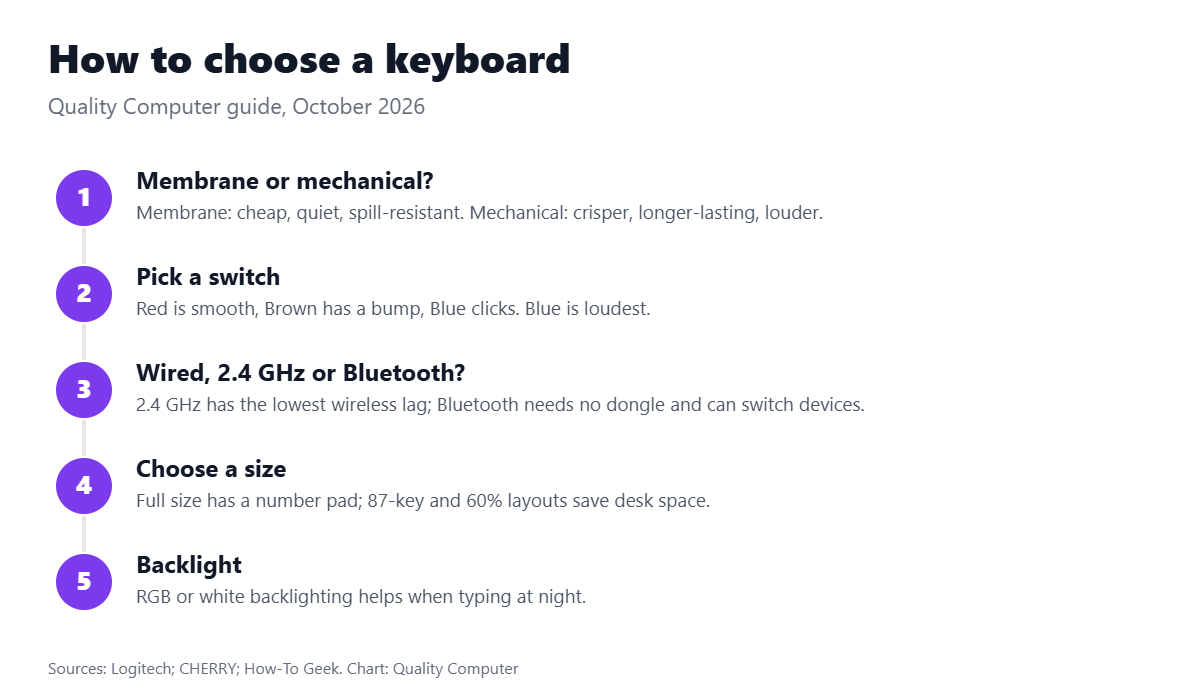
Membrane or mechanical?
In a membrane keyboard, every key presses a rubber dome onto a layered circuit. Logitech says membrane keyboards are cheaper, quieter and resist dust and splashes better, but the domes wear over time and a faulty one usually means replacing the whole keyboard.
In a mechanical keyboard, every key has its own switch with metal contacts. They cost more and are usually louder, but feel crisper and last longer: Logitech gives 50 to 100 million keystrokes for mechanical switches.
Red, brown or blue switches?
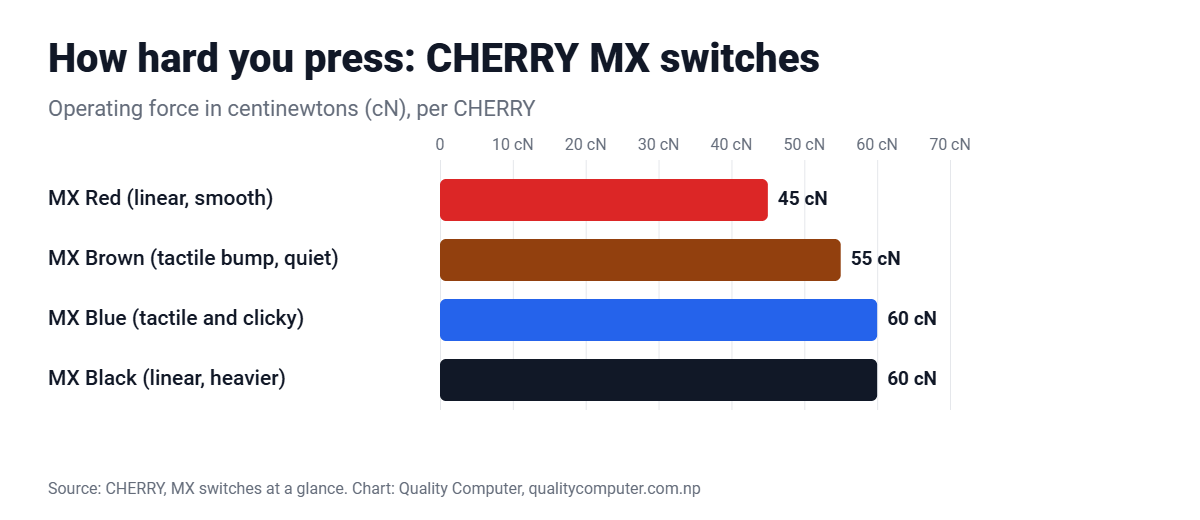
| Switch | Feel | Force | Good for |
|---|---|---|---|
| Red (linear) | Smooth, no bump or click | 45 cN | Gaming and quiet offices |
| Brown (tactile) | A small bump, no click | 55 cN | Typing and mixed use |
| Blue (tactile, clicky) | A bump and an audible click | 60 cN | Typists who like feedback; too loud for shared rooms |
| Black (linear) | Smooth but heavier | About 60 cN | People who press hard |
Figures are for CHERRY MX switches. Fantech, Rapoo and other brands use similar colour names, but their exact force can differ.
Video: Mechanical key switches explained (Kinesis)
A 90-second explainer on how mechanical key switches work.
Wired, 2.4 GHz wireless or Bluetooth?
- Wired: no batteries, no pairing, cheapest.
- 2.4 GHz (USB dongle): works as soon as you plug in and has lower lag, about 1 ms versus 1.3 ms for Bluetooth according to Razer’s figures; it needs a USB-A port.
- Bluetooth: no dongle, and many models switch between a laptop, tablet and phone, but pairing takes more steps.
Logitech’s Logi Bolt receiver uses Bluetooth Low Energy with up to 10 metres of range and pairs up to six Bolt devices to one receiver. Building a home office? See our home office setup guide and computer accessories everyone should have.
Frequently asked questions
Where can I see today's keyboard prices?
Every keyboard we stock is listed with today's price on our keyboard price in Nepal page.
Which is better, mechanical or membrane?
Mechanical keyboards feel crisper and last longer; membrane keyboards are cheaper, quieter and handle spills better.
Which switch is best for gaming?
For fast, repeated presses, a light linear switch is easiest, such as CHERRY MX Red: smooth, no bump, 45 cN.
Which switch is quietest?
Red (linear) and Brown (tactile, no click) are quieter than clicky Blue switches.
Is a wireless keyboard laggy?
A 2.4 GHz dongle keyboard has very low lag (about 1 ms per Razer’s figures). Bluetooth is slightly slower but fine for typing.
Sources
- Mechanical vs membrane keyboards, Logitech
- CHERRY MX switches at a glance, CHERRY, 1 August 2017
- CHERRY MX2A Red, CHERRY
- Logi Bolt, Logitech
- USB-RF vs Bluetooth mouse and keyboards, How-To Geek
- Keyboard prices: Quality Computer website, 29 October 2026.