iCloud Storage in Nepal (2026): iCloud+ Plans, Price and How to Pay
Short answer: Every Apple Account gets 5 GB of iCloud storage free. For more, iCloud+ in Nepal costs US$0.99 a month for 50 GB, US$3.49 for 200 GB, US$11.99 for 2 TB, US$34.99 for 6 TB and US$69.99 for 12 TB, billed monthly, according to Apple's price list (checked November 2026). You upgrade in Settings on your iPhone, under your name and iCloud. For Nepal, Apple lists only most credit and debit cards as payment, so use a card your bank has enabled for international online payments.
Shop at Quality Computer
iPhones and MacBooks View all →
How much iCloud storage you get free
Every Apple Account comes with 5 GB of storage free. You get it automatically when you set up iCloud (Apple), and you don't need a card for it.
That 5 GB is shared by everything iCloud keeps for you: iPhone and iPad backups, iCloud Photos, your files, iCloud Mail, Messages attachments, Voice Memos and more. It isn't much once photos, videos and a phone backup are all in there.
What iCloud Drive is
iCloud Drive is the file storage part of iCloud. Files and folders you keep there show up in the Files app on your iPhone and iPad, in Finder on a Mac, in File Explorer on Windows with iCloud for Windows, and at iCloud.com. Apple says every file you add counts towards your iCloud space (Apple iCloud User Guide).
To keep your iPhone backed up, connect to Wi-Fi, then go to Settings, tap your name, then iCloud, iCloud Backup and Back Up Now. If there isn't enough space, you get an alert, and the onscreen steps let you buy more (Apple). Just moved from Android? Our Android to iPhone transfer guide covers getting your photos and WhatsApp across first.
iCloud pricing in Nepal: the five iCloud+ plans
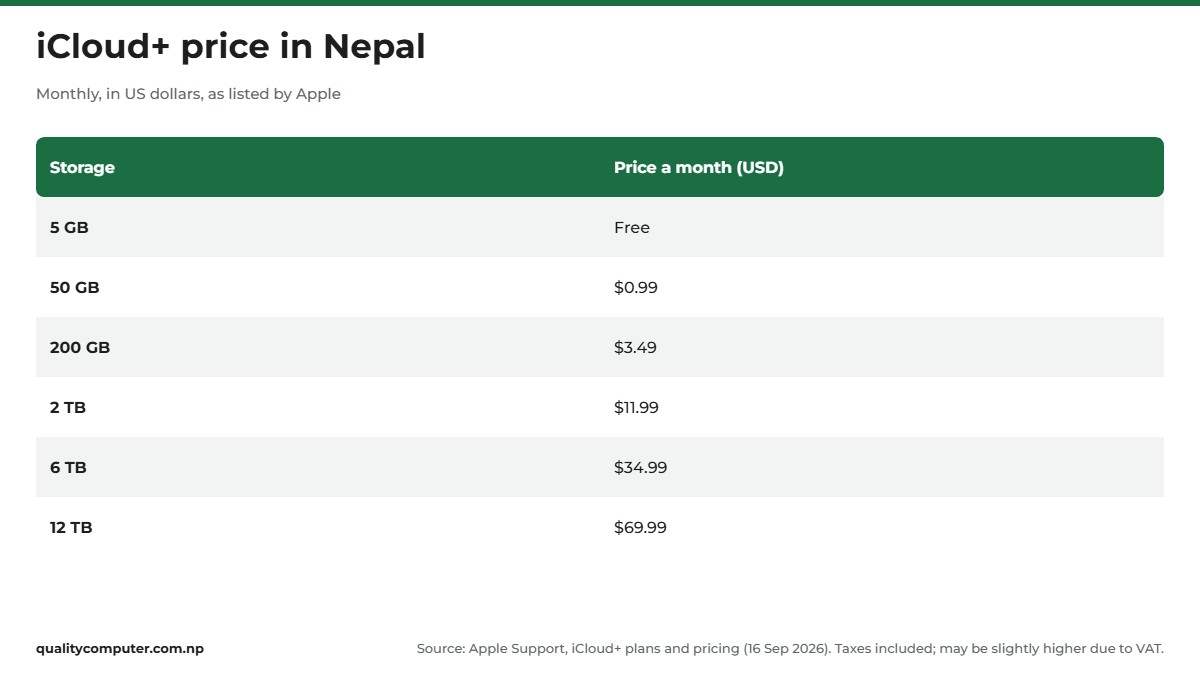
When 5 GB isn't enough, you pay for iCloud+. Nepal's prices are in US dollars, and Apple says you're billed monthly after you upgrade. At the time of writing (November 2026), Apple's iCloud+ plans and pricing page, dated 16 September 2026, lists these for Nepal:
- 50 GB: US$0.99 a month
- 200 GB: US$3.49 a month
- 2 TB: US$11.99 a month
- 6 TB: US$34.99 a month
- 12 TB: US$69.99 a month
Apple adds two notes to the Nepal row: taxes are included in the price, and iCloud+ prices may be slightly higher because of VAT. So treat the list as your guide, and check the price shown on your plan screen before you confirm.
Apple lists the same extras for every paid plan: iCloud Private Relay, Hide My Email, a custom email domain for iCloud Mail, Apple Invites, and sharing with up to five other family members. Beyond storage, the plans differ only in home security camera recording with HomeKit Secure Video: one camera on 50 GB, up to five on 200 GB, and unlimited from 2 TB.
Apple TV and Apple Arcade with iCloud+
Apple has an iCloud+ page saying iCloud+ subscribers get Apple TV and Apple Arcade included at no additional cost, and Nepal is in its list of countries. But when we checked in November 2026, the version of that page we could open still said "Coming soon", with no prices or launch date, and Apple says availability dates may vary by country. Apple's services availability page says only that, in Nepal, Apple TV and Apple Arcade access "might be included" with iCloud+. So don't buy a plan for these alone. To check whether your plan includes them, Apple says to open Settings, your name, Subscriptions, iCloud+.
Apple One, Apple's bundle of services, isn't listed for Nepal on that services availability page.
How to get more iCloud storage on iPhone, Mac or Windows
You buy iCloud+ from your device's settings. The menu names have changed a few times, so Apple gives steps by software version (Apple).
On iPhone
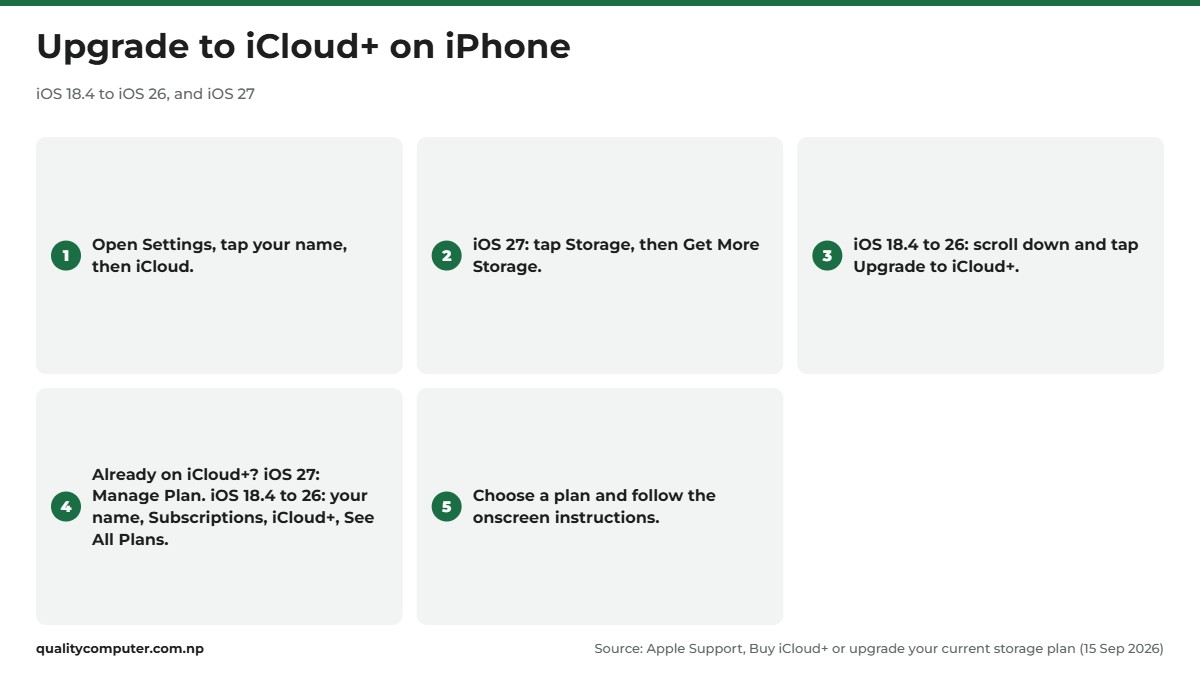
- iOS 27 and later: open Settings. If you see the iCloud Storage Almost Full notification, tap it. Otherwise tap your name, then iCloud, Storage and Get More Storage. Already on iCloud+? Tap your name, iCloud, then Manage Plan under iCloud+ Features.
- iOS 18.4 to iOS 26: open Settings, tap your name, then iCloud, scroll down and tap Upgrade to iCloud+. Already on iCloud+? Tap your name, Subscriptions, iCloud+, then See All Plans.
- iOS 17 and earlier: Settings, your name, iCloud, Manage Account Storage, then Change Storage Plan.
Then choose a plan and follow the onscreen steps.
On a Mac
On macOS Sequoia or later, choose the Apple menu, then System Settings. Click your name, then iCloud. Click Upgrade to iCloud+, or Manage Plan under iCloud+ Features if you already pay for a plan.
On a Windows PC
Install iCloud for Windows from the Microsoft Store. Apple says the latest version needs Windows 11 or later (Apple). Open it, click Manage, then Change Storage Plan if you already subscribe. Choose a plan, click Next, enter your Apple Account password and click Buy.
How to pay for iCloud+ from Nepal
Apple's list of payment methods has one entry for Nepal: most credit and debit cards. Apple Account balance, which is what gift cards add to, isn't on the Nepal list. So plan on paying for iCloud+ with a card.
Because Nepal's prices are in US dollars, the iCloud charges go on your card in dollars every month until you downgrade or cancel. Before you upgrade, ask your bank two things: is your card enabled for international online payments, and what does the bank charge on foreign-currency payments? Our guide to international payment problems in Nepal explains why international payments from Nepal often fail, and what the options are.
To add or change the card on your iPhone, go to Settings, tap your name, then Payment & Shipping. Tap the card and then Edit to update it, or tap Add Payment Method, enter the new card and tap Done (Apple).
Still setting up your account? Our Apple ID guide for Nepal shows how to create one with the payment set to None, so you only add a card when you need it.
Share one iCloud+ plan with your family
With Family Sharing, you and up to five family members can share Apple services, including one iCloud+ plan (Apple).
Sharing storage doesn't mean sharing your photos. On its Family Sharing page, Apple says that with iCloud+, your photos, files and documents "remain yours and yours alone" unless you choose to share them.
How to set it up:
- Create the family group if you don't have one. The organiser must be an adult. On iPhone, go to Settings, tap your name, then Family and Continue, and follow the steps to invite people.
- Share iCloud+. On iPhone, go to Settings, Family, Subscriptions, iCloud+, and follow the onscreen steps. On a Mac, open System Settings, click Family, Subscriptions, iCloud+, then Share with Family (Apple).
One detail if your family uses an iCloud Shared Photo Library: photos added to it count only towards the storage of the person who created that library.
iCloud storage full? How to free up space
When you run out of space, your iPhone stops backing up to iCloud, new photos and videos stop uploading to iCloud Photos, and iCloud Drive and other iCloud apps stop staying up to date across your devices (Apple). You can buy more, or clear out what you don't need.
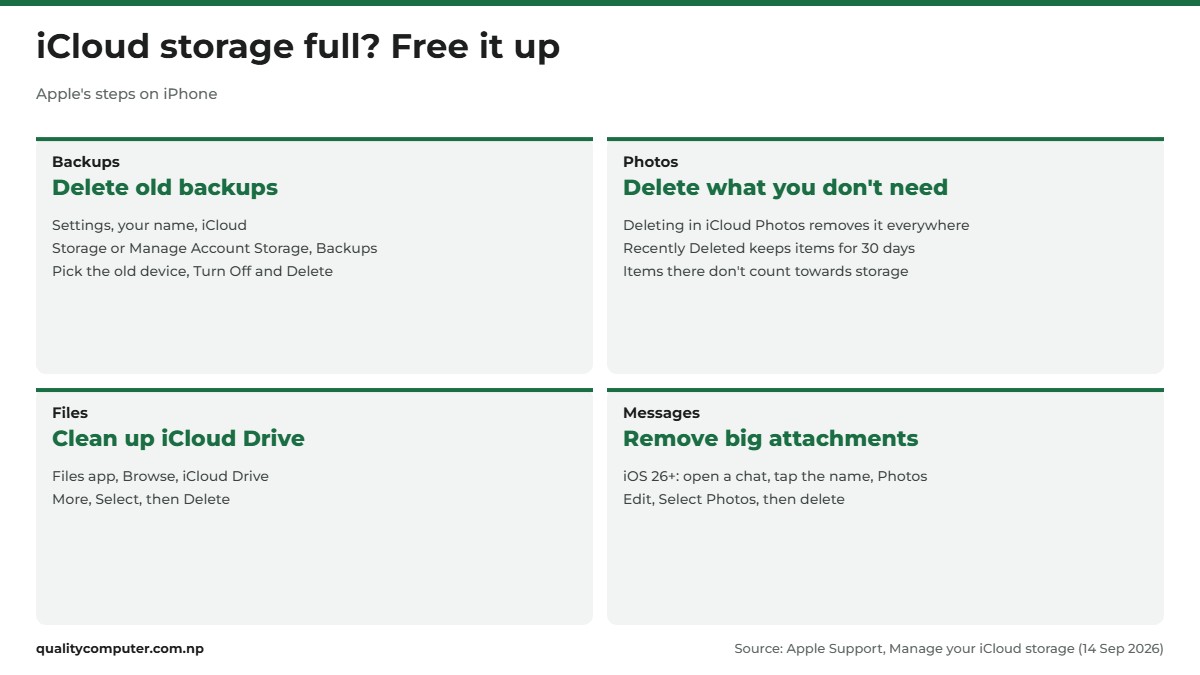
To manage iCloud storage, go to Settings, tap your name, then iCloud, and tap Storage (or Manage Account Storage) to see what's using the space.
Delete backups of old phones
Changed phones? The old one's backup may still be there: Apple keeps backups for 180 days after you stop using iCloud Backup. In the same storage screen, tap Backups. Tap the old device, then Turn Off and Delete from iCloud, and Turn Off and Delete to confirm. This also turns off iCloud Backup for that device.
Clear photos and videos you don't need
In Photos, open your Library, tap Select, choose items and tap the delete button. With iCloud Photos on, deleting on one device deletes everywhere (Apple). Deleted items stay in Recently Deleted for 30 days and don't count towards your storage. One catch: if you are already over your limit, your iPhone removes deleted photos straight away, and they can't be recovered from Recently Deleted. Save anything important to a computer first.
Don't use iCloud Photos? Then your photos may be inside your iPhone backup. Under Backups, tap your device and look at Photo Library. Apple suggests saving those photos to a computer, or turning off Photos in the backup.
A note on Optimise Storage. This setting (Settings, your name, iCloud, Photos, then iPhone Storage on iOS 27; you may see it spelt Optimize Storage) keeps smaller copies of photos on your iPhone while iCloud keeps the full-size originals. It frees space on the phone, not in iCloud.
Clean up files, Messages and Mail
- Files: in the Files app, tap Browse, then iCloud Drive under Locations. Tap the More button, Select, choose files and tap Delete. They're removed from all your devices.
- Messages: on iOS 26 or later, open a chat, tap the contact's name, then Photos. Tap Edit, Select Photos, pick the ones you don't need, tap delete, then Delete Attachment.
- Mail: in your iCloud Mail inbox, tap the More button, then Cleanup Recommendations and iCloud Mail Cleanup.
Downgrade or cancel iCloud+
Before you move to a smaller plan, download or delete whatever won't fit in the new amount. If you're still over the limit after the change, iCloud stops syncing and your backups stop until you free up space (Apple).
- iPhone, iOS 18.4 and later: Settings, your name, Subscriptions, then iCloud+ under Active. Tap Cancel Subscription, or See All Plans to pick a smaller one.
- iPhone, iOS 17 and earlier: Settings, your name, iCloud, Manage Account Storage, then Downgrade Options.
- Mac, macOS Tahoe 26 and later: System Settings, Apple Account, iCloud, then Manage Plan under iCloud+ Features. Choose See All Plans or Cancel Subscription.
- Windows: in iCloud for Windows, click Manage, Change Storage Plan, then Downgrade Options. Choosing the free 5 GB plan cancels iCloud+.

The change takes effect when your current billing period ends. On the free plan you lose the iCloud+ extras such as Hide My Email and Private Relay. Apple offers partial refunds where the law requires them, and asks you to contact it within 14 days if you recently changed your plan.
No Apple device any more? Sign in at reportaproblem.apple.com, choose I'd like to, then Request a refund, pick a reason, choose your latest iCloud+ charge and tap Submit. Apple says refund decisions can take 24 to 48 hours (Apple).
Other ways to keep your photos and backups
Google storage. Each Google Account includes up to 15 GB of storage, shared across Gmail, Google Drive and Google Photos. You can buy more through Google One where it's available (Google One Help).
A backup on your own computer. Apple's backup methods page says a computer backup is stored on your Mac or PC, so how big it can be depends on the computer's free space. iCloud backups are always encrypted; computer backups offer encryption, but it's off by default.
- Mac: connect the iPhone, open Finder, select your iPhone in the sidebar and click Back Up Now (Apple).
- Windows: open the Apple Devices app (or iTunes if your PC doesn't have it), connect the iPhone with a cable, follow the Trust This Computer prompt, click General (Summary in iTunes), then Back Up Now (Apple).
Tick Encrypt local backup if you want Health and Activity data saved, and keep the password somewhere safe: an encrypted backup can't be recovered without it.

Whichever you choose, keep a second copy of anything you can't lose. Our guide to backing up your computer data covers external drives and the 3-2-1 rule.
Quick verdict
- Every Apple Account gets 5 GB of iCloud storage free.
- iCloud+ in Nepal runs from US$0.99 (50 GB) to US$69.99 (12 TB) a month, per Apple's list.
- Pay with a card enabled for international online payments; Apple Account balance isn't listed for Nepal.
- One iCloud+ plan covers you and up to five family members, and each person's files stay private.
- Storage full? Delete old backups and unwanted photos before you pay for more.
- Apple TV and Apple Arcade may come with iCloud+ in Nepal; check Settings, your name, Subscriptions, iCloud+ before counting on it.
iPhones and MacBooks in our store
Buying a new iPhone or MacBook? Choose the built-in storage with your photos and files in mind, since iCloud and the device each have their own space.
| Product | What it is | Our price |
|---|---|---|
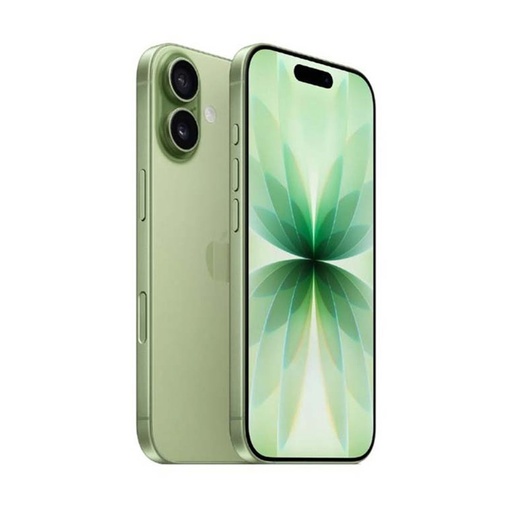
| Apple iPhone 17 | iPhone 17 | Rs 173,499 |
| Apple iPhone 16 | iPhone 16 | Rs 146,599 |
| Apple iPhone 15 | iPhone 15 | Rs 127,499 |
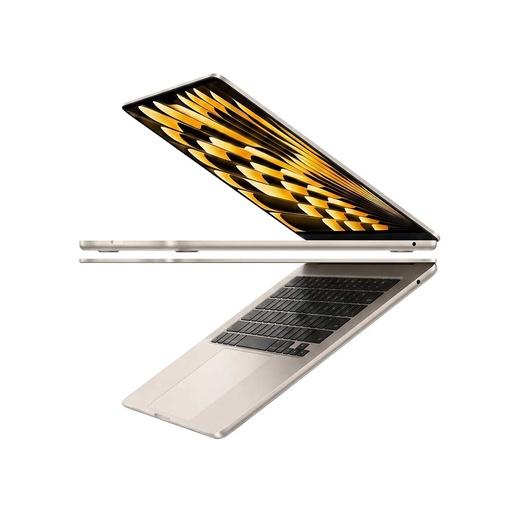
| Apple MacBook Air M5 13-inch (16GB, 512GB) | MacBook Air M5 | Rs 248,500 |
| Apple MacBook Neo 13-inch (8GB, 256GB) | MacBook Neo | Rs 135,000 |
Prices checked on 14 November 2026 on our website.
In our store
iPhone 17
MacBook Air M5
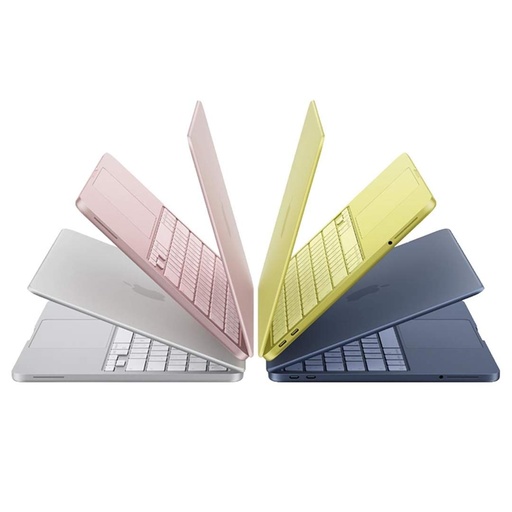
MacBook Neo
Frequently asked questions
How much is iCloud storage in Nepal?
Apple's price list for Nepal, in US dollars and billed monthly, is US$0.99 for 50 GB, US$3.49 for 200 GB, US$11.99 for 2 TB, US$34.99 for 6 TB and US$69.99 for 12 TB. Apple says taxes are included, but prices may be slightly higher because of VAT. These prices were checked in November 2026 and can change.
Can I get free iCloud storage?
Yes. Every Apple Account gets 5 GB of iCloud storage free. For more you need an iCloud+ plan, or you can make room by deleting old device backups and photos you don't need.
How do I pay for iCloud+ from Nepal?
Apple lists most credit and debit cards as the payment method for Nepal; Apple Account balance from gift cards isn't on the Nepal list. Add a card in Settings, your name, Payment & Shipping, and check with your bank that it works for international online payments.
How to free up iCloud storage on iPhone?
Go to Settings, tap your name, then iCloud and Storage or Manage Account Storage. Delete backups of old devices under Backups, delete photos and videos you don't need, remove files from iCloud Drive in the Files app, and clear large Messages attachments.
How to clear iCloud storage without losing photos?
Save the photos to a computer first, then delete them from iCloud Photos. If you are already over your storage limit, deleted photos are removed straight away and can't be recovered from Recently Deleted, so copy them before you delete.
Can I share iCloud storage with my family?
Yes. With Family Sharing, you and up to five family members can share one iCloud+ plan, and each person's files stay private. On iPhone, go to Settings, Family, Subscriptions, iCloud+ and follow the steps.
How do I cancel iCloud+ and go back to 5 GB?
On iPhone with iOS 18.4 or later, go to Settings, your name, Subscriptions, iCloud+ and tap Cancel Subscription. The change takes effect when your current billing period ends. Without an Apple device, you can cancel at reportaproblem.apple.com.
Sources
- iCloud+ plans and pricing, Apple Support, 16 September 2026
- Buy iCloud+ or upgrade your current storage plan, Apple Support, 15 September 2026
- Payment methods that you can use with your Apple Account, Apple Support, 7 August 2026
- If you need to change or update your Apple Account payment method, Apple Support, 16 September 2026
- iCloud+ Now with Apple TV & Apple Arcade Included, Apple (iCloud.com)
- Availability of Apple Media Services, Apple Support, 30 October 2026
- How to set up Family Sharing on your iPhone, iPad, or Mac, Apple Support, 9 November 2026
- Use iCloud+ with your family, Apple iCloud User Guide
- Family Sharing, Apple
- Manage your iCloud storage on your Apple device, Apple Support, 14 September 2026
- Set up and use iCloud Photos, Apple Support, 14 September 2026
- Keep your files up to date and share them with iCloud Drive, Apple iCloud User Guide
- How to back up your iPhone or iPad with iCloud, Apple Support, 24 September 2026
- Downgrade or cancel your iCloud+ plan, Apple Support, 15 September 2026
- How to cancel an iCloud+ subscription without an Apple device, Apple Support, 18 November 2024
- Download iCloud for Windows, Apple Support, 24 July 2026
- Backup methods for iPhone or iPad, Apple Support, 20 October 2026
- How to back up your iPhone or iPad with your Mac, Apple Support, 5 October 2026
- How to back up your iPhone, iPad, or iPod touch with Windows, Apple Support, 15 September 2026
- How your Google storage works, Google One Help