How to Check if AirPods Are Original: Serial Number, iPhone Alerts and Signs of a Copy (2026)
Short answer: To check if AirPods are original, pair them with an iPhone and open Settings > Bluetooth > the info button next to them: genuine AirPods show a model number, serial number and firmware version there, and iOS 16 or later can show a Cannot Verify AirPods alert if it can't verify them as genuine. Then type the serial number into Apple's Check Coverage page. A serial number alone isn't proof, because some copies carry serial numbers that pass Apple's check, so do both checks. The surest way is to buy from an authorised Apple reseller.
Shop at Quality Computer
Genuine AirPods and earbuds View all →
Five checks, in order
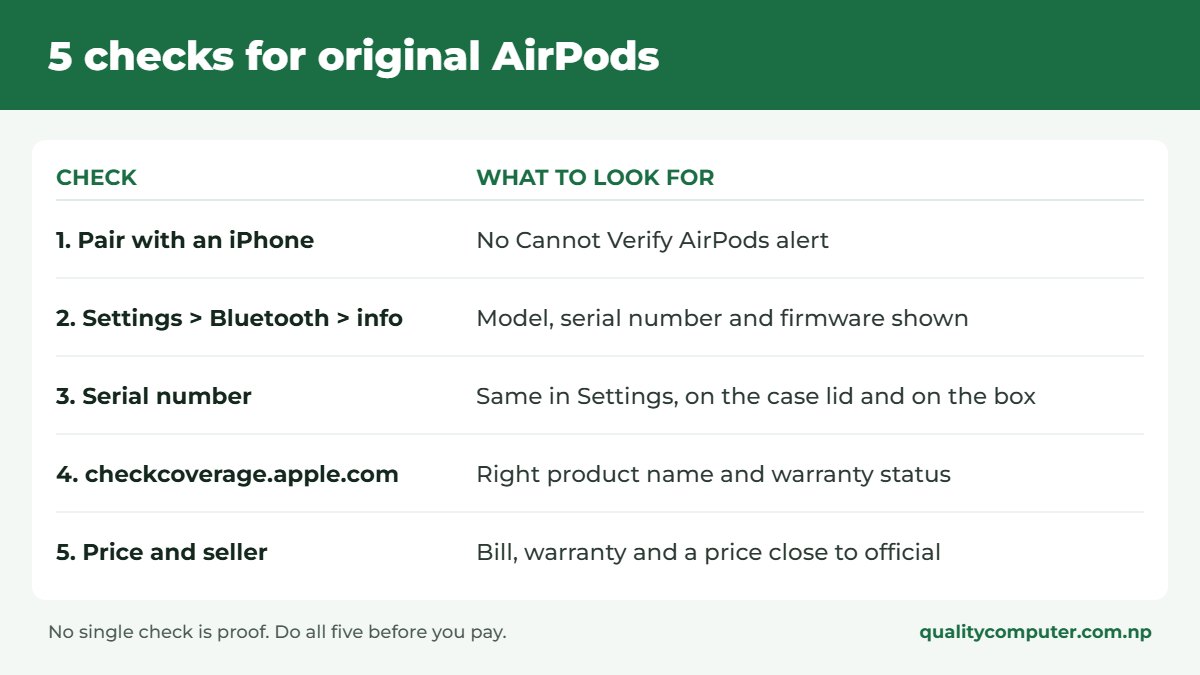
Each check takes a minute or two. No single one is proof on its own, so run through all of them, ideally before you pay.
1. Find and check the serial number
Apple lists three places to find it (Apple Support):
- On your iPhone: with the AirPods connected, go to Settings > Bluetooth and tap the info button next to your AirPods. The model number and serial number are shown there.
- On the case: the serial number is printed on the underside of the lid.
- On the AirPods: the model number, starting with the letter A, is printed on the underside of each AirPod.
Now open checkcoverage.apple.com and type in the serial number. Apple should show the right product name and its warranty status.
What to watch for: the number in Settings, on the case and on the box should all match. Apple prints it next to the barcode on the original packaging (Apple Support). And remember that a valid serial number doesn't prove much by itself, because some counterfeits carry spoofed serial numbers that Apple's site accepts (AppleInsider). If Apple shows a different product, an expired warranty on a "brand new" pair, or nothing at all, walk away.
2. What your iPhone tells you
This is the most useful check, though no single screen is proof.
- The Cannot Verify alert. Since iOS 16, an iPhone can show a "Cannot Verify AirPods" message when you connect a pair it can't verify as genuine (Apple Support; MacRumors). If you see it on a pair sold as new, don't buy them.
- The setup card. Open the case next to an unlocked iPhone. Genuine AirPods bring up a setup card with a picture of your exact model. Good copies can imitate this card, so treat it as one sign among several.
- The settings page. After pairing, the AirPods settings should show the model name, model number, serial number and firmware version. AirPods Pro, and other models with noise cancelling, should also show noise control options.
- Find My. Genuine AirPods appear in the Find My app once they're paired with your Apple Account.
If you use Android, borrow an iPhone for five minutes to run these checks. It is worth the trouble.
3. Signs you can see and hear
Good copies look convincing, so treat these as supporting evidence, not proof.
- Price. New AirPods sold far below the official price are a strong warning sign.
- Printing and finish. Look for blurry text, spelling mistakes, uneven gaps on the case lid or a hinge that feels loose.
- Features that don't work. On AirPods Pro, noise cancelling and transparency mode should make an obvious difference. On copies they often do little or nothing.
- The seller. No bill, no warranty card and no fixed shop are all warning signs.
What about high copy or master copy AirPods?
These are imitation earbuds made to look like AirPods. Many sellers describe them that way openly, and the price usually makes it clear. They aren't Apple products, so they come with no Apple warranty or service, and features like noise cancelling, Find My and automatic switching may be missing or work poorly.
If your budget is a few thousand rupees, you'll usually get better sound and a real warranty from a genuine budget brand than from a copy of an expensive one. Our earbuds price list has options from under Rs 3,000, and our ANC vs ENC guide explains what the noise-cancelling labels mean.
Before you buy: how to avoid a fake
- Buy from an authorised Apple reseller and keep the VAT bill.
- Ask to pair the AirPods with an iPhone in the shop.
- Check the serial number on Apple's site before you pay.
- Be careful with second-hand pairs sold online. Meet in person and run every check in this post first. Our second-hand mobile guide has more on buying used.
The same approach works for phones. See our iPhone IMEI check guide.
Quick verdict
- Pair with an iPhone and look for the Cannot Verify alert.
- Check that the serial number matches in Settings, on the case and on the box.
- Confirm the serial number on checkcoverage.apple.com.
- A very low price is a strong warning sign.
- Buying from an authorised reseller removes the doubt.
Genuine AirPods and earbuds in our store
Quality Computer is an authorised Apple reseller in Birtamode, Jhapa, and we deliver across Nepal. The other models and their prices are in our AirPods price in Nepal post. These were in stock when we checked:
| Product | What it is | Our price |
|---|---|---|
| Apple AirPods 5 | Genuine Apple AirPods | Rs 31,000 |
| Apple AirPods 5 with Wireless Charging Case | Genuine Apple AirPods, wireless charging case | Rs 36,500 |
| JBL Tune Beam 2 | Noise-cancelling earbuds, 48 hours playtime | Rs 12,900 |
| JBL Wave Beam 2 | Wireless earbuds, 40 hours playtime | Rs 9,900 |
| UGREEN HiTune P3 | Budget true wireless earbuds | Rs 3,450 |
| HiFuture SonicAIR | Budget earbuds with four mics for calls | Rs 2,999 |
Prices checked on 21 November 2026 on our website. Stock of AirPods changes quickly, so call or WhatsApp 9863609150 before you visit.
Frequently asked questions
How can I check if my AirPods are original?
Pair them with an iPhone and open Settings, Bluetooth, then the info button next to the AirPods. Genuine AirPods show a model number, serial number and firmware version. Then enter the serial number at checkcoverage.apple.com.
Can fake AirPods have a real serial number?
Yes. Some counterfeits carry serial numbers that Apple's site accepts, so a valid result on Apple's site is not proof on its own. Check it together with what your iPhone shows.
What does Cannot Verify AirPods mean?
It is an alert an iPhone running iOS 16 or later can show when it can't verify that the AirPods are genuine. Apple says such headphones may not behave as expected.
Where is the serial number on AirPods?
On the underside of the charging case lid, and on your iPhone under Settings, Bluetooth, info button.
Do high copy AirPods have an Apple warranty?
No. They are not Apple products, so Apple's warranty and service don't cover them.
Where can I buy original AirPods in Nepal?
From an authorised Apple reseller. Quality Computer in Birtamode is one, and we deliver across Nepal.
Sources
- Identify your AirPods, Apple Support
- Check Coverage, Apple
- If you get a Cannot Verify AirPods alert, Apple Support
- Find the serial number of your AirPods, Apple Support
- How to tell the difference between real AirPods Pro and counterfeit ones, AppleInsider
- Apple explains iPhone's new alert shown when fake AirPods are connected, MacRumors, 12 September 2022
- Product prices: Quality Computer website, 21 November 2026