
Which Pendrive to Buy? USB 2.0 vs USB 3.2, Size and Phone Drives
Updated 29 October 2026. Prices are Quality Computer’s website prices that day. USB and capacity facts are from Kingston and Seagate.
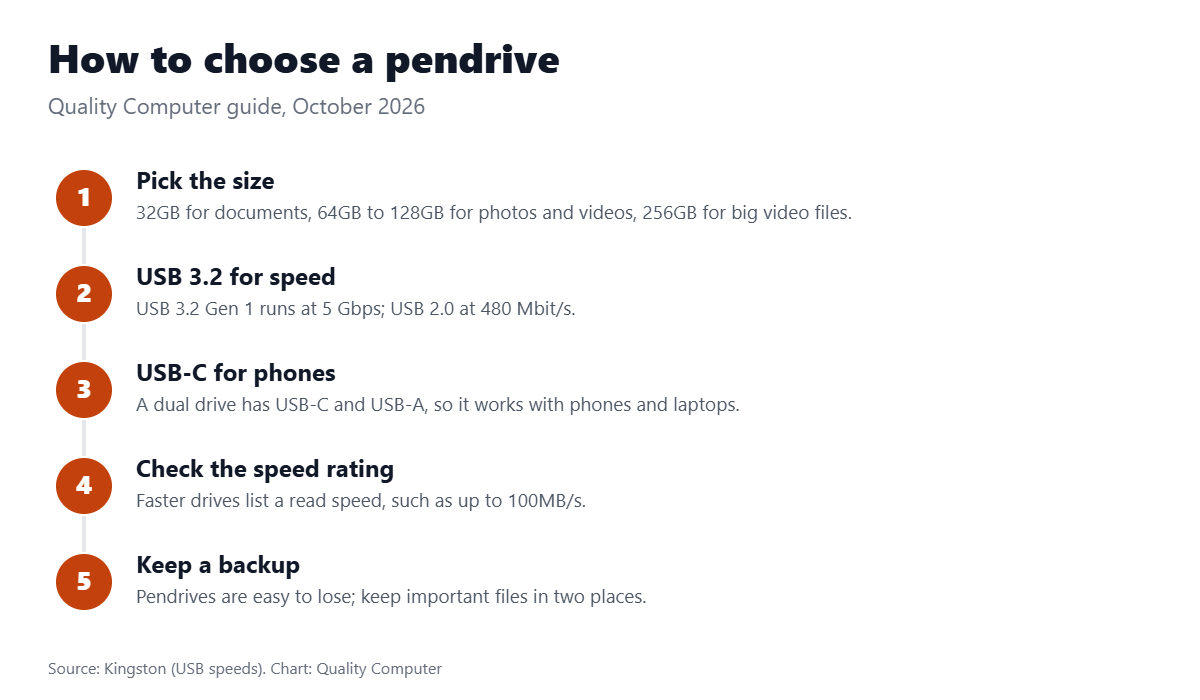
Short answer: For documents and the odd file, any 32GB or 64GB pendrive will do; if you copy large files or videos, pay a little more for USB 3.2, which is much faster when plugged into a USB 3 port. For an Android phone or a USB-C laptop, get a dual drive with a USB-C plug. Every pendrive with today's price is on our pendrive price in Nepal page.
Pendrives we stock
| Pendrive | USB | Capacity | Our price |
|---|---|---|---|
| Toshiba Pendrive | USB 2.0 | 64GB | Rs 900 |
| SanDisk Cruzer Blade | USB 2.0 | 32GB | Rs 890 |
| Kingston DataTraveler Exodia | USB 3.2 | 32GB | Rs 900 |
| Kingston DataTraveler Exodia | USB 3.2 | 64GB | Rs 1,500 |
| Adata UV150 | USB 3.2 | 32GB | Rs 1,000 |
| Adata UV150 | USB 3.2 | 64GB | Rs 1,450 |
| SanDisk Ultra Curve (up to 100MB/s) | USB 3.2 Gen 1 | 64GB | Rs 1,500 |
| SanDisk Ultra Curve (up to 100MB/s) | USB 3.2 Gen 1 | 128GB | Rs 1,800 |
| Transcend JetFlash 700 | USB 3.1 Gen 1 | 64GB | Rs 1,600 |
| SanDisk Ultra | USB 3.0 | 64GB | Rs 1,690 |
| Adata UV350 (metal body) | USB 3.1 | 16GB | Rs 1,100 |
| Lexar JumpDrive Dual Drive D400 (USB-C and USB-A) | USB 3.2 Gen 1 | 64GB | Rs 2,250 |
| Dahua Type-C OTG Dual Drive | USB 3.2 Gen 1 | 256GB | Rs 4,750 |
Website prices on 29 October 2026; call us on 9863609150 to check sizes and availability.
USB 2.0 vs USB 3.2: does it matter?
Yes, if you move big files. USB 2.0 runs at 480 Mbit/s. USB 3.0, USB 3.1 Gen 1 and USB 3.2 Gen 1 are all the same 5 Gbps standard, just renamed, and USB 3.2 Gen 2 is 10 Gbps. They’re backward compatible, so a USB 3.2 pendrive still works in an old USB 2.0 port, at USB 2.0 speed. The real speed also depends on the pendrive itself: The SanDisk Ultra Curve is listed at up to 100MB/s.
Why does my 64GB pendrive show less space?
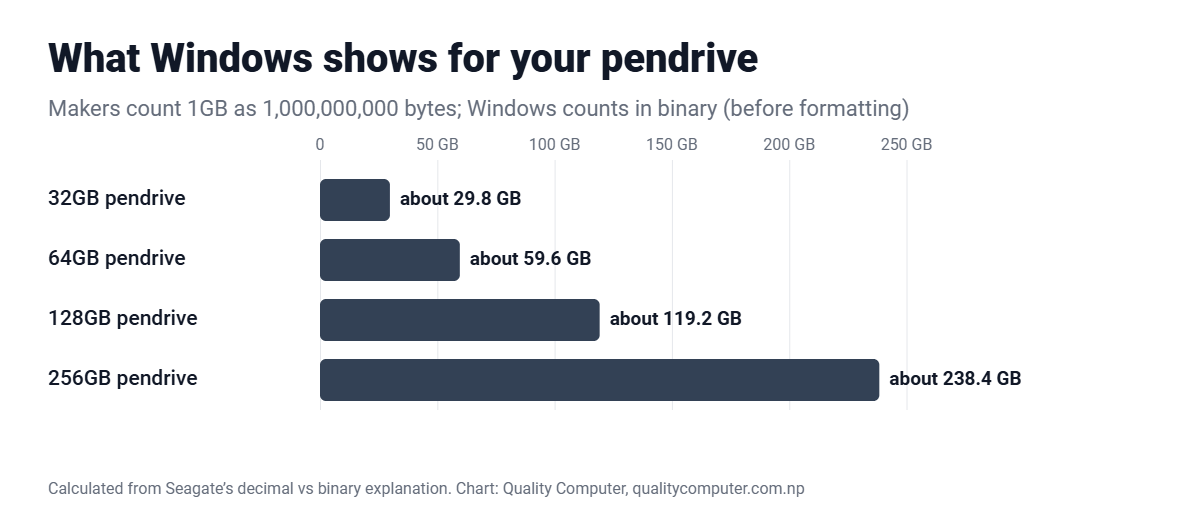
Storage makers count 1GB as 1,000,000,000 bytes, while Windows counts in binary, as Seagate explains. So a 64GB pendrive shows about 59.6GB, and formatting takes a little more. That’s normal, not a fake drive.
Pendrive, external hard disk or SSD?
- Up to 256GB, carrying files: a pendrive.
- 1TB and up for backups: an external hard disk; see our hard disk prices.
- Fast external storage: a portable SSD; see our SSD prices.
- Phones, cameras and drones: a microSD card; we sell V30 cards in our DJI guide.
Frequently asked questions
Where can I see today's pendrive prices?
Every pendrive we stock is listed with today's price on our pendrive price in Nepal page.
Is USB 3.0 the same as USB 3.2 Gen 1?
Yes. USB 3.0, USB 3.1 Gen 1 and USB 3.2 Gen 1 are the same 5 Gbps standard under different names.
Why does my 64GB pendrive show only about 59GB?
Makers count 1GB as a billion bytes, while Windows counts in binary, so 64GB shows as about 59.6GB before formatting.
Which pendrive works with a phone?
A dual drive with USB-C, such as the Lexar JumpDrive D400 (Rs 2,250) or the Dahua 256GB Type-C OTG drive (Rs 4,750).
Sources
- USB 3.0, Kingston
- Decoding USB standards, Plugable, 8 January 2026
- USB drops SuperSpeed branding, SamMobile, 3 October 2022
- Why does my drive report less capacity?, Seagate
- Pendrive prices: Quality Computer website, 29 October 2026.