Meroshare and Demat Account in Nepal (2026): Open, Register, Log In
Short answer: You open a Demat account through a Depository Participant (DP), such as a bank or its capital company, and many DPs now let you do it online with photos of both sides of your citizenship, a photo, your signature, thumbprint and a location map. Meroshare is CDSC's online service for that account: your DP registers you and emails a username and password. At the time of writing (November 2026), CDSC's own fee documents give Rs 50 to open a Demat account, Rs 100 a year to keep it and Rs 50 a year for Mero Share, but confirm your DP's current charges. To log in at meroshare.cdsc.com.np, choose your DP and type the last eight digits of your BOID without the leading zeros.
Shop at Quality Computer
Laptops for home and office work View all →
Demat account and Mero Share: what they are
A Demat account is where your shares are kept. In the demat system, a depository holds shares in electronic, book-entry form instead of on paper. In Nepal that depository is CDS and Clearing Limited (CDSC), and CDSC calls the account holder a Beneficial Owner, or BO (CDSC). Converting old paper certificates is called dematerialisation, and CDSC's FAQ says BOs don't pay for it.
You can't open one with CDSC itself. Its FAQ says the account "has to be opened only through a DP of CDSC". A DP can be a bank or financial institution, a stockbroker, a registrar and transfer agent or a custodian, with a SEBON registration and a CDSC licence. When it opens you get a BOID, a unique 16-digit number you quote in every share transaction.
Meroshare (CDSC writes it Mero Share) is CDSC's online service for that account. In it you can see your shares and portfolio, ask your DP to update your bank details and apply for public issues through the My ASBA menu. It works in a web browser and in the Mero Share app for Android and, since August 2022, iOS. At the time of writing (November 2026), CDSC's homepage counts 8,128,606 Demat accounts, 7,220,297 registered Mero Share users and 124 DPs.

Investing in shares carries risk, and prices can fall as well as rise. This guide only covers getting set up. Read CDSC's and SEBON's official notices before you apply for any share.
How to open a Demat account online
Start by choosing a DP. CDSC says you can pick any DP and can even hold more than one account, with the same or different DPs (CDSC account opening). Its list of DPs has 124 names, and SEBON keeps its own list of depository participants. Your own bank, or its capital company, may well be one of the 124. Global IME Bank Limited and Global IME Capital Limited are both on CDSC's list, for example, as are Prabhu Bank Limited and Prabhu Capital Limited, and Prabhu Capital's website has an Open Demat Account option.
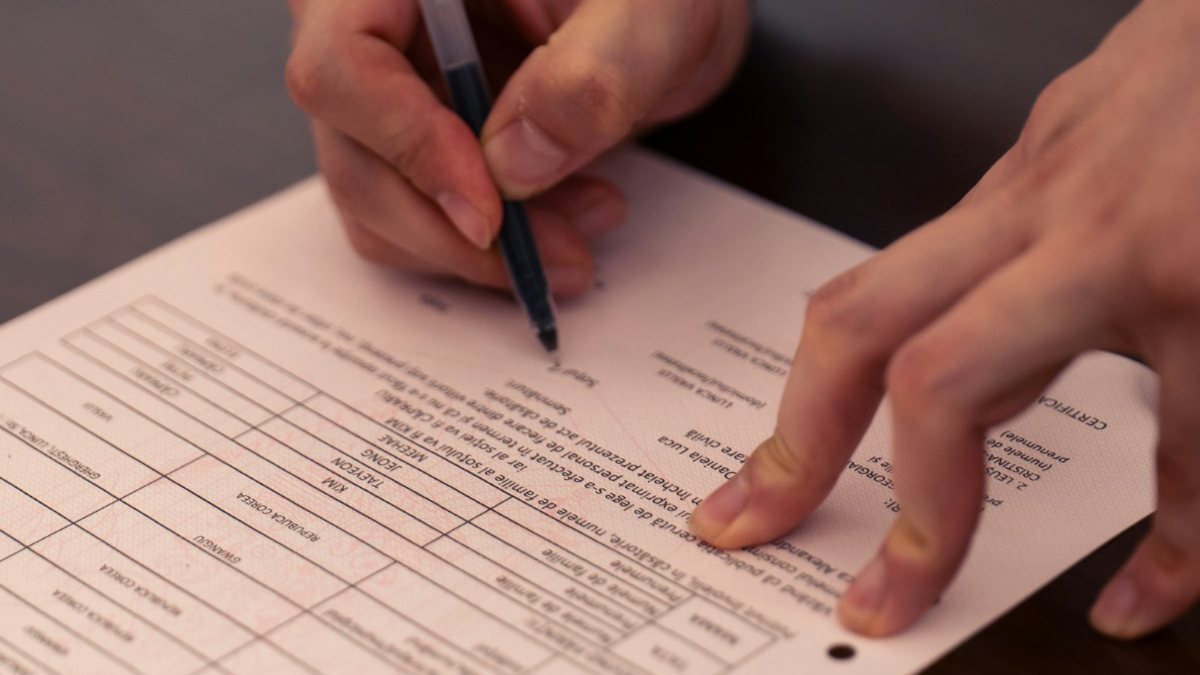
You can often create a Demat account online. Two examples of online forms, named only to show what they ask for:
- NIC Asia Capital (part of the NIC Asia Bank group; the name on CDSC's DP list is NIC Asia Bank Limited): its online Demat form (instructions dated 2026/01/14) asks for both sides of your citizenship as separate image files in JPG, PNG or BMP, plus your thumbprint, signature, a location map and a photo of you holding your citizenship or birth certificate. A PAN upload is optional. It also says Mero Share registration is compulsory and your Mero Share account is created automatically.
- Siddhartha Capital (on CDSC's DP list): its online demat portal has a Start New Application button, asks whether you already have a Siddhartha Bank account, and lets you pick up a saved form later with your registered mobile number and reference code.
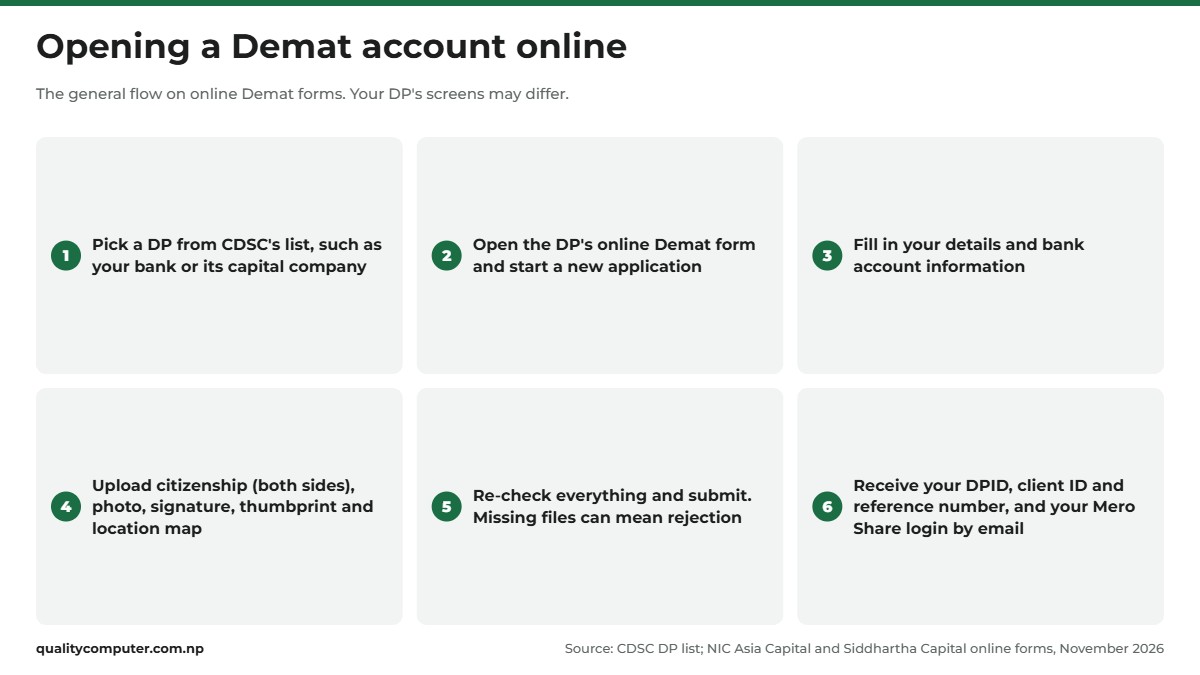
NIC Asia Capital's form warns that missing files will result in rejection and "significant processing delays", and asks you to re-check your details and files before you click submit. Once the account opens, Siddhartha Capital says you receive your Depository Participant ID (DPID), client ID and a reference number. Your BOID is generated at the same time, and Mero Share needs it.
Prefer paper? CDSC's FAQ says the process "is similar to opening a bank account", and you can apply at a DP's office instead. Siddhartha Capital, for one, says its DP services, including opening Demat accounts, are available at Siddhartha Bank branches.
Documents you need
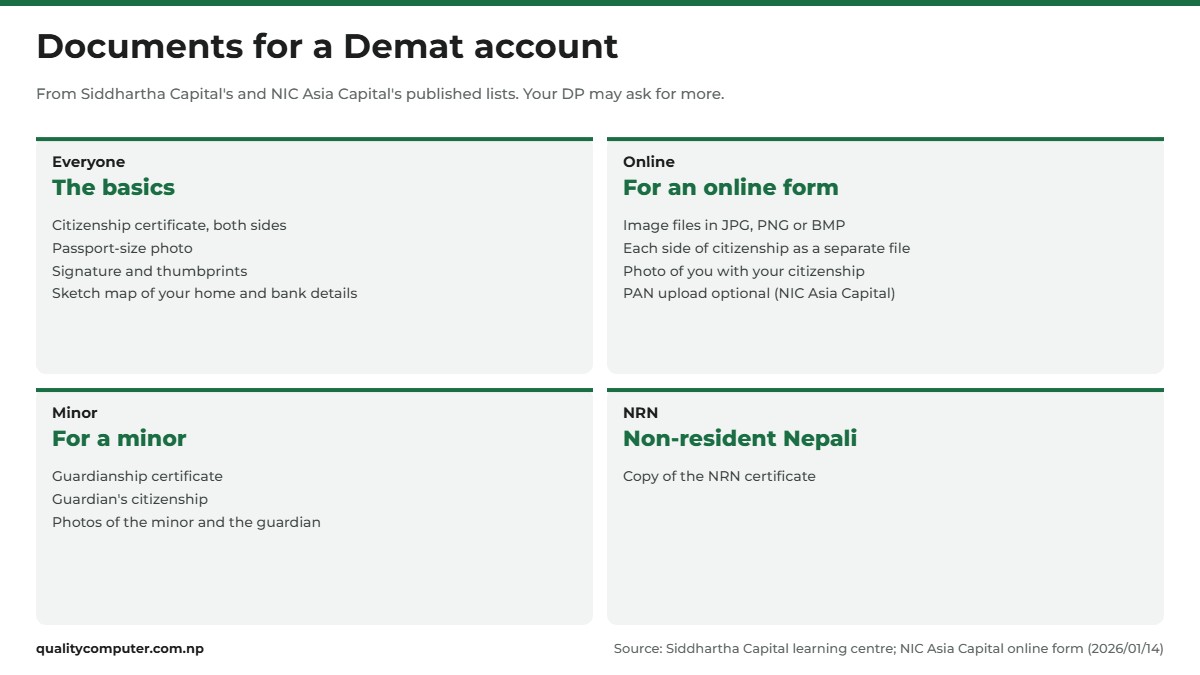
Each DP publishes its own list, and they are similar. Siddhartha Capital's guide to Demat accounts asks for:
- The completed Demat application form with your signature and thumbprints, including a sketch map of your home and your bank account details.
- A copy of your citizenship certificate, both sides.
- A passport-size photo. For a minor, photos of both the minor and the guardian.
- For a minor, a copy of the guardianship certificate.
- For a non-resident Nepali, a copy of the NRN certificate.
For a minor's account opened online, NIC Asia Capital's form has you upload the guardian's citizenship and passport-size photo, and verification is done on the guardian's documents. Keep your bank account number handy too: the Demat form asks for your bank details, and your bank later gives you the CRN for applying.
One recent change to watch: in June 2026 CDSC published a notice titled "हितग्राही खाता राष्ट्रिय परिचयपत्र नम्बर अनिवार्य गरिएको सम्बन्धमा", on making the National ID number mandatory for beneficiary (Demat) accounts. We couldn't read the notice itself on CDSC's news page, so ask your DP whether your account needs your NIN added. Some online Demat portals already have an option for it, such as the NID Update link on NIC Asia Capital's site. If you don't have a NIN yet, our National ID card guide explains how to get one.
Mero Share registration and renewal
Registration
CDSC's Nepali FAQ (under मेरो शेयर) sets out the steps:
- You must have a Demat account first.
- Go to the DP where you opened it and fill in the Mero Share form.
- Pay the Rs 50 fee with the form. The FAQ says this is an annual fee.
- Your DP sends a username and password to the email address on your form.
- Log in, change the password and set a Transaction PIN.
Some online Demat forms fold this in: NIC Asia Capital's says your Mero Share account is created automatically. Either way, give an email address you check: your login details arrive there, and so does any new password.
Renewal
Mero Share and the Demat account each carry a yearly fee, and CDSC's FAQ says you can pay both renewals from inside Mero Share. CDSC's renewal manual describes the screens:
- Log in. If your account has already expired, a notice appears with a Proceed button. To renew before it expires, open your profile and choose Renew Account.
- Choose the payment service provider.
- Choose how many years to renew for, check the fee shown and click Proceed.
- If you pay with a wallet such as eSewa, enter its login ID and password. Click Continue Payment, check the details, then click Confirm.
CDSC's payment partners page lists eSewa, IMEPay, Khalti and MyPay for Mero Share and Demat renewal. The older FAQ also names Prabhu Pay and connectIPS, so pick from what your screen offers. If you pay with eSewa, our eSewa guide covers setting up the wallet.
Demat and Mero Share fees at the time of writing
We found no current investor price list on CDSC's website. Nepal's depository regulation lets CDSC set an upper limit on what DPs charge investors (Central Depository Services Regulation, 2067), and the fees you pay are your own DP's. CDSC's own documents give these figures at the time of writing (November 2026). The fee schedule in CDSC's bylaws (2073 revision) says a DP may charge Rs 50 to open a Demat account, Rs 100 a year to run it and Rs 25 per transfer. CDSC's Nepali FAQ gives Rs 50 a year for Mero Share and the same Rs 25 DP fee for moving shares to another Demat account.
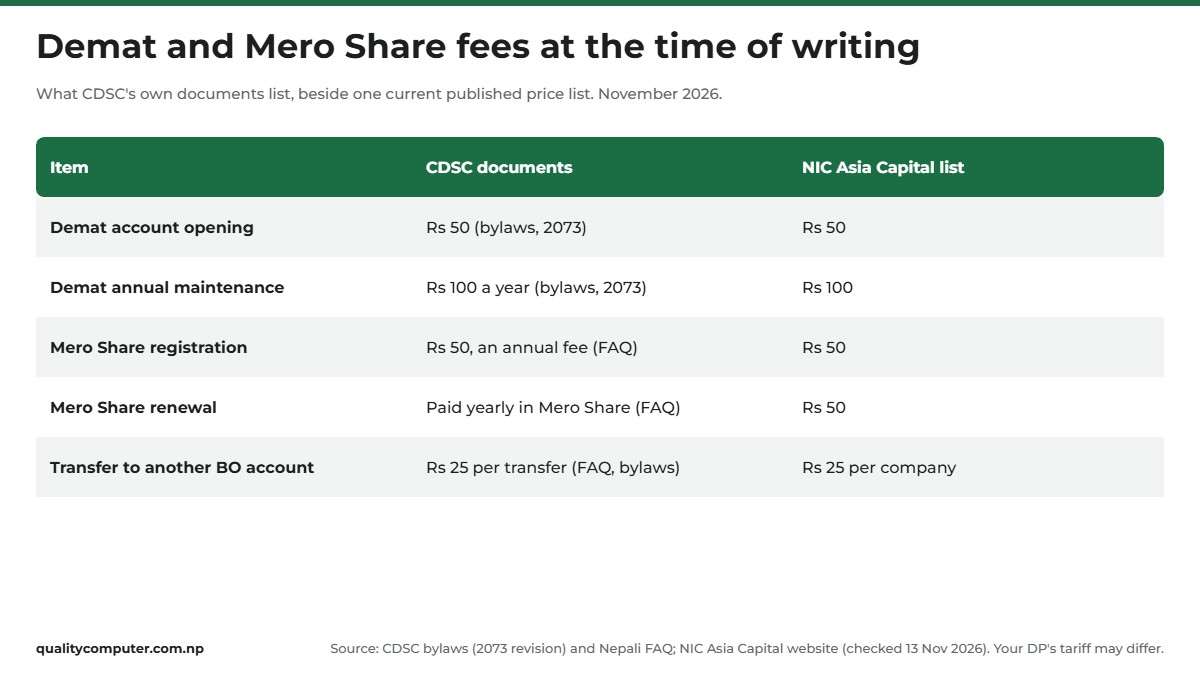
The bylaws have been amended since (CDSC lists a seventh amendment, from 2080), and we couldn't read the later texts. One current price list we found, on NIC Asia Capital's website in November 2026, matches these figures and gives Rs 50 for Mero Share renewal. Charges can differ between DPs, so ask yours for its current tariff before you pay. CDSC also posts notices about the annual fee on its news page, the latest in July 2026.
How to log in at meroshare.cdsc.com.np
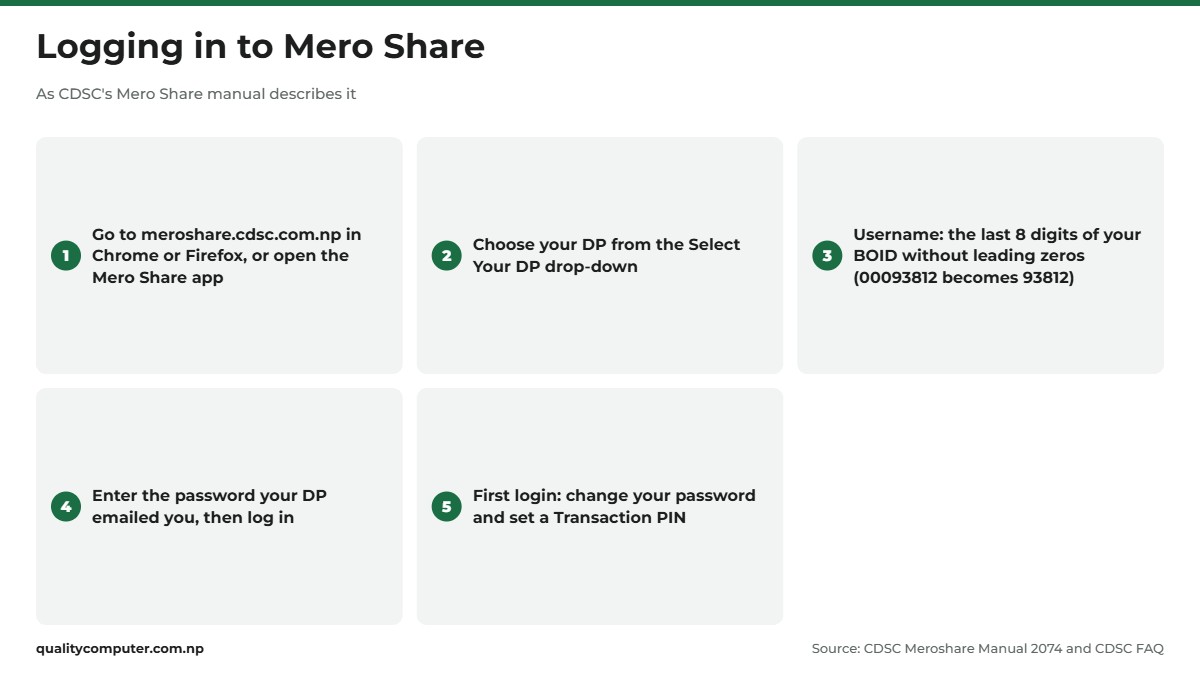
Open meroshare.cdsc.com.np in Chrome or Firefox, as CDSC's Mero Share manual suggests, or use the Mero Share app. Then:
- Choose your DP from the Select Your DP drop-down: the one that holds your account.
- Type your username. The manual calls it the Login ID: the last eight digits of your BOID, leaving out the zeros at the front. Its example: for BOID 1301020000093812 the last eight digits are 00093812, so you type 93812.
- Type the password your DP emailed you and log in.
- On your first login, change the password. The manual says you get full access only after that. If no Transaction PIN is set, CDSC's FAQ says to set one, and you need it when you apply for shares.
Inside, My Details shows your official account details; if anything is wrong, the manual says to report it to your DP. My Shares and My Portfolio show your holdings. The manual dates from 2074, so a label on your screen may read slightly differently.
CRN number and linking your bank account
To apply for shares from your Mero Share account, two bank links need to be in place.
Your bank details
Your bank account goes on the opening form. To change it later, the manual points to My Bank Request: choose your bank and branch, enter the account number, pick the account type and click Update Bank Details. Your DP then updates its records.
A CRN from your bank
The CRN, or C-ASBA Registration Number, comes from your bank. CDSC's FAQ explains how to get one:
- Go to the bank where you hold the account and fill in its CRN form. Siddhartha Capital's guide lists this step too.
- Check the account's status with the bank first. If it is dormant, ask the bank to make it active.
- The bank then gives you the CRN. If you have accounts at more than one bank, you can get a CRN from each.
CDSC also issued a notice in November 2022 about opening a remittance savings account and getting a CRN with it.
With a CRN in place, applying happens under My ASBA and then Apply for Issue, where you choose the bank, type the number of shares and your CRN, and confirm with your Transaction PIN. CDSC's FAQ says the bank must be able to hold back the amount, so the money has to be in the account when you apply. One rule to learn early: if you apply for the same IPO or FPO from more than one Demat account, all your applications are cancelled. Our separate guide covers how to apply for an IPO and check the result step by step.
Meroshare login problems and password reset
Most Meroshare login problems have one of these causes:
- Wrong DP selected. Choose the DP that holds your account.
- Full BOID or zeros in the username. Type only the last eight digits, without the leading zeros.
- Forgotten password. Click Forgot your password? on the login page. On the Reset your Password page, enter your DP, username, registered email and date of birth (A.D.), then click Send. CDSC's password guide says a new password is emailed to you if the details match.
- "The information you have provided doesn't match with the registered information." One of those details differs from your record. Check them, and if you can't give the registered details, contact your DP.
- A "maximum forgot password" message. You've reached the daily limit. Try again another day, or ask your DP to reset it.
- No access to your registered email. The new password only goes there, so ask your DP to change the address.
- Expired account. If a notice with Proceed appears after you log in, renew as described above.
- Forgotten Transaction PIN. CDSC's FAQ says to use Change Transaction PIN in your profile, or ask your DP for a new one.
- The service is down. CDSC posts notices when Mero Share and C-ASBA are suspended, as it did in August 2025. Check its news and notices first.

Keep your password and Transaction PIN to yourself, even with someone who offers to apply on your behalf. If your DP can't sort out a problem, you can contact CDSC on 01-5360783 or 5360386, or at info@cdsc.com.np. SEBON takes complaints through its grievance page and on toll-free 1660 01 44433.
Quick verdict
- Open a Demat account through any DP on CDSC's list; many DPs let you do it online.
- Have both sides of your citizenship, a photo, your signature, thumbprint and a location map ready.
- CDSC's documents list Rs 50 to open, Rs 100 a year and Rs 50 a year for Mero Share at the time of writing. Confirm with your DP.
- Log in by choosing your DP and typing the last eight digits of your BOID without the leading zeros.
- Get a CRN from your bank before you apply for any share.
- Investing carries risk. Read CDSC's and SEBON's notices before you apply.
Phones and laptops in our store
Mero Share runs in a phone app and in Chrome or Firefox on a computer, so a dependable phone or laptop is the only hardware you need. Here are some that suit everyday use.
| Product | What it is | Our price |
|---|---|---|
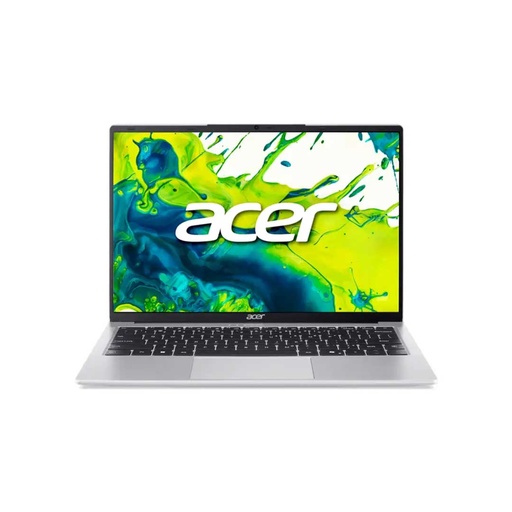
| Acer Aspire Lite 14 (Ryzen 3 5400U, 8GB, 512GB) | 14-inch laptop, Ryzen 3, 512GB SSD | Rs 72,900 |
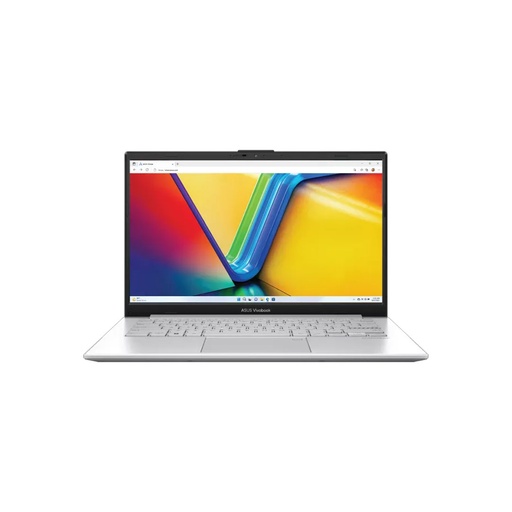
| Asus Vivobook Go E1404FA (Ryzen 5, 8GB, 256GB) | 14-inch laptop, Ryzen 5 | Rs 99,900 |
| Lenovo IdeaPad Slim 3 15IRH8 (Core i5-13420H, 8GB, 512GB) | 15.6-inch laptop, Core i5 | Rs 102,900 |
| Acer Aspire Lite 15 (Ryzen 7 7730U, 16GB, 512GB) | 15.6-inch laptop, Ryzen 7, 16GB | Rs 109,900 |
Prices checked on 14 November 2026 on our website.
In our store
Acer Aspire Lite 14
Asus Vivobook Go 14
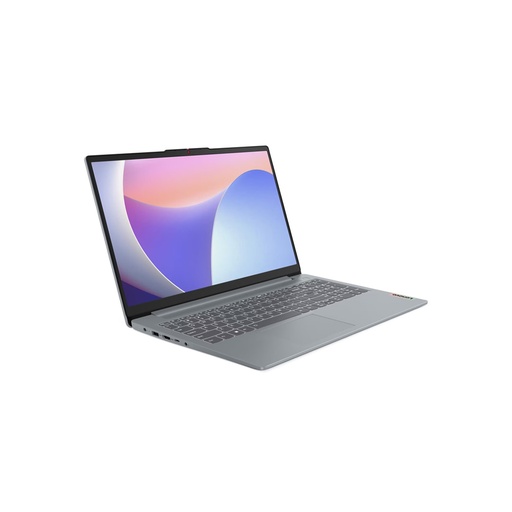
Lenovo IdeaPad Slim 3
Frequently asked questions
How do I create a Demat account online in Nepal?
Choose a Depository Participant (DP) from CDSC's list, such as your bank or its capital company, and open its online Demat form. Fill in your details and upload what it asks for, usually both sides of your citizenship, a photo, your signature, thumbprint and a location map, then submit. You can't open a Demat account directly with CDSC.
How much does it cost to open a Demat account in Nepal?
Your DP sets the fees, and they can differ between DPs. At the time of writing (November 2026), CDSC's own documents list Rs 50 to open a Demat account, Rs 100 a year to maintain it and Rs 50 a year for Mero Share. Ask your DP for its current tariff before you pay.
What is my Mero Share username?
CDSC's Mero Share manual says to use the last eight digits of your BOID without the leading zeros. For BOID 1301020000093812 the last eight digits are 00093812, so the username is 93812. Choose your DP from the drop-down first.
How does Mero Share registration work?
Go to the DP where your Demat account is and fill in the Mero Share form. CDSC's FAQ gives the fee as Rs 50 a year. Some DPs register you automatically when you open a Demat account online. Your DP emails a username and password, and you change the password on your first login.
How do I renew Mero Share?
Log in to Mero Share. If the account has expired, click Proceed on the notice; to renew early, choose Renew Account in your profile. Pick a payment provider such as eSewa, IMEPay, Khalti or MyPay, choose how many years, check the fee and confirm.
I forgot my Mero Share password. How do I reset it?
Click Forgot your password? on the login page, enter your DP, username, registered email and date of birth in A.D., then click Send. A new password is emailed to you if the details match. If they don't match, or you've hit the daily limit, contact your DP.
What is a CRN number in Mero Share?
CRN stands for C-ASBA Registration Number. You get it from the bank where you hold your account by filling in its CRN form, and you need it to apply for shares through Mero Share. You can get one from each bank where you have an account.
Sources
- Account Opening, CDS and Clearing Limited (CDSC)
- CDSC FAQ (English), CDSC
- Frequently asked questions (Nepali), CDSC
- Meroshare Manual 2074 (Nepali version), CDSC
- Manual of Meroshare Auto Renewal Process, CDSC, July 2020
- Meroshare: Forgot your password user guide (Nepali), CDSC, 20 August 2021
- Payment Partners for Meroshare/Demat renewal, CDSC, checked 13 November 2026
- Licensed Depository Participants (DPs), CDSC, checked 13 November 2026
- CDSC homepage statistics, CDSC, checked 13 November 2026
- News and notices (incl. National ID notice, June 2026), CDSC
- CDS Byelaws 2068, 2nd revision 2073 (Nepali), CDSC
- Securities' Central Depository Services Regulation, 2067 (English), Hosted by CDSC
- Depository Participants, Securities Board of Nepal (SEBON)
- Grievance, SEBON
- DP services page with published fees, NIC Asia Capital (NIC Asia Bank group), checked 13 November 2026
- Online Demat account opening (instructions), NIC Asia Capital, 2026/01/14
- Depository Participant and Demat Account, Siddhartha Capital
- Siddhartha Capital Online Demat, Siddhartha Capital