Lost Phone in Nepal: Find My iPhone, Find Hub and IMEI Blocking (2026)
Short answer: Lost phone? Find and lock it first: on an iPhone, go to icloud.com/find and turn on Lost Mode; on Android, use Google's Find Hub (it used to be called Find My Device) at google.com/android/find and tap Mark as lost. Then block the SIM (NTC 1498, Ncell 9005), secure your Apple or Google account, bank and wallets, and report it to the police. With the SIM blocked, you can also file the IMEI on NTA's MDMS Lost/Stolen Registration form.
Shop at Quality Computer
iPhones with Find My built in View all →
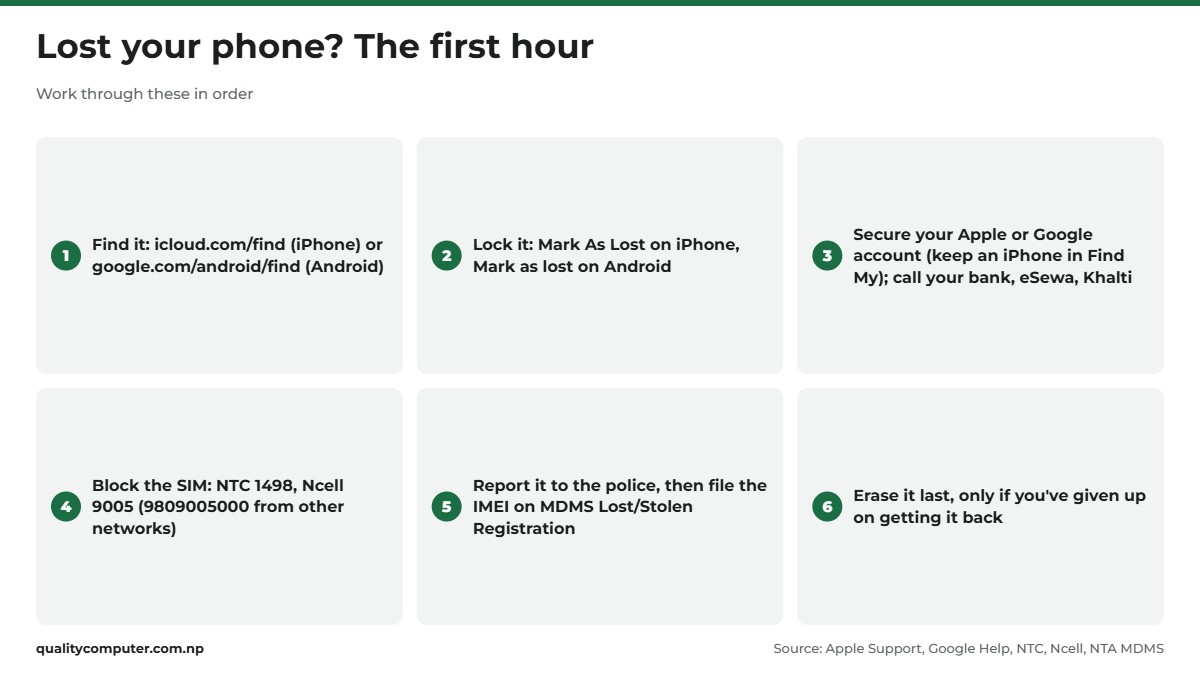
Lost phone? The first hour, in order
Ring it once, then work through this list in order. Each step closes a door a thief could use.
- Find it. Use Find My (iPhone) or Find Hub (Android) from another phone or a computer. If it's nearby, make it ring.
- Lock it. Turn on Lost Mode or Mark as lost, so nobody can get into your apps.
- Protect your accounts and money. Sign the phone out of your Google account or check your Apple Account (keep an iPhone in Find My), and call your bank, eSewa or Khalti.
- Block the SIM. Call NTC or Ncell, so calls and OTP codes stop reaching whoever has the phone.
- Report it. Go to the police, then file the IMEI on NTA's MDMS lost and stolen form.
- Erase it last. Only when you've given up on getting it back.
Why erase last? Google says a phone reset from Find Hub no longer shows up there, and Apple says erasing an iPhone can't be undone.
Find My iPhone: locate, lock or erase a lost iPhone
To use Find My iPhone from a computer or any browser, go to icloud.com/find and sign in with your Apple Account. The two-factor code may go to the missing iPhone itself, so tap the Find Devices button at the bottom of the sign-in window to get in without it (Apple).
No computer? Sign in to Find Devices on iCloud.com on a friend's phone, or ask a Family Sharing member to check their Find My app.
- Ring it: play a sound. Apple says it gets louder and lasts about two minutes.
- Lock it: on iCloud.com choose Mark As Lost; in the Find My app, tap Devices, your iPhone, the More button, then Lost Mode and Activate. It locks with your passcode and can show a number to call on the Lock Screen (Apple: Use Lost Mode).
- If it was stolen: Apple suggests leaving your contact details off, and never removing the phone from Find My.
How to find a lost iPhone that is turned off
If the battery died or someone switched it off, you'll see "No location found" or its last known location: for up to 24 hours on iCloud.com, or up to seven days in the Find My app if the Find My network was on. Turn on Notify When Found. Lost Mode still works: it shows as Pending and starts when the phone reconnects.
If Find My was never on, the phone won't appear at all. Skip to the account, SIM and police steps.
Apple will never contact you to say your iPhone has been found, and it warns about phishing messages and phony support calls after a theft (Apple: If your iPhone was stolen).
Find My Device is now Find Hub: Android phones
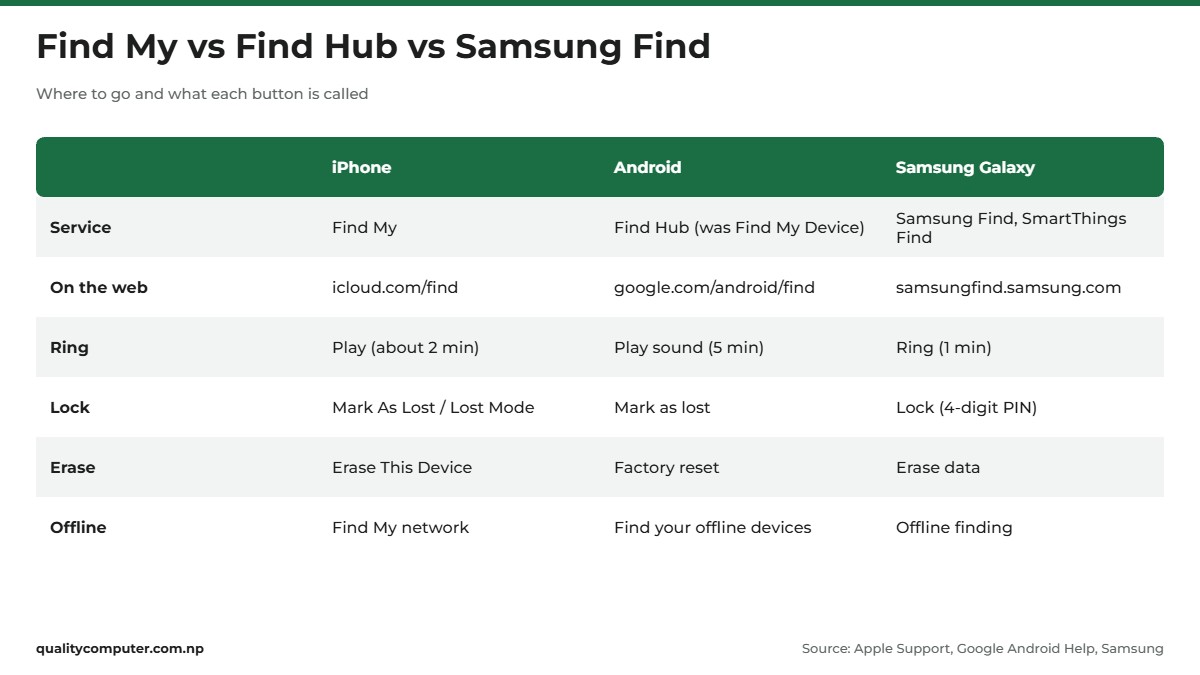
Search "find my device" or "find my phone Android" and you land on Google's service, renamed from Find My Device to Find Hub in May 2025 (Google).
- On another Android phone, open the Find Hub app (on a friend's phone, choose Sign in as guest). On a computer, go to google.com/android/find.
- Sign in with the Google account on the missing phone and select it to see it on the map.
- Play sound rings it at full volume for five minutes, even on silent.
- Mark as lost, then Next: add a contact number and a message for the lock screen, and tap Mark as lost again. This locks the phone.
- Factory reset wipes it. Keep this for last.
The phone must be on, online, signed in, have Find Hub on and not be hidden on Google Play. If not, you may still see its last known location (Google Help).
Offline phones can be found through Google's crowdsourced network of Android devices, if offline finding was on. Google says some, such as the Pixel 8 series, can be located for several hours after being turned off.

Samsung phones: Samsung Find and SmartThings Find
To locate your phone on a Samsung, use Google's Find Hub or Samsung's own service, which has had several names. Today it's the Samsung Find app, the website samsungfind.samsung.com, and SmartThings Find inside the SmartThings app. On the phone, the setting is still called Find My Mobile (Samsung).
Sign in with your Samsung account and you can (per Samsung Support):
- Ring it for one minute, even on mute or vibrate.
- Lock it with a new four-digit PIN and a message for whoever finds it.
- Track location, with updates every 15 minutes.
- Extend battery life, which turns on maximum power saving.
- Erase data, as a last step.
These work only if the phone is on, connected, signed in to a Samsung account, and "Allow this phone to be found" was turned on. Offline finding uses other Galaxy devices nearby and needs Android 8 or later.
Protect your accounts, bank and wallets
Do this from another phone or a computer, because whoever has your phone may also have your banking apps and email.
- Apple Account: sign in at account.apple.com and check Devices and Sign-In & Security. If you see changes you didn't make, change your password. If the phone is gone for good, Apple says to remove it from your account, but not from Find My. Our Apple ID guide for Nepal covers account recovery.
- Google account: in your Google Account, open Security, then Your devices, Manage devices, choose the lost phone and select Sign out. Then change your password and check passwords.google.com for saved logins to change (Google).
- Bank and cards: call the number on your card or the bank's official website and ask it to block mobile banking and cards. Never use a number sent by SMS.
- eSewa: its toll-free numbers are 1660-01-02121 (NTC) and 1810-21-02121 (Ncell), or email csd@esewa.com.np (eSewa).
- Khalti: its help page says to email support@khalti.com; Khalti verifies your details and blocks the account (Khalti). Its support line, 01-5970017, is open Sunday to Friday, 9 am to 6 pm.
Money already gone? Call the Cyber Bureau straight away. Our cyber scam helpline guide has the numbers and the form.

Block the SIM and get your number back
While your SIM works, OTP codes can reach the phone. NTA also asks you to block the SIM before the MDMS step.
NTC (Nepal Telecom)
Call 1498, NTC's mobile customer care, and ask them to block the number. NTC's prepaid page says you give the security code from your SIM's welcome letter, and the same code unblocks it if the phone turns up (Nepal Telecom).
For a replacement, Ratopati and Radio Nepal reported in July 2026 that NTC now takes requests online: on esim.ntc.net.np, choose Apply for Lost/Damaged SIM, ask for a physical SIM or an eSIM, and collect it at the counter yourself or through a representative named in the form. Ratopati put the fee at Rs 50, paid at the counter; we couldn't confirm it on NTC's portal.
Ncell
Call 9005 from any Ncell prepaid number, or 9809005000 from another network. The 24-hour call centre checks your name, date of birth, address and ID number. For a new SIM with the same number, go to an Ncell Centre or shop. At the time of writing (November 2026), Ncell says replacement costs Rs 100 per SIM and needs the original document, with the authorised customer present (Ncell).
Moving to an eSIM instead? See our eSIM guide for NTC and Ncell.
Report a lost or stolen phone to police and NTA
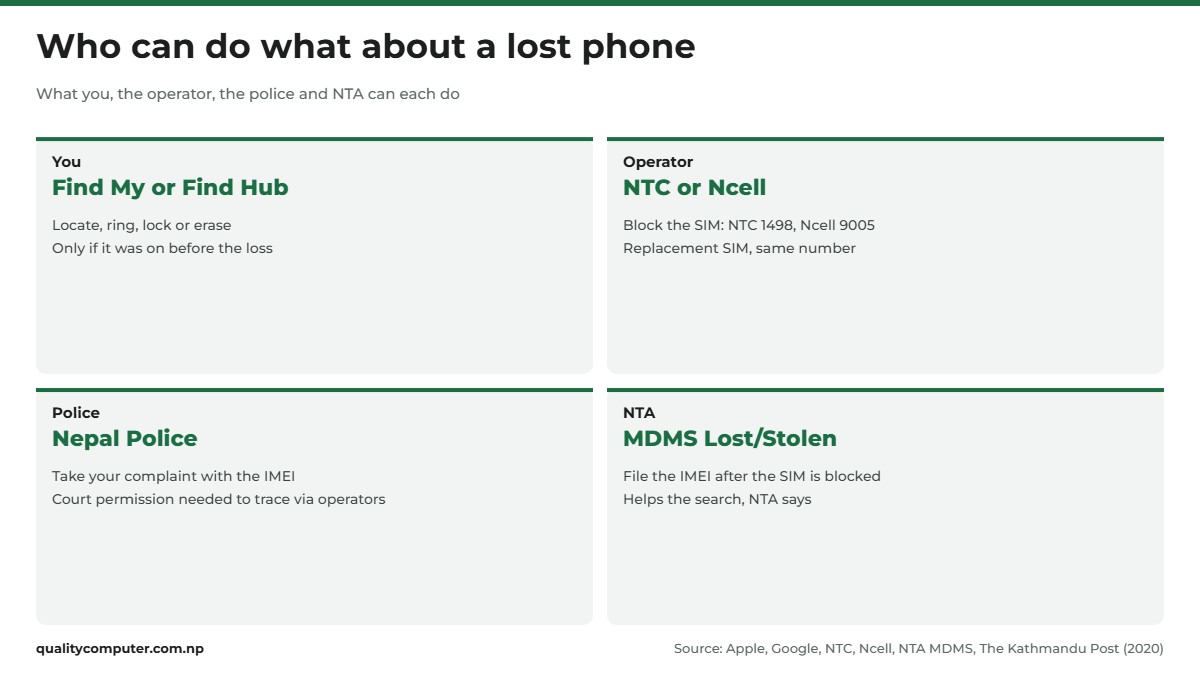
File a complaint at your nearest police office, or call 100 if you're in danger. Take your citizenship or passport, the bill and the IMEI: The Himalayan Times reported in 2019 that Kathmandu police needed the IMEI to take a complaint.
No box? On iPhone, sign in at account.apple.com, open Devices and select the phone to see its IMEI and serial number (Apple). On Android, go to android.com/find and select Settings next to the device to see it.
We couldn't confirm an online police report for lost phones. A complaint service with a theft category in the Nepal Police app was widely reported in May 2026 (NepaliTelecom), but going in person is the safe route.
File it on NTA's MDMS
- Block the SIM first. NTA's form says so at the top.
- Open Lost/Stolen Registration on MDMS. Under IMEI Numbers, enter the IMEI (a dual-SIM phone has two), then the numbers used in it, brand, model, Lost or Stolen, the date and the place. Tap Validate IMEI and Continue.
- Verify your email with the OTP. NTA notifies you there.
- Add your name, contact number and address, and upload your citizenship or passport.
- Check progress on the lost/stolen status page with the IMEI and the same email.
The form doesn't ask for a police report. NTA says MDMS helps the search for lost and stolen phones and stops their unauthorised use, without promising a time frame. Our MDMS registration guide explains the system.
Be realistic. The Kathmandu Post reported in 2020 that police need a court's permission before asking NTC or Ncell to trace a phone. Nepal Minute, citing police figures in 2023, said 40,996 phones were reported lost or stolen in one fiscal year and 5,310 were returned.
Can an IMEI phone tracker find your phone?
No. People search "locate phone by IMEI" hoping a website can track a stolen phone. The IMEI is the 15-digit number that identifies your handset to the mobile network, and it's the operator's network that sees it when the phone connects. A website has no access to NTC's or Ncell's network, so it can't show where your phone is.
Google says your mobile operator can use the IMEI to disable the device. In Nepal, the police, the operators and NTA's MDMS are the ones who can act on it. Don't pay an IMEI tracker site, and never give one your Apple or Google password.
Found it, or buying a second-hand phone?
If the phone turns up, undo the steps:
- iPhone: enter your passcode on the phone, or on iCloud.com select Lost, then Stop Lost Mode twice. With Stolen Device Protection on, Face ID or Touch ID may be needed too.
- Android: open it with your PIN, pattern or password.
- MDMS: on the status page, NTA says you can disable tracking once you've found your mobile.
- SIM: NTC unblocks with the same security code. Ncell's page doesn't explain unblocking, so ask its call centre on 9005.
Buying used? Check the IMEI on MDMS first; our iPhone IMEI check guide shows how. On an iPhone, a "Hello" screen means it has been erased; if it's Activation Locked to someone else's Apple Account, Apple says don't buy it (Apple). Android phones have a similar lock: after a reset, a protected phone needs the previous owner's screen lock or Google Account password (Google). Set it up in front of the seller before you pay.

Set this up today, before you need it
Most of these tools only work if they were on before the phone went missing.
- iPhone: Settings, your name, Find My, Find My iPhone. Turn on Find My network and Send Last Location, which sends the location to Apple when the battery is low (Apple). Then turn on Stolen Device Protection in Settings, Face ID & Passcode. It needs iOS 17.3 or later.
- Android: Settings, Security, Find Hub, and check that "Allow device to be located" is on. Set up offline finding and a screen lock. Google says you need 2-Step Verification to lock or erase it remotely, so keep backup codes somewhere other than the phone (Google).
- Samsung: turn on Allow this phone to be found, Send last location and Offline finding under Lost device protection.
- Everyone: dial *#06#, note the IMEI somewhere safe, and keep the box, the bill and NTC's SIM welcome letter.
Quick verdict
- iPhone: icloud.com/find, tap Find Devices to skip the code, then Mark As Lost.
- Android: Find Hub (formerly Find My Device) at google.com/android/find, then Mark as lost.
- Block the SIM: NTC 1498, Ncell 9005 (9809005000 from other networks).
- Secure your Apple or Google account, bank, eSewa and Khalti from another device.
- Report it to the police, then file the IMEI on MDMS Lost/Stolen Registration.
- Erase last. IMEI tracker websites can't locate your phone.
iPhones and phone cases in our store
Replacing a lost or stolen phone, or protecting the one you have? Here are phones and cases to start with.
| Product | What it is | Our price |
|---|---|---|
| Apple iPhone 17 | iPhone 17 | Rs 173,499 |
| Apple iPhone Air | iPhone Air | Rs 190,699 |
| Apple iPhone 16 | iPhone 16 | Rs 146,599 |
| Apple iPhone 15 | iPhone 15 | Rs 127,499 |
Prices checked on 14 November 2026 on our website.
In our store
iPhone 17

iPhone 16

iPhone 15
Frequently asked questions
How can I find my lost iPhone?
Go to icloud.com/find in any browser, sign in with your Apple Account and select the iPhone to see it on a map, play a sound or turn on Lost Mode. Tap the Find Devices button at the bottom of the sign-in window to skip the two-factor code.
How do I find a lost iPhone that is turned off?
If the Find My network was on, the Find My app can show its last known location for up to seven days, and iCloud.com shows it for up to 24 hours. Turn on Notify When Found and Lost Mode; Lost Mode starts when the phone next connects.
Is Find My Device the same as Find Hub?
Yes. Google renamed Find My Device to Find Hub in 2025. Use the Find Hub app on another Android device, or google.com/android/find in a browser, to ring, lock or erase your phone.
Can I track a stolen phone with its IMEI number?
Not by yourself. IMEI tracker websites and apps can't see mobile networks. In Nepal, the police and the operators can act on an IMEI, and you can register it on NTA's MDMS Lost/Stolen form after blocking your SIM.
How do I block a lost SIM in Nepal?
Call NTC customer care on 1498 and give the security code from your SIM's welcome letter, or call Ncell on 9005 from an Ncell prepaid number or 9809005000 from another network. Both operators can then give you a replacement SIM with the same number.
How do I locate my Samsung phone?
Sign in with your Samsung account at samsungfind.samsung.com, or use SmartThings Find or Google's Find Hub. Samsung's service works only if Allow this phone to be found was turned on in the phone's Find My Mobile settings.
Do I need a police report to register a lost phone on MDMS?
NTA's Lost/Stolen Registration form asks for the IMEI, phone details, when and where it was lost, an email OTP and a citizenship or passport upload, but not a police report. NTA asks you to block the SIM first. Report the loss to the police as well.
Sources
- How to find your lost iPhone or iPad, Apple Support
- If your iPhone or iPad was stolen, Apple Support
- Locate a device in Find Devices on iCloud.com, Apple Support
- Use Lost Mode in Find Devices on iCloud.com, Apple Support
- Set up Find My on your iPhone, iPad, or Mac, Apple Support
- About Stolen Device Protection for iPhone, Apple Support
- Find the serial number, EID, or IMEI on your iPhone, Apple Support
- If you want to buy a preowned iPhone, Apple Support
- Find Hub announcement, Google, 13 May 2025
- Find, secure or erase a lost Android device, Google Android Help
- Be ready to find a lost Android device, Google Android Help
- Secure a lost or stolen device, Google Account Help
- Prevent others from using your device without permission, Google Android Help
- Samsung Find, Samsung India
- How to find your lost Samsung Galaxy and remotely erase your data, Samsung Canada, updated 18 December 2025
- MDMS registration options, including Lost/Stolen Registration, Nepal Telecommunications Authority, checked 13 November 2026
- Lost/Stolen Registration form, Nepal Telecommunications Authority
- GSM prepaid service: blocking a lost mobile, Nepal Telecom
- Contact us: SIM block and SIM replacement, Ncell, checked 13 November 2026
- Nepal Telecom launches online service for lost/damaged SIM replacement, Ratopati, 17 July 2026
- Contact us, eSewa
- How to use Khalti: I lost my phone, Khalti
- Contact: support numbers and office hours, Khalti, checked 13 November 2026
- Complaints about stolen and lost mobile phones are rising but police are hardly helpful, The Kathmandu Post, 3 February 2020
- Retrieving lost, stolen mobile phones hard nut to crack for police, The Himalayan Times, 23 September 2019
- Tracking lost phones is an uphill task even with MDMS, Nepal Minute, 19 January 2023
- Nepal Police app, Nepal Police Headquarters, App Store
- File complaints online on the Nepal Police app (widely reported), NepaliTelecom, 21 May 2026