Laptop for Video Editing and Graphic Design in Nepal (2026)
Short answer: A good laptop for video editing has at least 16 GB of RAM, an H-series processor or an Apple M5 chip, a 512 GB or larger SSD and, on Windows, an NVIDIA RTX graphics card with 6 to 8 GB of its own memory. Adobe recommends 32 GB of RAM for 4K in Premiere Pro and 8 GB of GPU memory, while Final Cut Pro has no Windows version and recommends 16 GB. For Photoshop, Illustrator and Canva, the screen matters as much as the power, so look for a stated sRGB or DCI-P3 figure.
Shop at Quality Computer
Editing laptops, MacBooks and storage View all →
What Premiere Pro, DaVinci Resolve, Final Cut Pro and Photoshop ask for
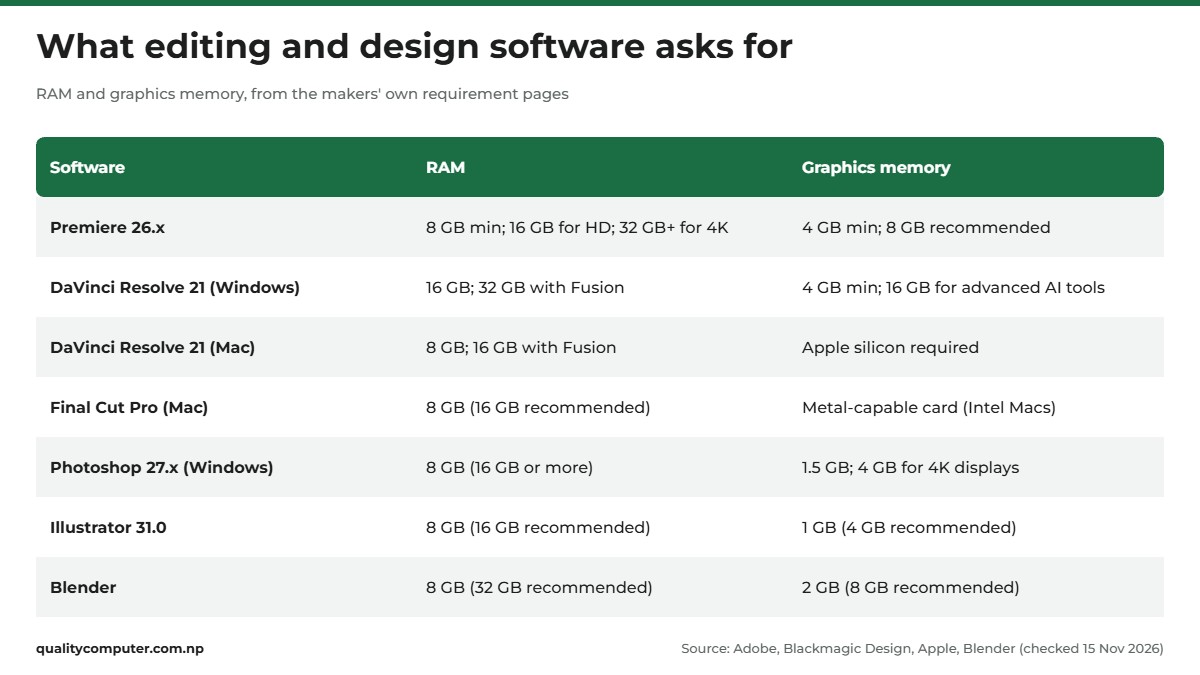
Start with the software, not the laptop. Every figure is from the maker's own page, checked on 15 November 2026.
- Premiere Pro (26.x), which Adobe now calls Premiere: the minimum, which Adobe says is "for editing HD video", is 8 GB of RAM and 4 GB of GPU memory. Adobe recommends 16 GB for HD, 32 GB or more for 4K, 8 GB of GPU memory, a fast internal SSD and a second fast drive for media.
- DaVinci Resolve 21: on Windows, 16 GB of RAM (32 GB with Fusion) and a GPU with 4 GB of VRAM; its advanced AI tools want at least 16 GB of VRAM. On a Mac, Apple silicon and 8 GB (16 GB with Fusion). The free version goes up to Ultra HD at 60 fps, and the paid Studio version lists hardware-accelerated H.264 and H.265 encoding and decoding.
- Final Cut Pro has no Windows version. On a Mac it needs 8 GB of memory, with 16 GB recommended.
- Photoshop 27.x: 8 GB, with 16 GB or more recommended and 4 GB of GPU memory for 4K displays (these are Adobe's Windows figures). The newer 28.x keeps the 8 GB minimum.
- Illustrator 31.0: 8 GB of RAM (16 GB recommended) and 1 GB of VRAM (4 GB recommended).
- Blender: 8 GB (32 GB recommended), 2 GB of VRAM (8 GB recommended) and 8 processor cores recommended.
- Canva's desktop app recommends 4 GB. We couldn't find official hardware requirements for CapCut's desktop app.
The specs that matter in a laptop for video editing
Processor: H or HX, not U
Intel's naming guide calls H and HX chips "Highest performance" and U chips "Power efficient", so pick H or HX for exports. Adobe's hardware guide says "eight cores are sufficient" for Premiere Pro, and Premiere's recommended spec names Intel chips with Quick Sync.
Graphics card and its memory (VRAM)
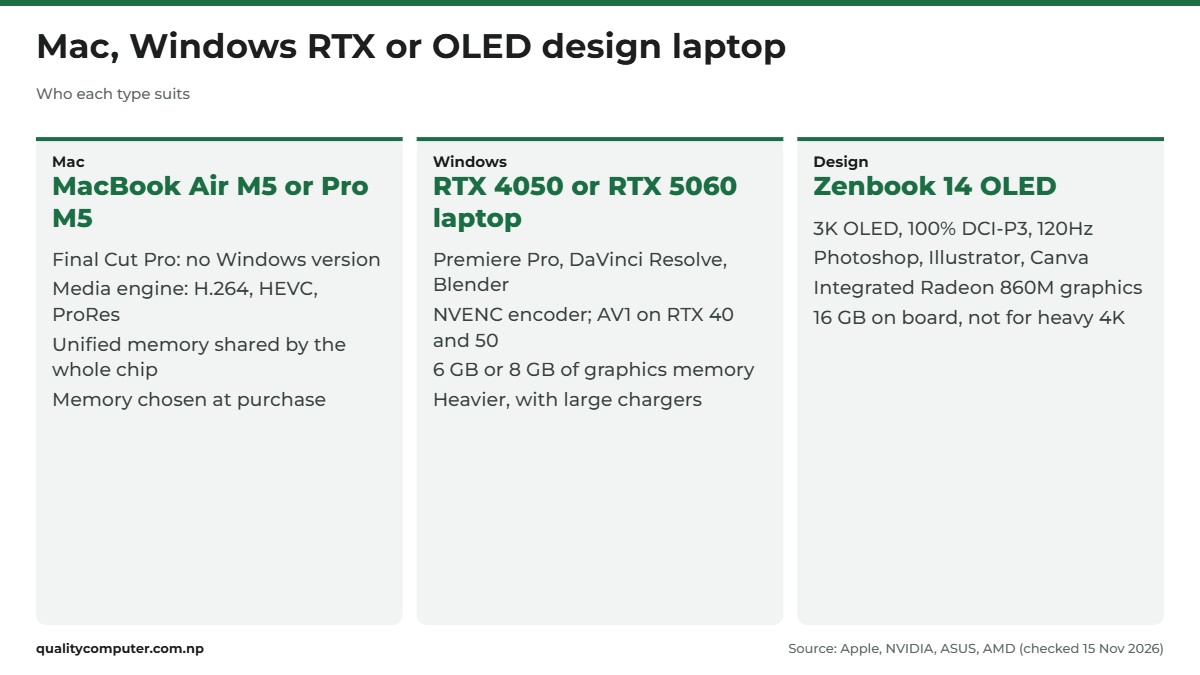
NVIDIA says its cards have video encoders and decoders "separate from the CUDA cores", and the encoder, NVENC, handles H.264, HEVC and AV1. Resolve on Windows uses CUDA or OpenCL, and Blender's OptiX option uses RTX ray-tracing hardware. On memory, 6 GB (RTX 3050 or RTX 4050) clears the 4 GB minimums, and 8 GB (RTX 5060) meets Premiere's and Blender's recommendation. NVIDIA's comparison page shows AV1 encoding on RTX 40 and 50 series laptops, not on the RTX 30 series that includes the RTX 3050.
RAM and storage
16 GB covers Premiere Pro for HD, Resolve on Windows, Photoshop, Illustrator and Final Cut Pro. For 4K in Premiere, Fusion in Resolve on Windows, or Blender, the makers point to 32 GB, so memory slots are worth having. Adobe also recommends a separate fast drive for media; 512 GB goes quickly with camera footage.
Screen: colour range and panel
The web is built around sRGB: the W3C's colour standard says colours in web pages and untagged images must be treated as sRGB, and ranks Display P3 as a wider gamut. For YouTube and web clients, look for close to 100% sRGB; for HDR work, Adobe recommends a DisplayHDR 1000 screen. OLED gives deeper blacks: Lenovo rates the Legion Pro 5's OLED at 1,000,000:1 contrast, against 1200:1 for its IPS option. Our colour gamut guide explains the terms.
Ports and battery
A built-in card reader saves a dongle: Apple lists an SDXC slot on the MacBook Pro M5, and Lenovo a 3-in-1 reader on the LOQ 15. For external SSDs, both M5 Macs have Thunderbolt 4 and the Zenbook 14 has a 40Gbps USB4 port. Apple says the MacBook Pro M5 performs the same "whether plugged in or on battery", unlike "many PC laptops". Lenovo rates the LOQ 15 at 3.5 hours in its MobileMark 30 test, so plug in for long exports.
Apple silicon: unified memory and the media engine
On an M5, Apple says "the entire chip" can access "a large single pool of memory", so the processor and graphics share the 16 GB. Every Mac pick below has a media engine for H.264, HEVC, ProRes and ProRes RAW. Adobe's older guidance, written for M2 Macs, recommends at least 16 GB of unified memory for video editing.
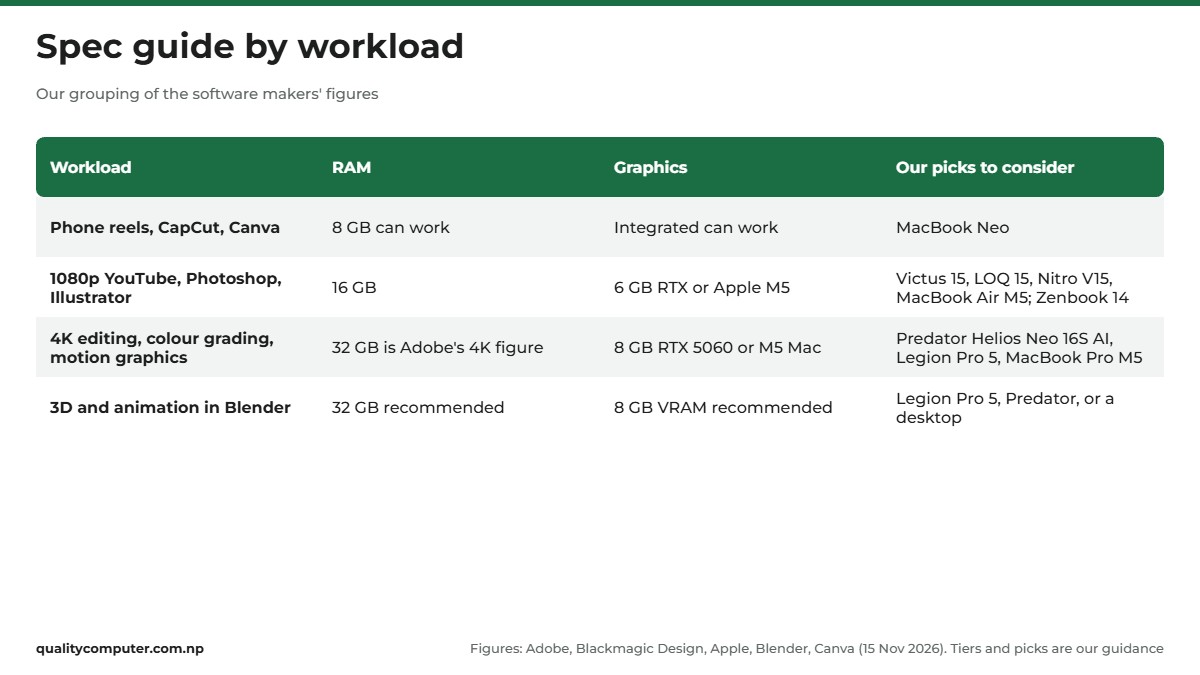
Spec guide by workload: from CapCut reels to 3D animation
The tiers below are our grouping of the makers' numbers.
- Phone-shot reels, CapCut and Canva: 8 GB can work; Final Cut Pro and Resolve on a Mac start there.
- 1080p YouTube, Photoshop and Illustrator: 16 GB and a 6 GB RTX card, or a 16 GB M5 Mac. A laptop for Photoshop sits here too.
- 4K editing, colour grading and motion graphics: 32 GB (Adobe's 4K figure, and Resolve's with Fusion on Windows) and an 8 GB card. A 16 GB laptop sits below Adobe's 4K advice.
- 3D and animation: Blender recommends 32 GB, 8 GB of VRAM and 8 cores, so in a laptop for animation, look for 8 GB of graphics memory, such as an RTX 5060.
Laptop for video editing and graphic design: picks by budget
Specs below are from the model names and the makers' own pages where we could reach them, with each pick's main limitation.
Entry Mac: MacBook Neo (8 GB)
Apple MacBook Neo 13 (A18 Pro, 8 GB, 256 GB): Apple lists a 6-core CPU, a 5-core GPU, a media engine with ProRes support and a 13-inch sRGB screen at 500 nits. It suits reels in CapCut, posters in Canva and light Photoshop work. Limit: 8 GB with no larger option meets Final Cut Pro's minimum but not its 16 GB recommendation, and Apple lists no Thunderbolt.
Mac for serious editing: MacBook Air M5 or MacBook Pro M5
- Apple MacBook Air M5 13 (16 GB, 512 GB): Apple lists a 10-core M5 with an 8-core GPU in this version, a 13.6-inch P3 screen at 500 nits, two Thunderbolt 4 ports, up to 18 hours of video streaming and 1.23 kg, and its MacBook Air page describes a "silent, fanless design". It suits Final Cut Pro and Resolve for 1080p and lighter 4K. Limit: no SD slot or HDMI, and Apple sells 24 GB and 32 GB as separate configurations, so this one stays at 16 GB.
- Apple MacBook Pro M5 14 (16 GB, 1 TB): Apple lists a 10-core GPU, a 14.2-inch Liquid Retina XDR screen (up to 1600 nits HDR peak and 120Hz), three Thunderbolt 4 ports, HDMI and an SDXC slot, and says it "breezes through" 4K editing in Premiere Pro. It suits wedding videographers copying cards on site. Limit: 16 GB is half what Resolve asks for background rendering on a Mac, and it weighs 1.55 kg.
Windows budget: RTX 3050 (6 GB)
- HP Victus 15 (RTX 3050): a Core i5-13420H (8 cores, 12 threads, per Intel), 16 GB, 512 GB and a 15.6-inch Full HD IPS 144Hz screen, for 1080p editing. Limit: we couldn't reach HP's page for this model, so its colour coverage, weight and memory slots aren't confirmed.
- Lenovo LOQ 15 (15ARP10E): a Ryzen 7 7735HS (8 cores, 16 threads) and an RTX 3050 6 GB at 65 W. Lenovo's PSREF lists a 15.6-inch Full HD IPS screen at 300 nits and 100% sRGB, a 3-in-1 card reader and a weight from 1.8 kg. Limit: Lenovo lists 16 GB as the maximum across its two slots, short of Adobe's 32 GB for 4K.
Both have 6 GB of graphics memory, below Premiere's 8 GB recommendation, and no AV1 encoding.
Windows mid-range: RTX 4050 (6 GB)
- HP Victus 15 (RTX 4050): the same chip, memory and screen with an RTX 4050, which NVIDIA lists with 6 GB of GDDR6 and AV1 encoding. It suits a YouTuber editing 1080p and some 4K. Limit: HP's page wasn't reachable, so screen colour coverage isn't stated.
- Acer Nitro V15 ANV15-52: per its model name, a Core 5 210H, 16 GB, 512 GB, an RTX 4050 6 GB and a 15.6-inch Full HD IPS 165Hz screen. Limit: we couldn't find Acer's page for this version, so colour coverage and upgrade options aren't confirmed.
Colour-first laptop for graphic design: Zenbook 14 OLED
Asus Zenbook 14 OLED UM3406KA (Ryzen AI 7 350, 16 GB, 1 TB): ASUS lists a 14-inch 2880 x 1800 OLED at 120Hz with 100% DCI-P3, 400 nits (600 nits HDR peak), a 40Gbps USB4 port and 1.20 kg. AMD lists the chip with 8 cores and Radeon 860M integrated graphics. It suits Photoshop, Illustrator, Canva and light 1080p edits. Limit: no dedicated graphics card, so it isn't for heavy 4K grading or Blender; the 16 GB is on board with no slot, and no card reader is listed.
Top tier for 4K, grading and 3D: RTX 5060 (8 GB)
- Acer Predator Helios Neo 16S AI: a Core Ultra 7 255HX (20 cores, per Intel), an RTX 5060 with 8 GB of GDDR7, 16 GB, 512 GB and a 16-inch OLED WQXGA 240Hz screen, per its model name. Limit: 16 GB is half Adobe's 4K figure, and we couldn't find Acer's page for this exact version, so its weight, ports and screen colour coverage aren't confirmed.
- Lenovo Legion Pro 5 16ADR10: 24 GB and 1 TB. PSREF lists the Ryzen 7 8745HX, the RTX 5060 at 115 W, up to 32 GB in two slots and a 16-inch 2560 x 1600 OLED at 100% DCI-P3 and 165Hz. It has the most memory here, useful for Blender and Fusion. Limit: no card reader or Thunderbolt listed, about 2.3 kg, and a 245 W charger.
PC for video editing: when a desktop makes more sense
If you always edit at one desk, consider an editing PC. Lumion, a rendering software maker, says laptop graphics "can be approximately 40% less" powerful than a similar desktop card. NVIDIA rates its desktop RTX 5060 at 145 W, while Lenovo runs the laptop RTX 5060 in the Legion Pro 5 at 115 W.
- Cooling: a tower has room for bigger fans during long exports and renders.
- Upgrades: add RAM, drives or a new graphics card later instead of replacing the machine.
As a build component, the PNY GeForce RTX 5060 OC 8GB (GDDR7, PCIe 5.0) has the same 8 GB as the top laptops. NVIDIA lists 550 W of system power for the RTX 5060, but that's for its own reference card, so check PNY's figure. See our custom PC vs branded desktop guide, or Mac mini vs PC if you'd rather edit in Final Cut Pro.
Add-ons: a monitor for photo editing, a portable SSD and cards
A second screen: the BenQ GW2491 is a budget screen for timelines and web-colour work. BenQ lists a 23.8-inch IPS Full HD panel at 100Hz with 99% sRGB, 250 nits, flicker-free backlighting, HDMI 1.4 and DisplayPort 1.2. It gives no DCI-P3 figure, and BenQ lists tilt but not height adjustment. To compare panel types and sizes, see our monitor price guide.
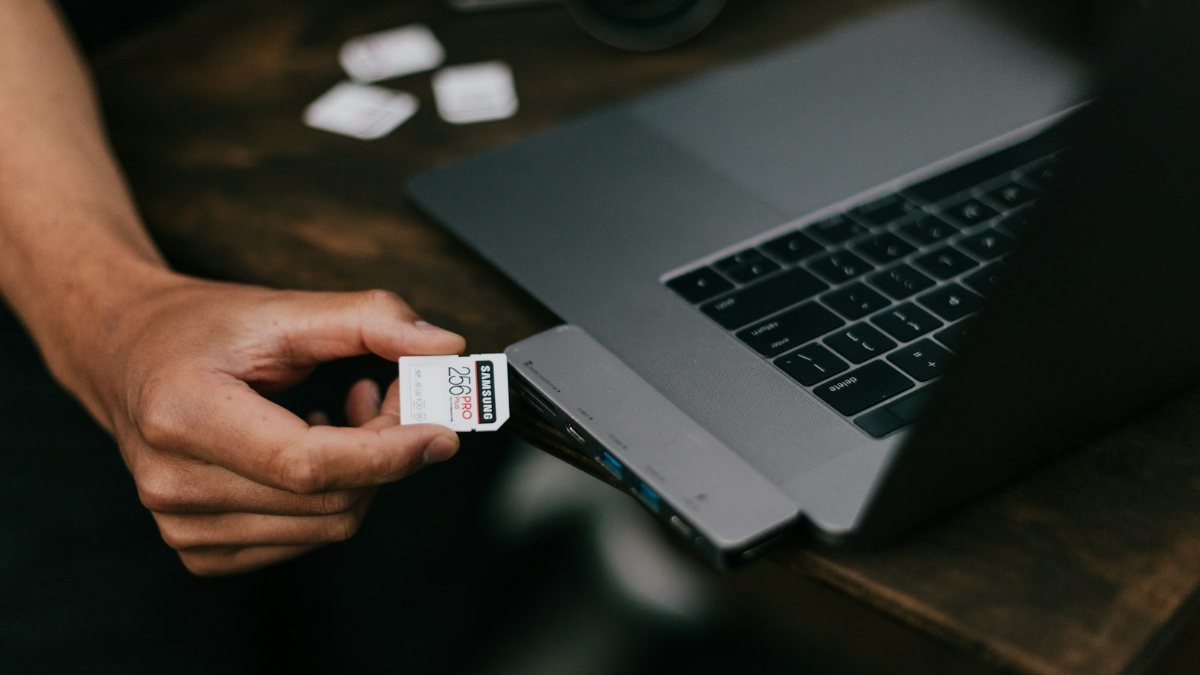
A portable SSD: the Lexar SL300 1TB keeps footage off the internal drive, as Adobe advises. Lexar lists USB 3.2 Gen 2, up to 1050MB/s read and 1000MB/s write (from its own testing; real speed depends on the laptop) and a cable with USB-C and USB-A ends.
Memory cards: buy cards your camera maker approves for the resolution and frame rate you shoot.
How to choose, and buying tips in Nepal
Check these five things before you pay.
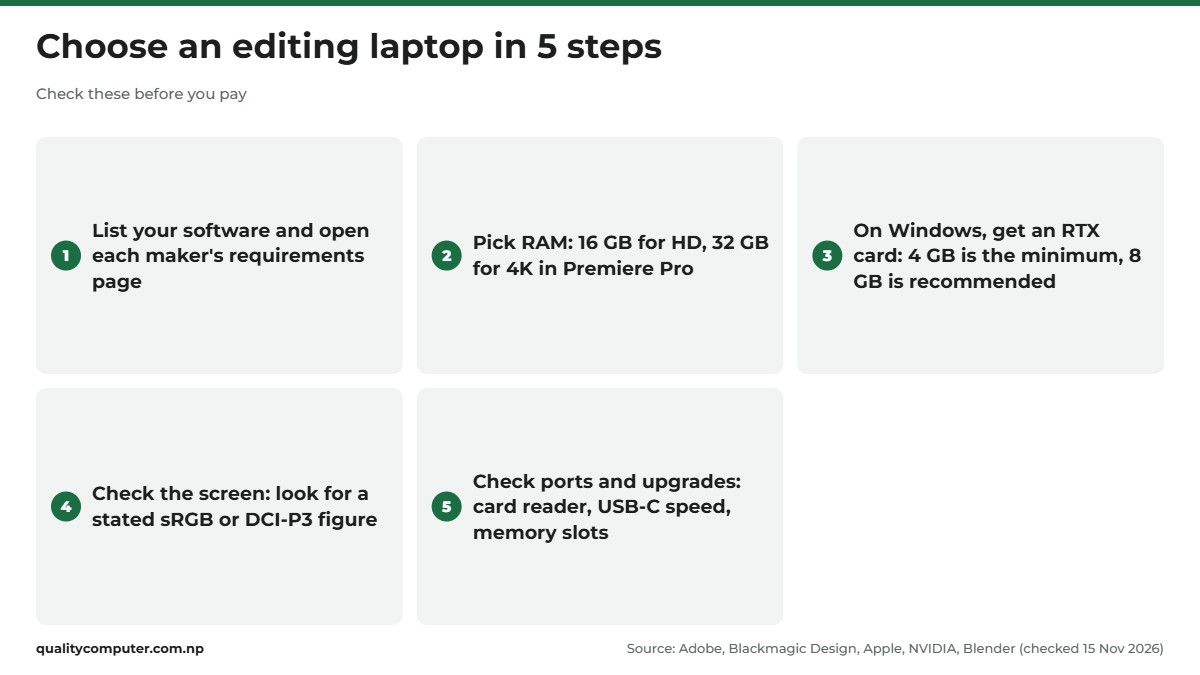
- Upgrades: check memory slots and limits on the maker's spec sheet. Of the Windows picks we could confirm, only the Legion Pro 5 lists room to grow to 32 GB.
- Software: Resolve's free version goes up to Ultra HD at 60 fps, so try it before you pay for an editor. Blackmagic lists NVIDIA Studio driver 581.57 or newer for Resolve on Windows.
- Warranty and EMI: ask the shop what the warranty covers and whether EMI is available, and get the terms written on your bill.
Quick verdict
- Buy 16 GB of RAM at minimum; Adobe recommends 32 GB for 4K in Premiere Pro.
- On Windows, get an NVIDIA RTX card: 6 GB clears the 4 GB minimum, 8 GB meets Premiere's and Blender's recommendation.
- RTX 40 and 50 series laptops encode AV1; the RTX 3050 does not.
- Final Cut Pro has no Windows version; the 16 GB MacBook Air M5 and MacBook Pro M5 meet Apple's recommendation.
- For design work, check the screen's stated sRGB or DCI-P3 figure; the Zenbook 14 OLED lists 100% DCI-P3.
- The 8 GB MacBook Neo suits CapCut, Canva and light Photoshop, not regular 4K editing.
Editing laptops and MacBooks in our store
If you edit video, look for 16 GB of RAM with an RTX graphics card or an M5 Mac, and add a second screen or a portable SSD for footage. Bring your software list and check it against the specs before you buy.
| Product | What it is | Our price |
|---|---|---|
| Apple MacBook Neo 13 (A18 Pro, 8GB, 256GB) | Entry Mac for phone-shot video, Canva and light photo work | Rs 135,000 |
| Apple MacBook Air M5 13 (16GB, 512GB) | Mac for 1080p and 4K editing in Final Cut Pro or DaVinci Resolve | Rs 248,500 |
| Apple MacBook Pro M5 14 (16GB, 1TB) | 14-inch Pro Mac with 1TB storage for heavier projects | Rs 376,500 |
| HP Victus 15 (i5-13420H, 16GB, RTX 3050) | Budget Windows laptop with an RTX 3050 | From Rs 149,900 |
| Lenovo LOQ 15ARP10E (Ryzen 7 7735HS, 16GB, RTX 3050 6GB) | Ryzen 7 laptop with an RTX 3050 6GB | From Rs 167,900 |
| HP Victus 15 (i5-13420H, 16GB, RTX 4050) | RTX 4050 laptop for Premiere Pro and DaVinci Resolve | From Rs 169,900 |
| Acer Nitro V15 ANV15-52 (Core 5 210H, 16GB, RTX 4050) | RTX 4050 laptop with a 165Hz IPS screen | From Rs 174,900 |
| Asus Zenbook 14 OLED UM3406KA (Ryzen AI 7 350, 16GB, 1TB) | 3K OLED laptop for photo and graphic design work | From Rs 219,900 |
| Acer Predator Helios Neo 16S AI (Core Ultra 7 255HX, RTX 5060) | RTX 5060 laptop with a 16-inch OLED screen | From Rs 289,000 |
| Lenovo Legion Pro 5 16ADR10 (Ryzen 7 8745HX, 24GB, RTX 5060) | RTX 5060 laptop with 24GB RAM and a 16-inch OLED screen | From Rs 365,000 |
| BenQ GW2491 24" IPS FHD monitor | 24-inch IPS second screen | From Rs 19,700 |
| Lexar SL300 1TB portable SSD (USB 3.2 Gen 2) | 1TB portable SSD for footage | Rs 29,000 |
Prices checked on 16 November 2026 on our website.
In our store
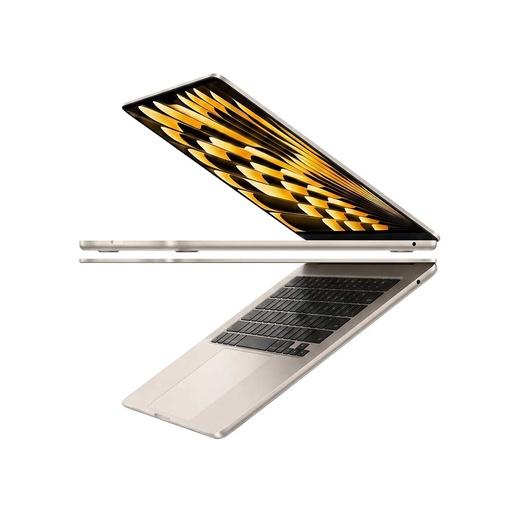
MacBook Air M5 (16GB)
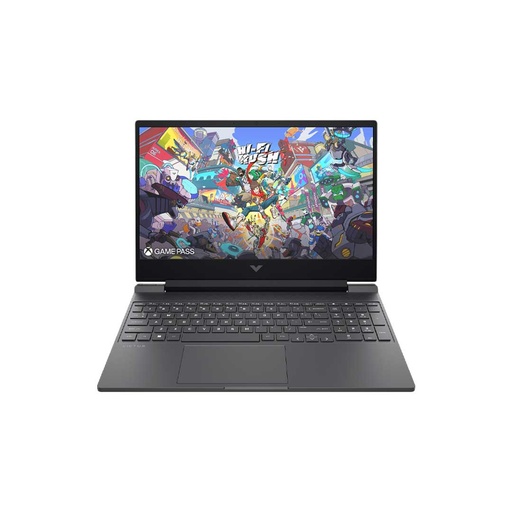
HP Victus 15 (RTX 4050)
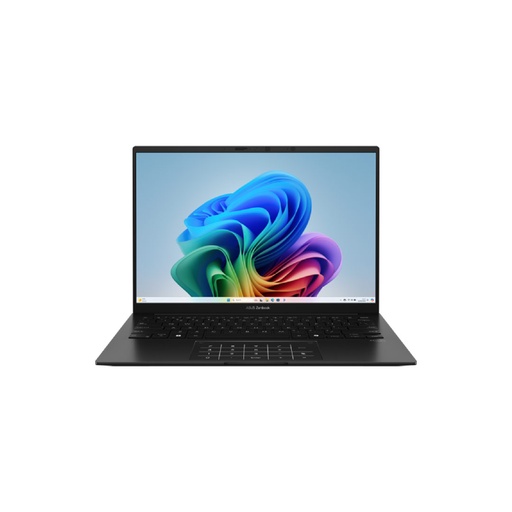
Asus Zenbook 14 OLED
Frequently asked questions
Which is the best laptop for video editing in Nepal?
There isn't one best laptop for every editor. For 1080p editing in Premiere Pro or DaVinci Resolve, a laptop with 16 GB RAM and an NVIDIA RTX 4050 with 6 GB, or a 16 GB MacBook Air M5, is a sensible start. For 4K, colour grading or Blender, look at an RTX 5060 with 8 GB and as much RAM as you can, since Adobe recommends 32 GB for 4K.
How much RAM do I need for video editing?
Adobe recommends 16 GB of RAM for HD video in Premiere Pro and 32 GB or more for 4K. DaVinci Resolve 21 on Windows needs 16 GB, or 32 GB when using Fusion. Final Cut Pro needs 8 GB and Apple recommends 16 GB.
What laptop do I need for DaVinci Resolve?
On Windows, Blackmagic lists 16 GB of system memory, or 32 GB with Fusion, and a GPU with at least 4 GB of VRAM that supports OpenCL 1.2 or CUDA 12.8. On a Mac it needs Apple silicon and 8 GB, or 16 GB with Fusion. Its advanced AI tools want at least 16 GB of VRAM on Windows.
Which laptop is good for graphic design and Photoshop?
For Photoshop, Illustrator and Canva, colour and screen quality matter as much as power. Adobe lists 16 GB of RAM as recommended for Photoshop 27.x and Illustrator 31.0, and Illustrator recommends 4 GB of VRAM. A laptop with a stated 100% sRGB or DCI-P3 screen, such as the Zenbook 14 OLED with a 100% DCI-P3 OLED panel, suits design work.
Is a gaming laptop good for video editing?
Often, yes. Gaming laptops with NVIDIA RTX graphics cards have the NVENC hardware encoder and the CUDA support DaVinci Resolve can use on Windows. The trade-offs are weight, large chargers and screens whose colour coverage the maker may not state, so check the screen before you buy.
Can I edit video on a MacBook Air?
Yes. The MacBook Air M5 has a media engine with hardware-accelerated H.264, HEVC and ProRes and 16 GB of unified memory, which meets Final Cut Pro's 16 GB recommendation. Apple describes it as fanless, and it has no SD card slot, so for camera work you'll need a card reader.
Is a PC better than a laptop for video editing?
If you edit at one desk, a desktop editing PC usually gives more graphics power and easier upgrades. Lumion says laptop graphics can be about 40% less powerful than a similar desktop card, and NVIDIA rates its desktop RTX 5060 at 145 W against 115 W for the laptop version in the Legion Pro 5. A laptop is the choice if you edit on location.
Sources
- Adobe Premiere 26.x technical requirements, Adobe, checked 15 Nov 2026
- Processor, memory, and GPU recommendations (Premiere Pro), Adobe
- Adobe Photoshop on desktop technical requirements, Adobe, checked 15 Nov 2026
- Illustrator on desktop system requirements, Adobe, checked 15 Nov 2026
- About DaVinci Resolve 21 (Studio 21.1.2 readme), Blackmagic Design, updated 23 Oct 2026
- DaVinci Resolve Studio, Blackmagic Design
- Final Cut Pro tech specs, Apple
- Blender requirements, Blender Foundation
- GPU Rendering, Blender 5.3 Manual, Blender Foundation
- Technical requirements, Canva Help Center
- NVIDIA Video Codec SDK, NVIDIA Developer
- Compare GeForce laptops, NVIDIA
- GeForce RTX 5060 family, NVIDIA
- Intel processor names and numbers, Intel
- Intel Core i5-13420H processor, Intel
- Intel Core Ultra 7 processor 255HX, Intel
- AMD Ryzen 7 7735HS, AMD
- AMD Ryzen AI 7 350, AMD
- CSS Color Module Level 4, W3C
- Apple unleashes M5, the next big leap in AI performance for Apple silicon, Apple Newsroom, 15 Oct 2025
- Apple unveils new 14-inch MacBook Pro powered by the M5 chip, Apple Newsroom, 15 Oct 2025
- MacBook Neo tech specs, Apple
- MacBook Air 13- and 15-inch with M5 tech specs, Apple
- MacBook Air, Apple
- MacBook Pro (14-inch, M5) tech specs, Apple Support
- LOQ 15ARP10E specifications, Lenovo PSREF
- Legion Pro 5 16ADR10 specifications, Lenovo PSREF
- ASUS Zenbook 14 OLED (UM3406) tech specs, ASUS
- GW2491 specifications, BenQ India
- Lexar SL300 Portable SSD, Lexar
- Which laptop PCs do you recommend for Lumion 2024 and newer?, Lumion Support