iPhone Storage Full? 8 Ways to Free Up Space Without Deleting Your Photos (2026)
Short answer: When your iPhone storage is full, open Settings > General > iPhone Storage and follow the recommendations first. The biggest savings usually come from turning on Optimize iPhone Storage for iCloud Photos, offloading apps you don't use, clearing large attachments in Messages and WhatsApp, and deleting downloaded videos. If you keep running out, move old photos and videos to a computer or an external drive, or pay for iCloud+ from US$0.99 a month.
Shop at Quality Computer
Portable SSDs View all →
Step 1: see what is using the space
Open Settings > General > iPhone Storage. Give it a few seconds to load. You get a coloured bar, a list of recommendations, and every app sorted by how much space it takes (Apple Support). Look at the top five apps. For most people they are Photos, WhatsApp, Messages and one or two video or game apps.
8 ways to free up space
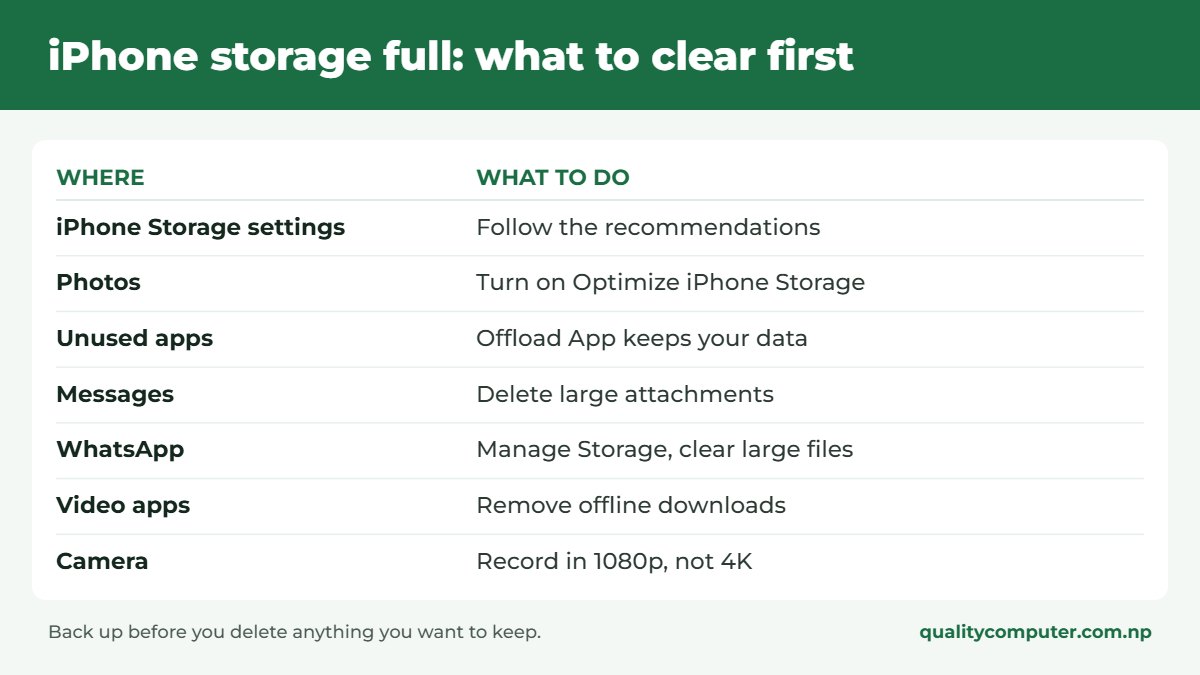
1. Use the recommendations iOS gives you
In iPhone Storage, tap Show All next to the recommendations. Read each one and tap Enable, or open it to review what can be deleted. These are the quickest wins because the phone has already found them.
2. Turn on Optimize iPhone Storage
If you use iCloud Photos, this is the big one. Your full-resolution photos and videos stay in iCloud and the phone keeps smaller copies and downloads the original when you open a photo (Apple Support).
- Open Settings, tap your name, then iCloud.
- Tap Photos and turn on Sync this iPhone.
- On iOS 27 or later, tap iPhone Storage.
- Make sure Optimize iPhone Storage is turned on.
It only works if you have enough iCloud storage for your whole library. The free 5 GB fills quickly, so most people need a paid plan. Prices and how to pay from Nepal are in our iCloud storage guide.
3. Offload apps you don't use
In the iPhone Storage list, tap an app and choose Offload App. Apple says this frees the storage the app uses but keeps its documents and data, so everything is still there when you reinstall it. Delete App removes the app and its data.
4. Clear large attachments in Messages
In iPhone Storage, tap Messages. You will see categories such as Photos and Videos with their sizes. Open a category, tap Edit, select the big ones you don't need and delete them. Your conversations stay.
5. Clean up WhatsApp
WhatsApp is often the largest app on phones in Nepal because of family and class groups. In WhatsApp go to Settings > Storage and Data > Manage Storage. It shows large files and the chats that use the most space (WhatsApp Help Center). To stop it filling up again, go to Settings > Storage and Data and, under Media Auto-Download, set Video to Wi-Fi or Never.
6. Delete downloaded videos and music
Offline downloads in YouTube, Netflix, Spotify and Apple Music add up quietly. Open each app's Downloads section and remove what you have already watched.
7. Empty Recently Deleted and remove duplicates
Deleted photos sit in the Recently Deleted album for about 30 days and still take up space. First merge copies: in Photos, tap Collections, scroll down to Utilities and open Duplicates (it only appears if you have duplicates). The extra copies move to Recently Deleted (Apple Support). Then open Recently Deleted, also under Utilities, and delete everything in it if you are sure. With iCloud Photos on, this removes them from all your devices.
8. Record smaller videos
Video is what fills an iPhone fastest. In Settings > Camera > Record Video, the screen shows how much space a minute takes at each setting. Dropping from 4K at 60 fps to 1080p at 30 fps makes each video several times smaller. In Settings > Camera > Formats, High Efficiency also saves space.

What not to do
- Don't install "cleaner" apps. iOS doesn't let one app delete another app's files or caches, so the most a cleaner app can do is sort the photos and contacts you give it access to. Some of them push expensive weekly subscriptions.
- Don't delete photos you haven't backed up. With iCloud Photos on, deleting a photo on the iPhone deletes it from iCloud too.
- Don't worry about "System Data" too much. Apple says the iPhone removes cached and temporary files by itself when it needs more space. Restarting the phone or updating iOS sometimes brings it down, but there is no button to clear it.
Still full? Three longer-term answers
Move old photos and videos off the phone
Copy them to a computer, then to an external drive, and keep two copies of anything you care about. iPhone 15 and later have a USB-C port, so you can plug in a USB-C flash drive or portable SSD and copy files to it from the Files app (Apple Support). The drive must have a single partition and be formatted as exFAT, FAT32 or APFS, and large hard drives may need their own power. Our guide to choosing external storage explains which type suits you.
Pay for iCloud+
50 GB costs US$0.99 a month and 200 GB costs US$3.49, according to Apple's price list for Nepal (VAT can make it slightly higher). How to pay from Nepal is in our iCloud storage guide. For many people that is cheaper and easier than managing files by hand.
Buy more storage next time
iPhone storage can't be upgraded later, and there is no memory card slot. If a 64 GB or 128 GB iPhone has been full for a year, choose at least 256 GB for your next one, and 512 GB if you shoot a lot of video. Current models are on our iPhone price page.
Quick verdict
- Open Settings > General > iPhone Storage and use the recommendations first.
- Turn on Optimize iPhone Storage if you use iCloud Photos.
- Clear WhatsApp and Messages attachments, and delete offline video downloads.
- Record in 1080p unless you really need 4K.
- Back up before you delete, and keep two copies of important photos.
Drives for your photos, in our store
All in stock when we checked. The USB-C drives plug straight into an iPhone 15 or later; for older iPhones with a Lightning port, copy through a computer.
| Product | What it is | Our price |
|---|---|---|
| Lexar JumpDrive Dual Drive D400 64GB | USB-C and USB-A flash drive | Rs 2,250 |
| Dahua 256GB Type-C OTG Dual Drive | USB-C and USB-A flash drive | Rs 4,750 |
| Transcend ESD270C 1TB Portable SSD | 1TB portable SSD | Rs 20,500 |
| Lexar SL200 1TB Portable SSD | 1TB USB-C portable SSD | Rs 21,900 |
| Lexar SL300 1TB Portable SSD | 1TB USB 3.2 Gen 2 USB-C portable SSD | Rs 29,000 |
Prices checked on 21 November 2026 on our website.
Frequently asked questions
Why is my iPhone storage full when I have iCloud?
iCloud storage and iPhone storage are separate. Photos only leave the phone if iCloud Photos is on with Optimize iPhone Storage selected, and you have enough iCloud space for your library.
How do I free up iPhone storage without deleting photos?
Turn on Optimize iPhone Storage, offload unused apps, clear large attachments in Messages and WhatsApp, and delete offline video downloads. Or copy old photos to a computer or external drive first.
What does Offload App do?
It removes the app to free its storage but keeps its documents and data. When you reinstall the app, your data comes back.
Can I add a memory card to an iPhone?
No. iPhones have no memory card slot and the storage can't be upgraded. On iPhone 15 and later you can plug in a USB-C drive and copy files to it from the Files app.
Do iPhone cleaner apps work?
We don't recommend them. iOS doesn't let apps clean other apps' data, and some charge high subscriptions for things the Settings app already does free.
How much iPhone storage should I buy?
256 GB is the comfortable choice for most people, and it is where the newest models start. If you take a lot of videos or keep the phone for several years, consider 512 GB. 128 GB on an older model is fine for lighter use with iCloud Photos turned on.
Sources
- How to check the storage on your iPhone and iPad, Apple Support
- Manage your photo and video storage, Apple Support
- Delete photos on your iPhone or iPad, Apple Support
- Merge duplicate photos and videos on iPhone, Apple Support
- Connect external storage devices to iPhone, Apple Support
- iCloud+ plans and pricing, Apple Support
- How to free up storage on WhatsApp, WhatsApp Help Center
- Product prices: Quality Computer website, 21 November 2026