Things to Buy Before Going Abroad from Nepal: Tech Checklist (2026)
Short answer: The tech things to buy before going abroad are few: one multi-port charger, the right plug adapter, a power bank for your hand luggage and a memory card for document copies, plus a laptop only once you've checked what your course needs. What matters more is what you sort out in Nepal: a phone that isn't locked to one network and takes two numbers, a plan to keep your Nepali number for bank OTPs, a second way to get sign-in codes, and a full backup. Power banks never go in checked bags.
Shop at Quality Computer
Travel chargers, power banks and memory cards View all →
Things to buy before going abroad: the short list
The tech things to carry abroad fit in one small pouch. The bigger job is sorting out your phone, your Nepali number and your accounts, because those are hard to fix once you've left.
Buy or pack in Nepal:
- One multi-port charger that can charge your phone and laptop together.
- The right plug adapter for the country you're going to.
- A power bank for the journey, in your hand luggage.
- A memory card or USB drive with copies of your documents.
- A laptop, if your course or job needs one and you've checked what it should run.
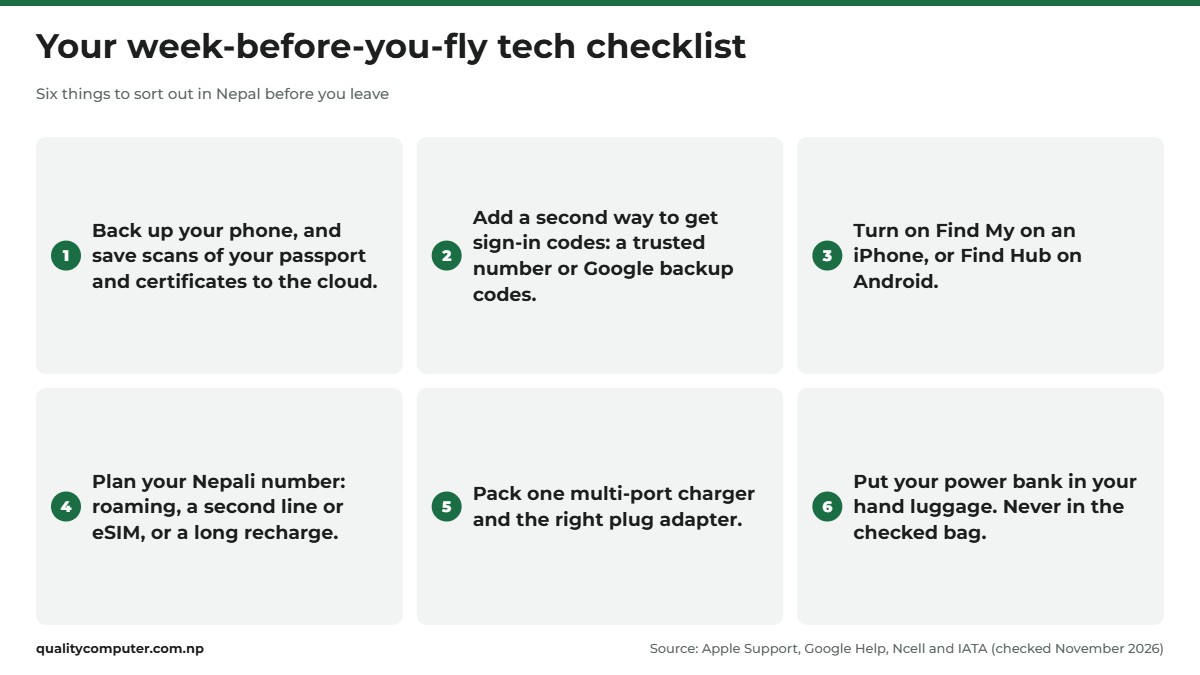
Sort out before you fly: check your phone isn't locked to one network, decide how you'll keep your Nepali number, add a second way to receive sign-in codes, turn on Find My or Find Hub, and back everything up. Each section below covers one item on this going abroad checklist.
Phone for abroad: not locked, with dual SIM or eSIM
The best phone to take abroad is usually the one you already have, as long as it passes three checks.
1. It isn't locked to one network. A phone bought through a mobile operator abroad may be locked to that operator. On an iPhone, open Settings, General, About and look for "No SIM restrictions" on the lock line. Apple's own pages call that line Carrier Lock, Network Provider Lock or Service Provider Lock. If the phone is locked, Apple says only your current network provider can remove the lock, and it can take a few days (Apple Support). To use a local provider while you travel, "your iPhone cannot be locked to a service provider" (Apple).
2. It takes two numbers. You'll want your Nepali number and a local one. Apple says the iPhone XS, XS Max, XR and later support eSIM, and an iPhone can manage "up to eight or more" eSIMs (Apple). On a Google Pixel 3a or later you can use "one physical SIM card and one eSIM" (Google notes US Pixel 10 models, except the 10 Pro Fold, take eSIM only), and choose which SIM handles data, calls and texts (Google). Other Android phones vary, so check yours. Our eSIM in Nepal guide shows how to move an NTC or Ncell number to eSIM.
3. It works on the networks there. Check your phone supports the mobile networks in the country you're going to. The maker's specification page lists its bands.
Keep your Nepali number for bank OTPs
Your Nepali number is probably where your bank and wallet apps send one-time codes. Lose it and you can be locked out of your own money. There are three ways to keep it:
- Roaming. Keep the SIM in your phone with roaming on. Our NTC and Ncell roaming guide covers activation, packs and charges.
- Two lines on one phone. Keep your Nepali SIM on one line and add a local SIM or travel eSIM for data. Apple says a travel eSIM can be "a secondary line", and with both on, "the capabilities on your primary line will continue to work". It also warns you might still pay roaming fees on the home line, so set the local line for mobile data (Apple).
- Keep it valid. A prepaid number has to stay recharged. Ncell says that when the main balance validity expires, outgoing calls stop for 14 days, and after that incoming and outgoing services both stop. At the time of writing (November 2026), a recharge of Rs 1,000 or more gives the longest validity on its list, 730 days (Ncell). On NTC, 1415 is the number to check your balance and expiry date (Nepal Telecom).
Before you go, ask your bank how its OTPs and app approvals work from abroad, and keep the SIM that receives them in your phone. When you come back, Nepal Telecom suggests turning international roaming off.

Secure your Apple and Google accounts before you fly
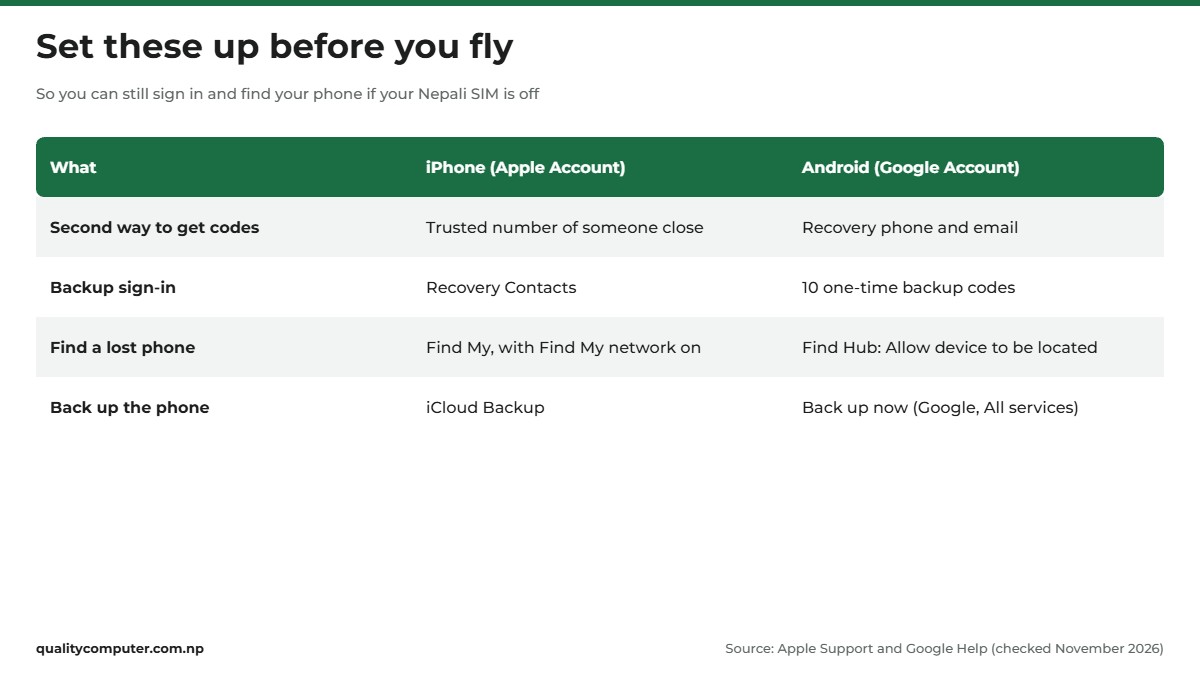
If your sign-in codes only go to your Nepali SIM and that SIM is off or lost, you're locked out. Set up a second route now, while you have both phone and SIM.
iPhone and Apple Account
- Two-factor authentication: it's under Settings, your name, Sign-In & Security (Apple).
- A second trusted number: Apple suggests "one not associated with your iPhone as an additional trusted phone number" (Apple), and its Mac guide gives "a number used by a family member or close friend" as an example (Apple), such as someone at home in Nepal. On iPhone: Settings, your name, Sign-In & Security, Two-Factor Authentication, Add Trusted Phone Number. A code goes to the new number, so add it while you're together.
- A recovery contact: Settings, your name, Sign-In & Security, Recovery Contacts. The person needs an Apple device running iOS 15, iPadOS 15, macOS Monterey or later (Apple).
- Find My: Settings, your name, Find My. Turn on Find My iPhone, then Find My network, so you can see the phone even when it's offline (Apple).
Android and Google Account
- Recovery phone and email: in your Google Account, open Security & sign-in, then Recovery phone and Recovery email (Google). Use an email you can open from anywhere.
- Backup codes: under 2-Step Verification, Backup codes. You get 10, and "each code can be used only once". Google suggests them "in case you lose your phone, change your phone number" (Google). Keep them somewhere safe, away from the phone.
- Find Hub: Settings, Security, Find Hub, and check that "Allow device to be located" is on. To lock or erase a lost phone remotely, Google says "you must turn on two-step verification" (Google).
Travel adapter, chargers and voltage
Two things decide whether a charger works abroad: voltage and plug shape.
Voltage. Apple says its power adapters "support a universal voltage range of 100-240V AC and a frequency range of 50-60Hz" (Apple). Check the Input line on any other charger's label the same way. If it doesn't show a range like 100-240 V, don't count on it working abroad.
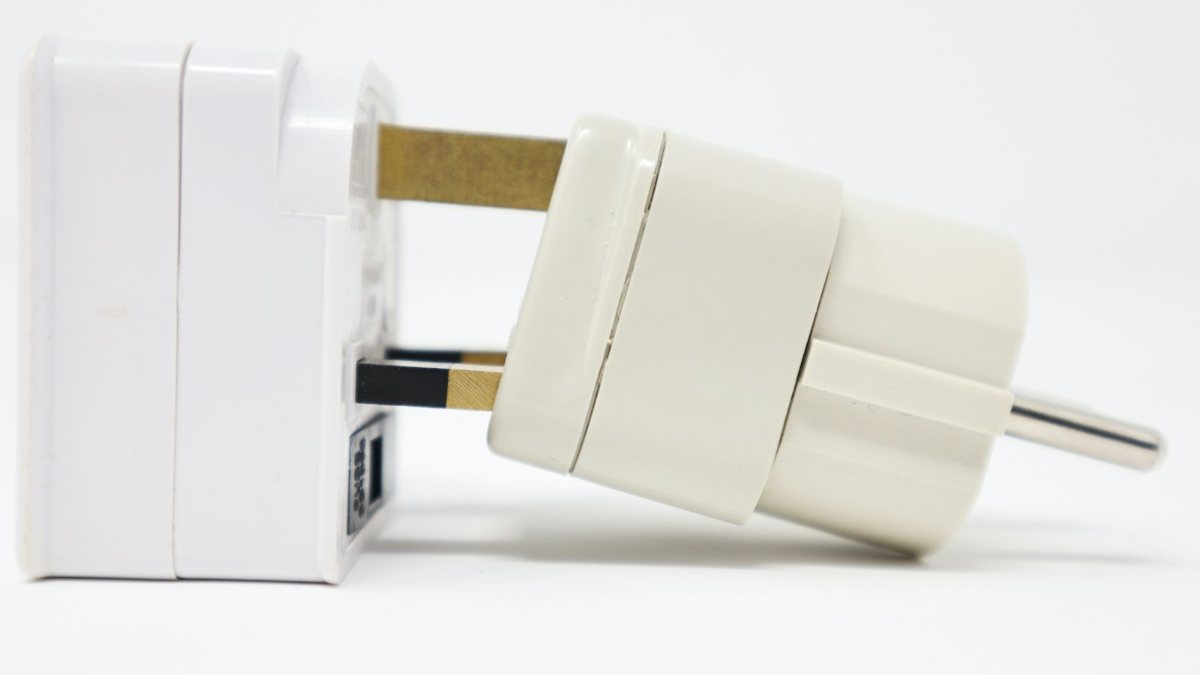
Plug shape. A travel adapter only changes the pins. Apple says its travel plugs "do not convert electrical voltage or frequency". Its travel kit page lists Type A for North America and Japan, Type C for continental Europe, Type G for the UK, the UAE and Saudi Arabia, and Type I for Australia and New Zealand. For South Korea, Qatar and anywhere else, check your adapter maker's country list, which is what the IEC now advises since it retired its own world plugs guide, or see our universal travel adapter guide.
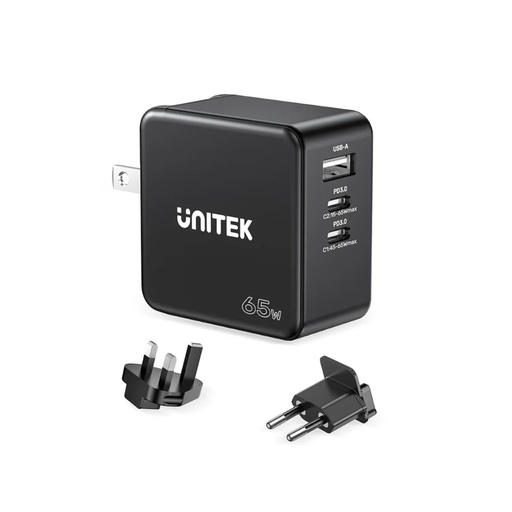
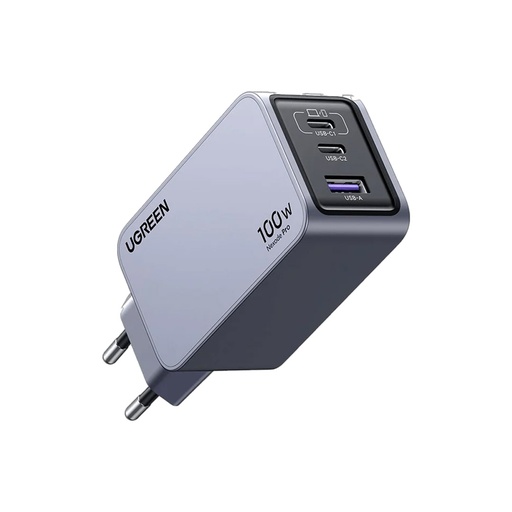
One charger, several devices. A multi-port GaN charger means one brick instead of several. The UNITEK P1117B is sold as a travel charger: UNITEK lists 65W in total, two USB-C ports (up to 65W each) and one USB-A port (up to 30W), with UK and EU plugs (UNITEK). The 65W is shared between the ports when you charge more than one device. For a laptop that needs more, the UGREEN X757 Nexode Pro is a 100W, three-port GaN charger. For a phone and earbuds, the Mcdodo 33W GaN charger has two outputs.
Power bank: hand luggage only
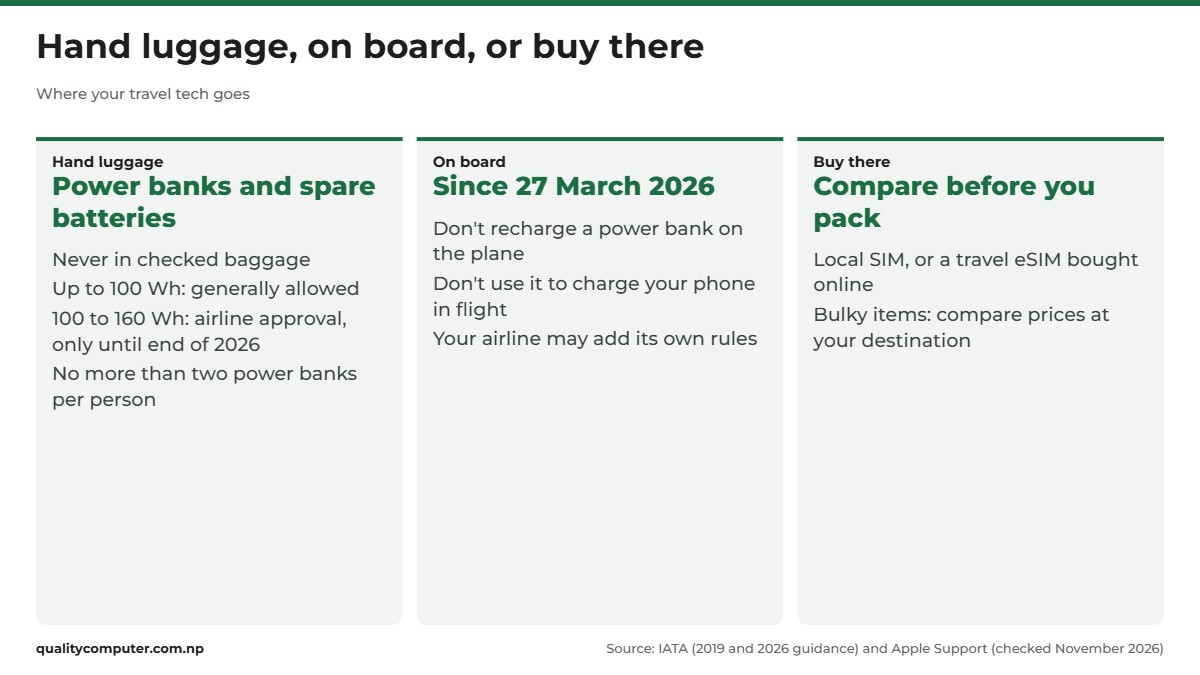
Take one for the journey, but never in your checked bag. IATA is blunt: "Never place spare batteries or power banks in checked baggage." Up to 100 Wh is "generally allowed in carry-on baggage", 100 to 160 Wh "may be allowed with airline approval", and over 160 Wh is "usually not permitted" (IATA). The Wh figure is printed on the label.
The rules tightened in 2026. IATA's guidance for airlines, based on ICAO rules that apply from 27 March 2026, says "no more than two power banks may be carried per person", that they "must not be recharged while onboard", and that they shouldn't be used to charge a phone or other device on board. The same guidance says the approval option for 100 to 160 Wh power banks won't carry into IATA's rules from 1 January 2027, so a power bank of 100 Wh or less is the safe pick (IATA). Airlines can add their own limits, so check yours before you fly. Our power bank guide explains the Wh maths and the flight rules in full.
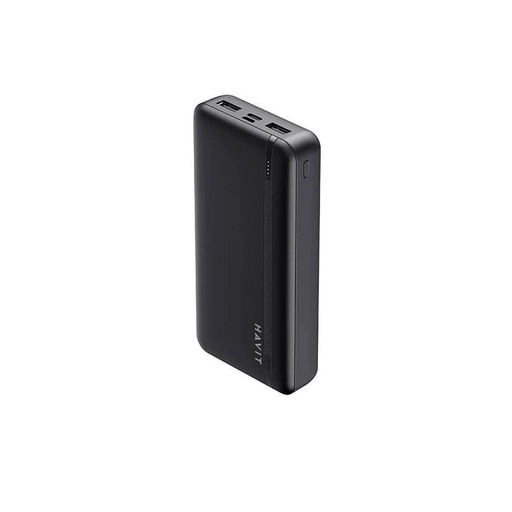
Two examples: the Havit PB89, a 10,000 mAh bank that Havit lists with two USB-A outputs and USB-C or Micro-USB input (Havit), and the Trusmi PB03-013, a 20,000 mAh, 22.5W bank. Whichever you take, charge it fully the night before you leave.
Laptop for abroad study: what to check
Before you buy, find your university's IT or new-student page. UCL in London, for example, accepts "Windows, macOS or Unix/Linux", suggests at least an i5 processor, 8GB of RAM and a 256GB SSD for a Windows laptop, and warns that "some courses may require more specialist equipment or software so you need to check this". It also offers students Microsoft Office 365 free, and says a tablet or phone alone isn't enough to study with (UCL).
Mac or Windows? UCL accepts either. What decides it is the specialist software your course uses, so if your course page names Windows-only software, buy Windows. Our laptops for students guide compares models by budget.
Warranty. Ask where the warranty can be used before you buy. Apple's warranty says Apple "may restrict warranty service" for iPhone and iPad to the country where they were originally sold, and its Mac warranty has a similar line for hardware. If you seek service outside the country of purchase, you pay any customs duties and taxes (Apple iPhone and iPad warranty, Apple Mac warranty). Windows laptop terms differ by brand and model, so ask, and keep the bill.
Back up your phone and documents
Scan your passport, citizenship, academic certificates and transcripts, offer or visa letters and insurance papers with your phone. Keep one copy in the cloud, one offline, and share one with a family member at home.
- Cloud storage: each Google Account includes up to 15 GB, "shared across Gmail, Google Drive, and Google Photos" (Google).
- iPhone backup: Settings, your name, iCloud, iCloud Backup, and make sure Back Up This iPhone is on (Apple).
- Android backup: Settings, Google, All services, Backup, then Back up now. It saves apps and app data, call history, contacts, settings and SMS (Google).
- Offline copy: a memory card such as the Lexar 633x 128GB microSDXC, or a USB drive, works without internet on the day you land.
Back up a few days before you fly, so a big upload can finish on home Wi-Fi.
What to leave behind, or buy there
Not everything on a list of things to buy before going abroad needs buying in Nepal. A few practical rules:
- Leave bulky gear. Printers, monitors and desktop PCs eat your baggage allowance. Compare prices at your destination first.
- Leave single-voltage appliances. If the label doesn't show a range such as 100-240 V, it may not suit the sockets there.
- Get the local SIM there, or buy a travel eSIM online. Apple notes you can buy a plan "before you travel" from a provider's website or app.
- Compare phone and laptop prices on both sides, and count the warranty and, for a phone you'll bring home, registration in Nepal.
- Don't pack a charger for every device. One multi-port charger and one adapter usually do the job.
Coming home: IMEI registration in Nepal
Bringing a phone home from abroad? Nepal's Mobile Devices Management System (MDMS) records phones by IMEI, and NTA says buying or selling an unregistered phone is illegal.
NTA's MDMS page says a phone brought from abroad for personal use that passes customs inspection is registered automatically ("MDMS प्रणालीमा स्वतः दर्ता हुने"). You can also register it yourself through the MDMS registration portal with:
- your passport or citizenship certificate
- the passport page with your departure and arrival stamps, or your boarding pass
To check a phone, dial *#06# to see its 15-digit IMEI, then enter it on the MDMS site under दर्ता भए/नभएको हेर्नुहोस (check registration status). Our MDMS registration guide has the full steps.
Quick verdict
- Buy one multi-port charger, the right plug adapter and a power bank. Leave bulky gear.
- Check your phone shows "No SIM restrictions" and can take two numbers through dual SIM or eSIM.
- Keep your Nepali number for bank OTPs: roaming, a second line, or a long recharge.
- Add a second way to get sign-in codes, and turn on Find My or Find Hub, before you leave.
- Power banks go in hand luggage only, and no more than two per person since 27 March 2026.
- Back up your phone and keep document scans in the cloud and offline.
Travel chargers, power banks and memory cards in our store
A multi-port charger, a power bank for your hand luggage and a memory card for document copies cover most of the tech you need to buy before you fly.
| Product | What it is | Our price |
|---|---|---|
| Mcdodo 33W GaN dual-output charger (CH-413) | 33W GaN charger with two ports | From Rs 3,000 |
| UNITEK P1117B 65W GaN travel charger | 65W GaN travel charger for phone and laptop | From Rs 3,980 |
| UGREEN Nexode Pro 100W 3-port GaN charger | 100W 3-port GaN charger | From Rs 7,890 |
| Havit PB89 10000mAh power bank | 10,000mAh power bank | From Rs 2,550 |
| Trusmi PB03-013 20000mAh 22.5W power bank | 20,000mAh 22.5W power bank | From Rs 3,550 |
| Joyroom JR-W020 10000mAh magnetic power bank | 10,000mAh magnetic wireless power bank | Rs 4,990 |
| Lexar 633x 128GB microSDXC V30 | 128GB microSD card | From Rs 4,900 |
Prices checked on 15 November 2026 on our website.
In our store
UNITEK P1117B 65W
UGREEN Nexode Pro 100W
Havit PB89 10000mAh
Frequently asked questions
What are the things to buy before going abroad from Nepal?
On the tech side, buy one multi-port charger, the right plug adapter for your destination, a power bank for your hand luggage and a memory card or USB drive for document copies. Buy a laptop only after checking what your university or job needs. Then sort out your phone, your Nepali number, your backups and your account recovery before you fly.
What is the best phone to take abroad?
Usually the one you already have, if it isn't locked to a network, can take two numbers through dual SIM or eSIM, and supports the networks in your destination. Apple says the iPhone XS, XR and later support eSIM, and Google says the Pixel 3a and later take one physical SIM and one eSIM.
Can I keep my NTC or Ncell number while I'm abroad?
Yes. Keep the SIM in your phone on roaming, or keep it on one line and use a local SIM or travel eSIM for data. A prepaid number must stay recharged: Ncell says a recharge of Rs 1,000 or more keeps the main balance valid for 730 days, and on NTC you can check your expiry date on 1415.
Can I pack a power bank in checked luggage?
No. IATA says never to place power banks or spare batteries in checked baggage. Carry them in hand luggage: up to 100 Wh is generally allowed, 100 to 160 Wh needs airline approval until the end of 2026, and IATA's 2026 guidance limits each passenger to two power banks.
Do I need a voltage converter for my phone charger abroad?
Not if the charger is rated 100-240 V. Apple says its power adapters support 100-240 V at 50-60 Hz, so they only need a plug adapter, which changes the plug shape but not the voltage. Check the input line on any other charger's label.
Which laptop is good for abroad study?
One that meets your university's published requirements and runs your course's software. UCL in London, for example, accepts Windows, macOS or Linux and suggests at least an i5 processor, 8GB of RAM and a 256GB SSD for a Windows laptop. Also ask where the warranty can be used before you buy.
How does IMEI registration in Nepal work for a phone bought abroad?
NTA says a phone brought from abroad for personal use that passes customs inspection is registered in MDMS automatically. You can also register it yourself with your passport or citizenship and the passport page with departure and arrival stamps, or your boarding pass. Dial *#06# to see the IMEI and check it on the MDMS site.
Sources
- How to unlock your iPhone for use with a different network provider, Apple Support (UK)
- Use eSIM while travelling internationally with your iPhone, Apple Support (AU)
- Set up eSIM on iPhone, Apple Support
- How to use dual SIMs on your Google Pixel phone, Pixel Phone Help (Google)
- How to recharge?, Ncell
- GSM Prepaid Service, Nepal Telecom
- Two-factor authentication for Apple Account, Apple Support
- About trusted phone numbers and trusted devices for Apple Account, Apple Support
- Add or remove trusted phone numbers on Mac, Mac User Guide (macOS Tahoe 26), Apple
- Set up a recovery contact for your Apple Account, Apple Support
- How to turn on Find My on your iPhone, iPad, or Mac, Apple Support
- Set up recovery options, Google Account Help
- Sign in with backup codes, Google Account Help
- Be ready to find a lost Android device, Android Help (Google)
- Use the Apple World Travel Adapter Kit, Apple Support (UK)
- World plugs (interactive guide retired; advises checking with your travel adapter manufacturer), International Electrotechnical Commission (IEC), checked 15 November 2026
- 65W GaN Wall Charger (P1117B), UNITEK
- Safe Travel with Lithium Batteries, IATA
- Passengers Travelling with Lithium Batteries, IATA, Revision 3, February 2019
- Guidance Document for Operators: Power Banks, IATA, 31 March 2026
- HAVIT Power Bank PB89, HAVIT
- Technical requirements for studying at UCL, UCL Information Services Division, updated 7 August 2024
- Apple One (1) Year Limited Warranty (iPhone, iPad), Apple, from 1 March 2023
- Apple One (1) Year Limited Warranty (Mac), Apple, from 1 March 2023
- How your Google storage works, Google One Help
- How to back up your iPhone or iPad with iCloud, Apple Support
- Back up or restore data on your Android device, Android Help (Google)
- Mobile Devices Management System (MDMS), Nepal Telecommunications Authority