Lok Sewa Online Form (2026): How to Apply and Check Your Result
Short answer: You fill the Lok Sewa online form on the system of the commission that advertised the post: the federal Public Service Commission (psc.gov.np) or your provincial Lok Sewa Aayog, such as Koshi's online registration system at psconline.p1.gov.np. It is widely reported that PSC vacancies can also be applied for in the Nagarik App under Lok Sewa, then Vacancy, and since April 2026 the app lets you download your admit card as a PDF. Provincial commissions post results as notices by advertisement number, and the Lok Sewa Aayog Act 2079 says federal PSC results must list candidates' roll numbers.
Shop at Quality Computer
Printers and scanners for forms and admit cards View all →
Which Lok Sewa commission are you applying to?
"Lok Sewa" is used for more than one commission. Before you open any form, check which one published your vacancy, because each runs its own website, notices and results.
The federal Public Service Commission (PSC Nepal, लोक सेवा आयोग) works under the Lok Sewa Aayog Act, 2079. It fills federal civil service posts. It also runs the written exams for the Nepal Army, Nepal Police, Armed Police Force and National Investigation Department, for other federal government services, and for organisations in which the government owns or controls 50% or more, apart from universities and the Teaching Service Commission (Sections 2 and 22 of the Act).
Each of the seven provinces also has its own provincial Lok Sewa Aayog (प्रदेश लोक सेवा आयोग). These fill provincial and local government jobs, and they work under their own provincial laws: Koshi's commission, for example, publishes the प्रदेश लोक सेवा आयोग ऐन, २०७६ (Province Public Service Commission Act, 2076) on its site (Koshi PSC). The section numbers quoted in this guide are from the federal Act, so they set the rules for federal PSC exams. A recent Koshi advertisement, dated 26 Asoj 2083, is for Local Government Service officer posts at levels 7, 8 and 9 (Koshi PSC), and Bagmati's notices cover both provincial civil service and local government posts (Bagmati PSC). The Act says the federal and provincial commissions work in coordination, and the federal commission can run a provincial commission's selection exams if the provincial government asks through the federal government (Section 55).
| Commission | What it recruits for | Where to start |
|---|---|---|
| Public Service Commission (federal) | Federal civil service; written exams for the Army, Police, Armed Police Force, NID, other federal services and state-owned organisations | psc.gov.np (the Nagarik App's Lok Sewa section is a reported second route) |
| Pradesh Lok Sewa Aayog (one per province) | Provincial civil service and local government posts | Your province's commission website (list below) |
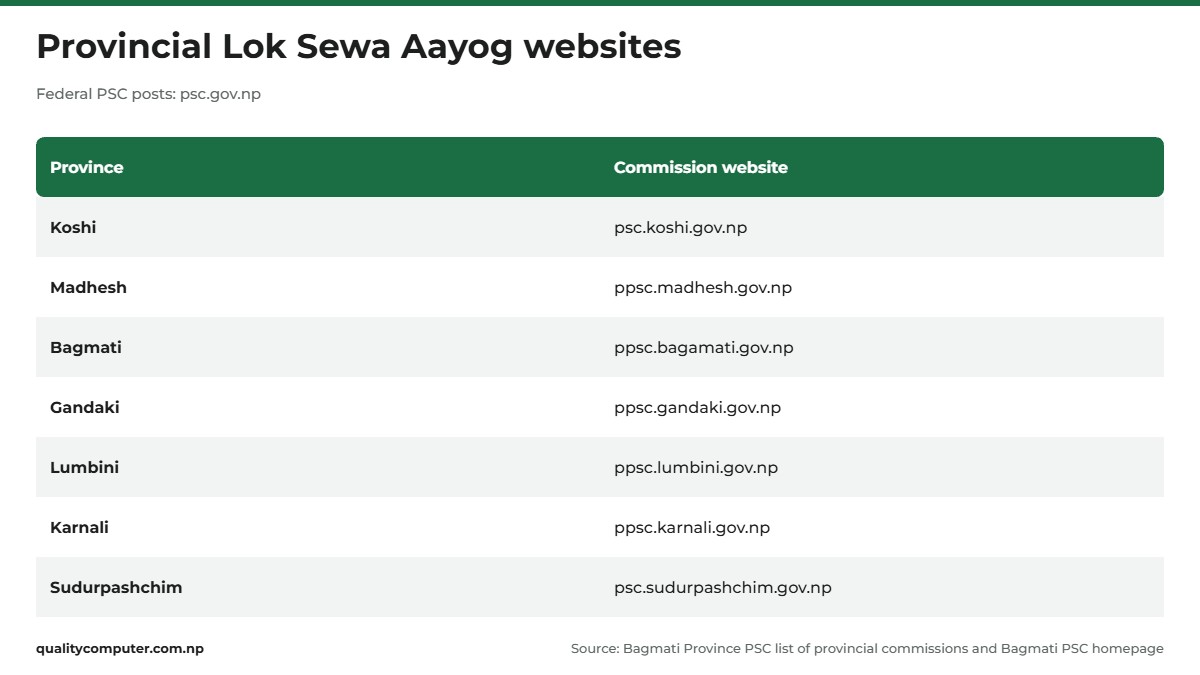
In Jhapa and the rest of Koshi Province, the provincial commission is the Koshi Province Public Service Commission in Biratnagar (psc.koshi.gov.np).
Before you fill the Lok Sewa online form
Three things save trouble later.
- Note the advertisement number. Every vacancy notice (विज्ञापन) has one, written like "4001-4008/082-83" in Koshi's notices, with "Open" or "Inclusive" groups marked. Exam centres and results are later published under the same number, so write it down. The Act requires separate advertisements for open competition and for promotion (Section 16).
- Check you qualify. An application that doesn't meet the qualification the commission set can be rejected at any time before the final result (Section 17).
- Look at the annual schedule. Both Koshi (schedule 2083-084) and Bagmati (schedule 2083/084) have published their recruitment timetables (वार्षिक कार्यतालिका) for this fiscal year, so you can see roughly when your level is due.
Then get your scans ready. Koshi PSC's FAQ says documents uploaded to your profile must be PDF, PNG or JPEG files of 500 KB or less (Koshi PSC FAQ). Scanning at a lower resolution, or in greyscale, gives smaller files. Our guide to printers for home and office covers all-in-one models that scan as well as print.
How to fill the Lok Sewa online form, step by step
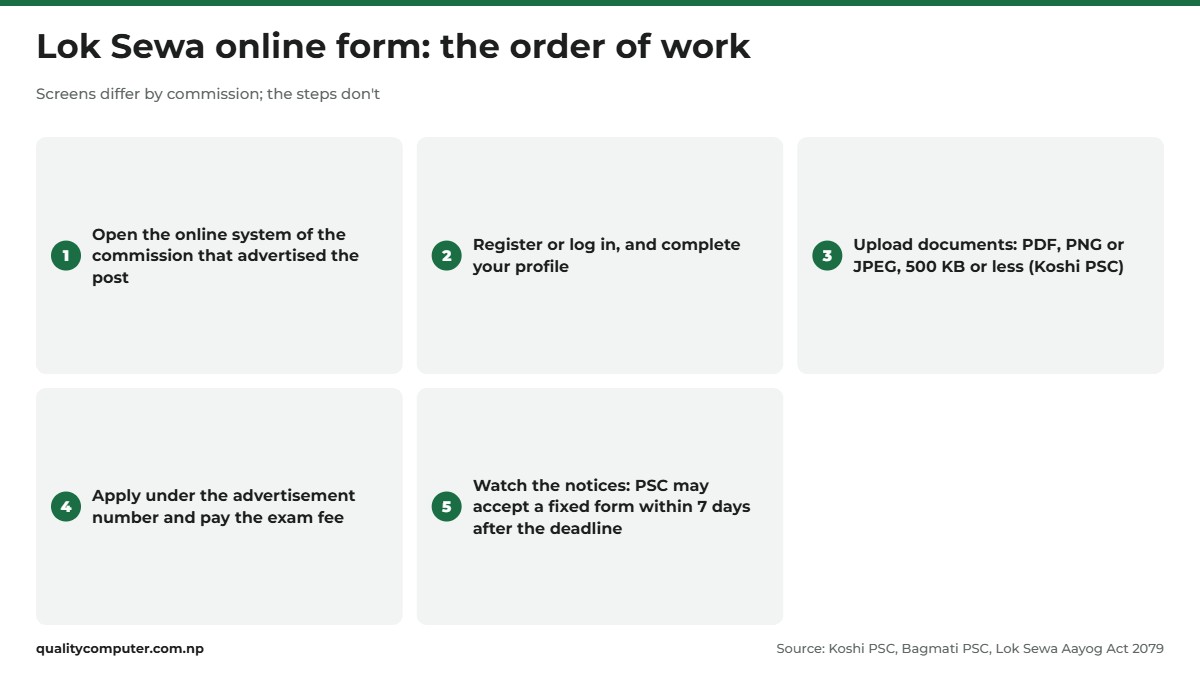
The Lok Sewa online form is filled on the commission's own system, and each one has its own screens. For PSC posts, the Nagarik App is reported to be a second route for your Lok Sewa online application. The order of work is the same, though:
- Open the right system. Koshi PSC links its अनलाइन दर्ता प्रणाली (online registration system) at psconline.p1.gov.np, which calls itself the Online Recruitment Management System. Bagmati PSC links its Online Application Management System (PSRMS) at ppsconline.bagamati.gov.np. Both are linked from the commission's homepage. For federal posts, start from psc.gov.np or the Nagarik App, explained below.
- Register or log in, and complete your profile. Koshi's FAQ talks about uploading documents while updating your profile, so expect to fill in a profile before you apply.
- Upload your documents within the size and file-type limits above.
- Apply under the advertisement number for your post. Advertisements are split into open and inclusive groups, so check which ones you're eligible for.
- Pay the exam fee the commission has set for that advertisement.
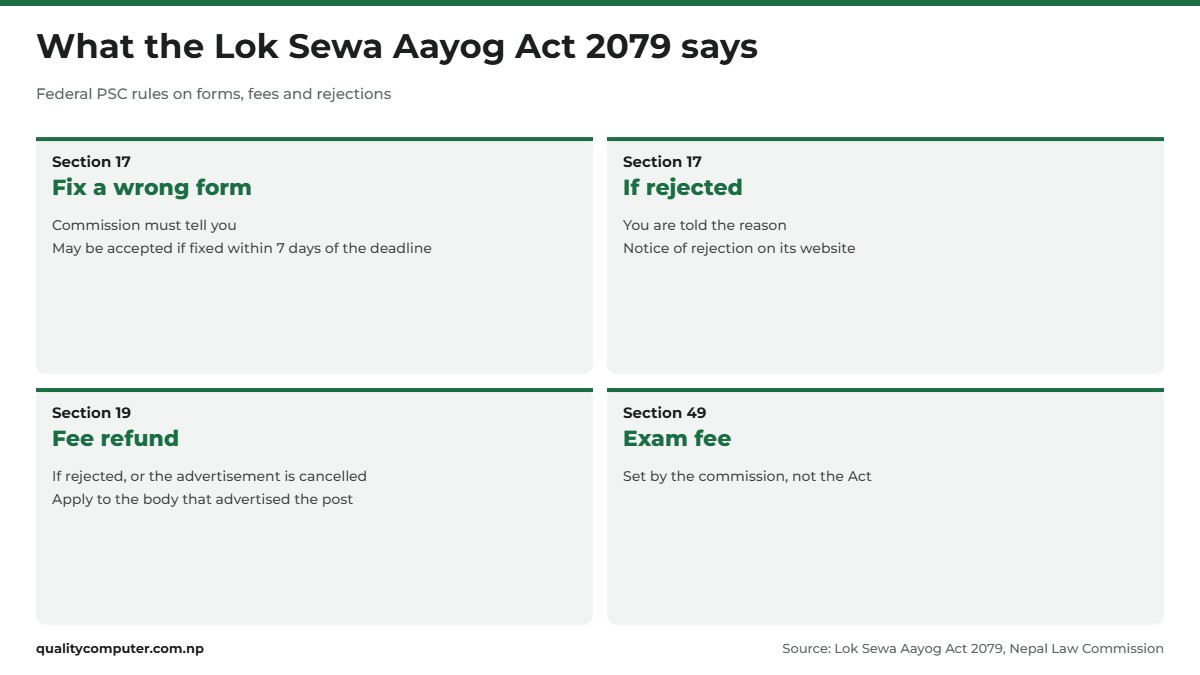
- Keep checking the notices until the exam. Under the federal Act, if your form is incomplete or in the wrong format, the PSC must tell you, and it may accept the form if you fix it within seven days after the application deadline (Section 17).
Koshi's system needs JavaScript switched on, so use an up-to-date browser. A laptop is easier than a phone for long forms and uploads.
Lok Sewa in the Nagarik App: vacancies, payment and admit card
The government's Nagarik App has been adding Lok Sewa services step by step:
- October 2024: Lok Sewa was already among the services linked to the app, and the Department of Information Technology's director general said Lok Sewa form filling would be added soon (Onlinekhabar).
- May 2025: version 2.0.67 (9 May 2025) brought Loksewa and payment updates, including an integrated payment system for Loksewa (App Store release notes).
- April 2026: Onlinekhabar reported that PSC admit cards in the app were at the final stage (Onlinekhabar). Version 2.0.95 on 27 April then enabled a PDF download for Loksewa admit cards (App Store).
To apply for a vacancy in the app, open the Lok Sewa option, which shows your personal details, and tap Vacancy. This route is widely reported (NepaliTelecom) but isn't described on a PSC page we could read, so if a screen differs, go by what the app shows.

You need a working Nagarik App account first. Our Nagarik App guide covers registering and linking your National ID, and our National ID card guide explains how to get an NID if you don't have one yet.
Exam fee, refunds and fixing a wrong form
The Lok Sewa Aayog Act doesn't put a figure on the exam fee. It leaves fees for open competition and promotion exams to the commission (Section 49), so check the amount for your advertisement before you pay. Payment arrangements can change: Koshi PSC issued an urgent notice on special arrangements for paying exam fees on 27 Falgun 2082 (Koshi PSC notice). Read the latest notices before paying.
For federal PSC exams, the Act also protects your fee and your form in a few ways (Lok Sewa Aayog Act, 2079). For a provincial post, check your province's own Act.
- Refund: if your application is rejected, or the advertisement is cancelled because the post is no longer needed, you are entitled to your exam fee back. You apply for it to the body that published the advertisement, with the necessary documents, within the set period (Section 19).
- Rejection: the commission must tell you why, and publish a notice of the rejection on its website (Section 17).
- Postponement: if there are irregularities at an exam centre, or something stops the exam being held, the commission can cancel or postpone all or part of the exam for that advertisement (Section 18).
Many people ask about applying late with a double fee (दोब्बर दस्तुर). We couldn't confirm the current rule from an official page, so check the advertisement notice itself for any late-application option and its deadline.
Lok Sewa admit card and exam centre
For PSC exams, you can get your Lok Sewa admit card (प्रवेशपत्र) in the Nagarik App, which has offered a PDF download since version 2.0.95 in April 2026 (App Store). Save the PDF on your phone. If you want a paper copy, any printer can print it.
Your exam hall is announced separately. Koshi PSC publishes exam centre (परीक्षा भवन) notices and has shared a Google Map of exam buildings for some exams (Koshi PSC exam centres). Bagmati PSC posts its own notices on fixing exam halls. Lumbini PSC, for one, has issued a notice amending an exam timetable it had already published (Lumbini PSC), and as above the commission can postpone an exam at a centre. Check your centre a day or two before the exam.

How to check your Loksewa result
Provincial commissions post results as notices on their websites, one per advertisement number. Koshi PSC lists them under written results (Koshi results), and Bagmati PSC posts each one as "लिखित परीक्षाको नतिजा प्रकाशन" (publication of written exam results) under its written exam results section (Bagmati results). For the federal PSC, the Act lets the commission publish results electronically (Section 32), and for the written exams it runs for the security bodies, other federal services and organisations, it must publish the result on its website once the marks are sealed (Section 27).
For federal PSC exams, what a Lok Sewa result shows is set by the Act:
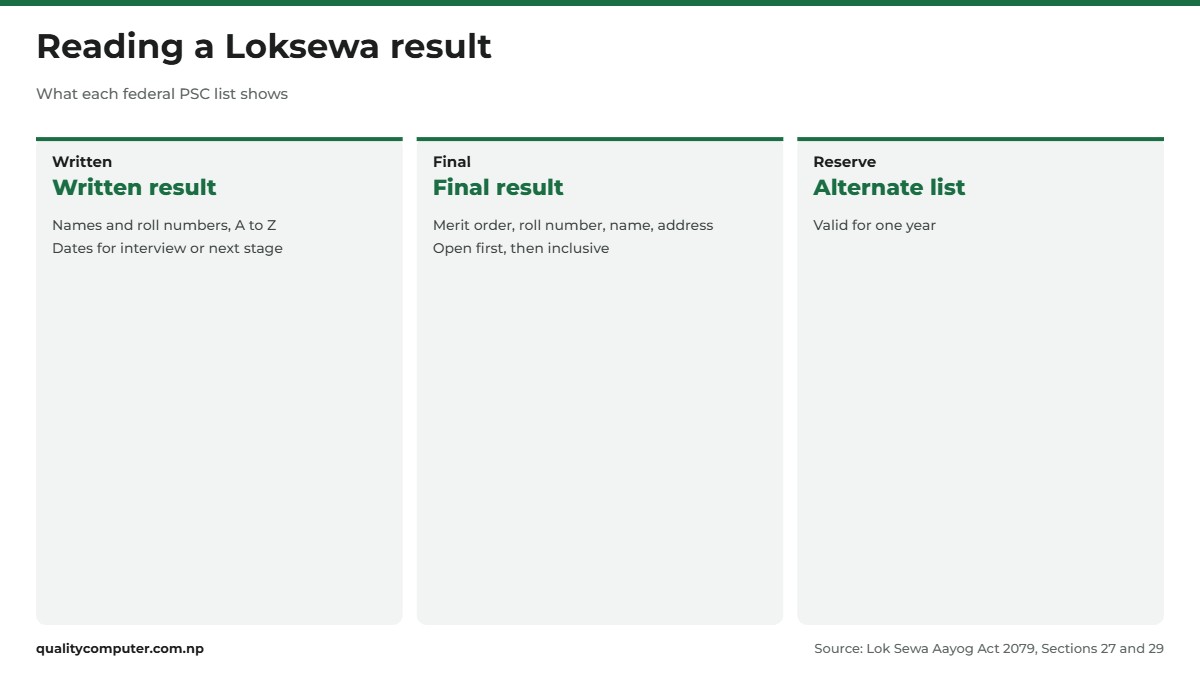
- Written or practical result: the names and roll numbers of the candidates who passed and were shortlisted, in alphabetical order, with the dates for the interview or next stage (Section 27).
- Final result: merit order, with roll number, name, address and recommending agency. Open results come first, then inclusive results, plus a combined merit list by total marks (Section 29).
- Alternate and provisional lists: the alternate (वैकल्पिक) list stays valid for one year. The provisional list, of candidates who passed but weren't selected at interview, stays valid until the next one for the same post (Section 29).
To find yours, open the notice with your advertisement number and search the page or PDF for your roll number with your browser's find option. Both provinces also have a marks page: Koshi's कूल प्राप्ताङ्क (total marks) page (Koshi PSC) and Bagmati's कुल प्राप्ताङ्क (Check Your Marks) page, where you choose the advertisement number and enter your Master ID, roll number and date of birth in BS (Bagmati PSC).
Both commissions also publish पुनर्योग (re-totalling) notices for some advertisements, and alternate recommendation notices. We couldn't confirm how to apply for re-totalling from an official page, so if you think your marks were added up wrongly, ask the commission's office straight away.

Common problems and who to contact
- A document won't upload. Koshi PSC's FAQ, under "मेरो प्रोफाइल अपडेट गर्दा कागजात अपलोड गर्दा समस्या आएमा के गर्ने ?", says to use PDF, PNG or JPEG and keep each file at 500 KB or less (Koshi PSC FAQ). Rescan at a lower resolution, or crop the empty margins, rather than uploading a phone photo of the whole desk.
- Your form is flagged or rejected. For federal PSC posts, if the commission says it is incomplete or in the wrong format, it may accept it if you fix it within seven days after the application deadline. If it is rejected, the commission must give you the reason (Section 17), and you are entitled to your fee back (Section 19). For a provincial post, ask that commission's office.
- Payment taken but not showing, or a forgotten password. We found no official fix published for either. Don't pay a second time. Contact the commission's office with your payment details.
Koshi Province Public Service Commission, Biratnagar: phone 021-422077 or 021-422075, email koshipsc@gmail.com. Its office is open Sunday to Friday from 9 am, to 4 pm in winter (16 Kartik to 15 Magh) and to 5 pm in summer (Koshi PSC). Bagmati PSC: 057-590613, 590614 or 590615, info.ppsc@bagamati.gov.np (Bagmati PSC). For other provinces, use the contact page on the commission's site from the list above (list of provincial commissions).
Quick verdict
- Apply to the commission that advertised the post: federal PSC (psc.gov.np) or your provincial Lok Sewa Aayog.
- Koshi's online system: psconline.p1.gov.np. Bagmati's: ppsconline.bagamati.gov.np.
- Koshi upload rule: PDF, PNG or JPEG, 500 KB or less.
- Nagarik App: Lok Sewa, then Vacancy to apply (widely reported); admit card PDF since April 2026.
- Federal PSC rules: a wrong or incomplete form may be accepted if fixed within seven days of the deadline; rejected forms get a fee refund.
- Results: open the notice for your advertisement number and find your roll number.
Printers and scanners in our store
Scanning certificates under the upload limit and printing an admit card are easier with your own printer and scanner.
| Product | What it is | Our price |
|---|---|---|
| Epson EcoTank L3260 Wi-Fi ink tank printer | Colour ink tank printer with Wi-Fi, prints, copies and scans | Rs 34,900 |
| Epson EcoTank M2050 ink tank printer (black and white) | Black-and-white ink tank printer | Rs 33,900 |
| Epson Perfection V39II flatbed scanner | Flatbed scanner for certificates and photos | Rs 11,400 |
| Epson WorkForce DS-1730 document scanner | Document scanner for many pages | Rs 56,000 |
Prices checked on 14 November 2026 on our website.
In our store
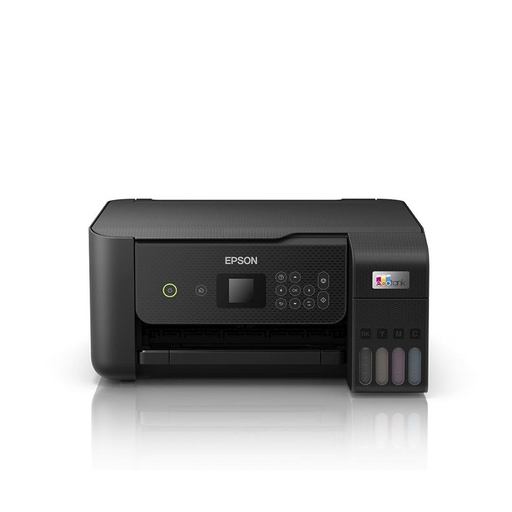
Epson L3260
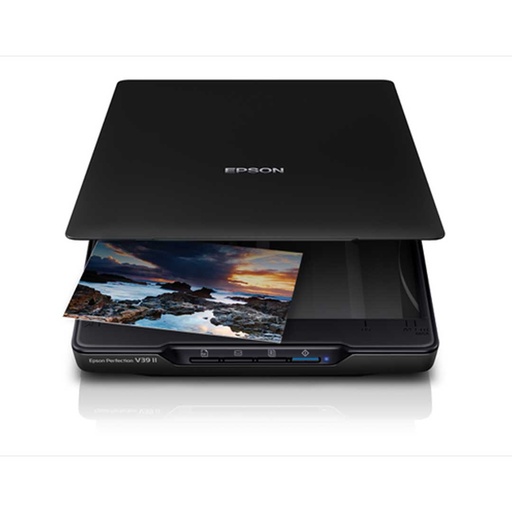
Epson V39II
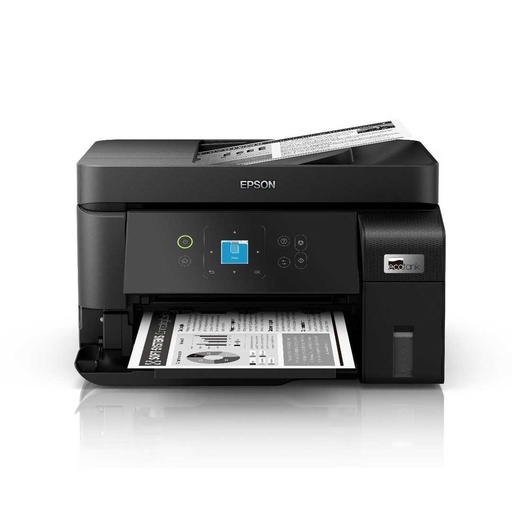
Epson M2050
Frequently asked questions
How do I fill the Lok Sewa online form?
Find the advertisement number on the website of the commission that advertised the post, then apply on that commission's online system: the federal PSC from psc.gov.np (the Nagarik App is a reported second route), or your provincial commission's system, such as psconline.p1.gov.np for Koshi Province. Complete your profile, upload your documents, apply under the advertisement number and pay the exam fee.
Can I apply for Lok Sewa through the Nagarik App?
It is widely reported that you can: open the Lok Sewa option in the Nagarik App and tap Vacancy to apply for a PSC post. No PSC page we could read describes this route. A May 2025 app update added an integrated payment system for Loksewa.
How do I download my Lok Sewa admit card?
For PSC exams, the Nagarik App has offered a PDF download of Loksewa admit cards since version 2.0.95 in April 2026. Save the PDF, and print it if you want a paper copy.
How can I check my Loksewa result?
Open the result notice for your advertisement number on the commission's website and search it for your roll number. For federal PSC exams, the Lok Sewa Aayog Act 2079 says written results list shortlisted candidates' names and roll numbers in alphabetical order, and final results list them in merit order.
What file size should documents be for the Lok Sewa form?
Koshi Province Public Service Commission's FAQ says uploaded documents must be PDF, PNG or JPEG files of 500 KB or less. Other commissions may set their own limits, so check the system you are using.
Is the Lok Sewa exam fee refunded if my application is rejected?
For federal PSC exams, yes. The Lok Sewa Aayog Act 2079 says you are entitled to a refund if your application is rejected or the advertisement is cancelled because the post is no longer needed. You apply for it to the body that published the advertisement within the set period. Provincial commissions follow their own provincial Acts.
Which jobs does the provincial Lok Sewa Aayog handle?
Provincial commissions fill provincial civil service and local government posts. A recent Koshi advertisement (26 Asoj 2083), for example, is for Local Government Service officer posts at levels 7, 8 and 9. Federal civil service posts go through the federal Public Service Commission.
Sources
- लोक सेवा आयोग ऐन, २०७९ (Lok Sewa Aayog Act, 2079), Nepal Law Commission
- Lok Sewa Aayog Act, 2079 (PDF, Nepali), Nepal Law Commission
- Province Public Service Commission, Koshi Province, Koshi PSC, checked November 2026
- Frequently asked questions, Koshi PSC
- Local Government Service officer-level advertisement, 26 Asoj 2083, Koshi PSC
- Urgent notice on special arrangements for paying exam fees, 27 Falgun 2082, Koshi PSC
- Province Public Service Commission, Bagmati Province, Bagmati PSC, checked November 2026
- Provincial public service commissions, Bagmati PSC
- प्रदेश लोक सेवा आयोग ऐन, २०७६ संशोधन सहित (Province Public Service Commission Act, 2076, with amendments), Koshi PSC, 31 Baisakh 2083
- Notice 1/083/84: amendment to the exam timetable published on 2083/04/01, Lumbini PSC, 7 Shrawan 2083
- Nagarik App: version history, App Store, National Information Technology Center
- Government services are being added to the Nagarik App, Onlinekhabar, 4 Kartik 2081 (October 2024)
- New services are expanding in the Nagarik App, Onlinekhabar, 27 Chaitra 2082 (April 2026)
- Nagarik App brings Nepal Engineering Council link: NOC, PSC Admit Card soon, NepaliTelecom, 16 April 2026
- Public Service Commission, Government of Nepal