Laptop for Engineering Students in Nepal (2026): Architecture and CAD Guide
Short answer: A good laptop for engineering students has 16 GB of RAM, an H-series processor, a 512 GB or larger SSD and an NVIDIA RTX card with 6 GB of graphics memory, which meets Revit 2027's 16 GB entry level and Lumion Pro's 6 GB memory minimum. First-year students who mostly draw in 2D in AutoCAD can start on 16 GB with integrated graphics. Architecture students who render in Lumion should look at an RTX 5060 with 8 GB, the amount Lumion says 1080p ray-traced renders need. Revit, SOLIDWORKS and Lumion are Windows software, so check your course list before you buy a Mac.
Shop at Quality Computer
Laptops with 16GB RAM and NVIDIA RTX graphics View all →
What AutoCAD, Revit, SOLIDWORKS, SketchUp and Lumion ask for
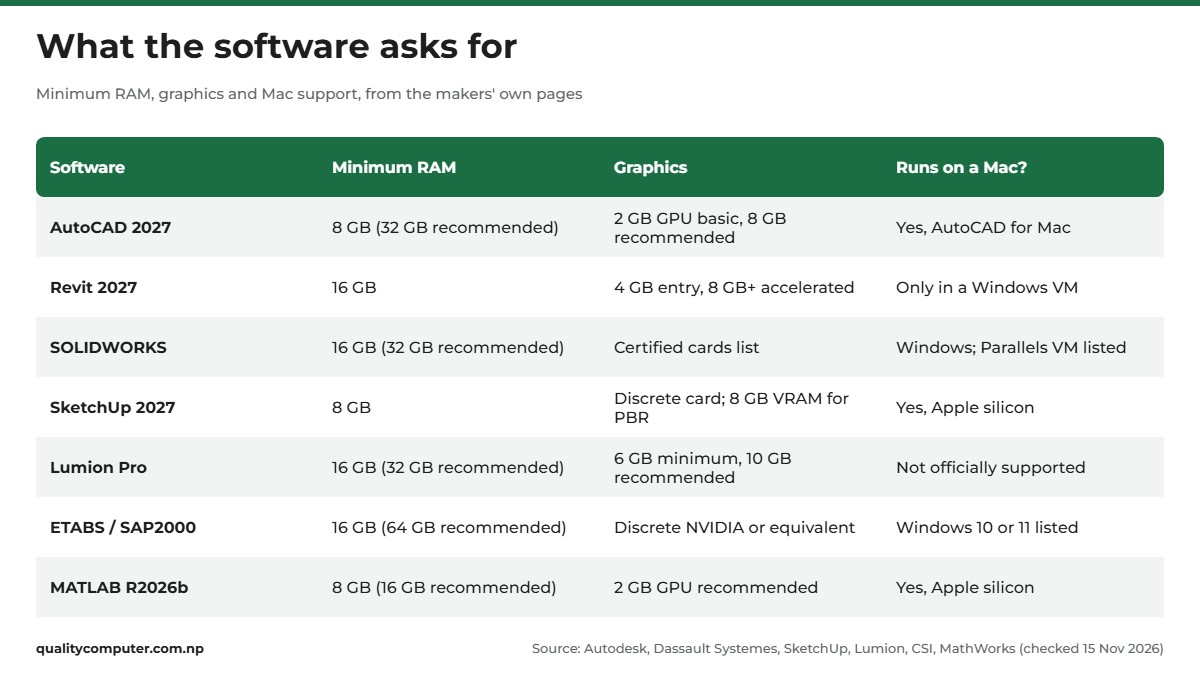
Before you choose a laptop for engineering students, start with the software. Every figure here is from the maker's own requirements page, checked on 15 November 2026; open the links before you buy, as they change with each release.
- AutoCAD 2027 is the lightest. Its basic level is 8 GB of RAM, a 2.5 to 2.9 GHz processor with 8 logical cores and a 2 GB GPU. Autodesk recommends 32 GB and an 8 GB GPU. A laptop for AutoCAD 2D work doesn't need much.
- Revit 2027 runs on 64-bit Windows 11. A laptop for Revit starts at 16 GB, with at least 4 GB of video memory recommended. The "value" level asks for 32 GB and 6 GB, Autodesk recommends 8 GB or more for accelerated graphics, and it wants 100 GB free for temporary files.
- SOLIDWORKS needs 16 GB (32 GB recommended) and recommends SSDs. Its certified graphics list names professional cards such as Quadro, RTX A-series and Radeon Pro, and no GeForce cards like those in the laptops below, so ask if your department requires certified hardware.
- SketchUp 2027 requires Windows 11 or an Apple silicon Mac, and its recommended minimum is 8 GB of RAM and "a discrete graphics card", with 8 GB of VRAM for PBR materials, ambient occlusion or image-based lighting.
- Lumion Pro is the heaviest: 16 GB of RAM and a 6 GB card scoring at least 8,000 in the G3DMark benchmark at minimum, which Lumion says "will not smoothly support Lumion Pro's high-end features". It recommends 32 GB and 10 GB, and 1080p ray-traced renders need at least 8 GB. Its laptop guide warns that laptop graphics can be "approximately 40% less" powerful than a similar desktop card.
- ETABS and SAP2000, CSI's structural analysis software, need 16 GB (64 GB recommended), and CSI recommends a discrete NVIDIA card or equivalent. For ETABS it also recommends 4 GB of video memory and a PCIe SSD of 500 GB or more.
- MATLAB R2026b needs 8 GB (16 GB recommended) and recommends a GPU with at least 2 GB.
Civil students may also meet Bentley's STAAD.Pro. We couldn't open Bentley's requirements page, so we've left it out.
The specs that matter in a laptop for engineering students
RAM: 16 GB is the floor
Revit, SOLIDWORKS, Lumion Pro, ETABS and SAP2000 all start at 16 GB, MATLAB recommends it, and several recommend 32 GB. Buy 16 GB now, ideally in a laptop that can take more later. Some solder part of the memory or cap the total, as two of our picks show.
Graphics: a dedicated NVIDIA card, and its memory
Look at the graphics card's own memory (VRAM): that's how Revit, SketchUp and Lumion state their requirements. Integrated graphics share the main memory.
- 6 GB (RTX 3050 or RTX 4050) clears Revit's entry level, ETABS' 4 GB recommendation and Lumion Pro's memory minimum. Lumion's laptop guide lists the RTX 4050 Laptop GPU in its minimum group; the RTX 3050 isn't listed.
- 8 GB (RTX 5060) adds Lumion's 1080p ray tracing, SketchUp's 8 GB for advanced materials and Revit's 8 GB for accelerated graphics.
NVIDIA lists the RTX 4050 Laptop GPU with 6 GB of GDDR6 and the RTX 5060 Laptop GPU with 8 GB of GDDR7.
Processor: H-series over U-series
Intel's naming guide describes H as "Highest performance" and U as "Power efficient". For long renders and simulations, pick an H-series chip; our H-series processor guide explains why.
Storage: 512 GB fills up fast
Lumion Pro wants at least 105 GB free, Revit 30 GB plus 100 GB for temporary files, and a full MATLAB install 25 GB. Add project files and 512 GB goes quickly, so buy 1 TB or pick a laptop with a second M.2 slot.

Screen, weight and battery
A 15.6 or 16-inch screen gives room for toolbars and drawings, and colour range matters for presentation renders, though Lumion notes a screen above 1920 x 1080 "may impact Lumion's performance". The gaming laptops below weigh 1.8 kg to about 2.3 kg where the makers state it, with big chargers, which matters if you carry one to campus daily.
Avoid Arm-based Windows laptops for CAD
Rhino for Windows needs a "64-bit Intel or AMD processor (Not ARM)", Archicad lists "Non-ARM PC", and SOLIDWORKS and MATLAB name Intel or AMD x86-64 chips.
Laptop picks by course and budget
These laptops from our range are grouped by what they can run. Specs are from the model names and the makers' pages where we could reach them.
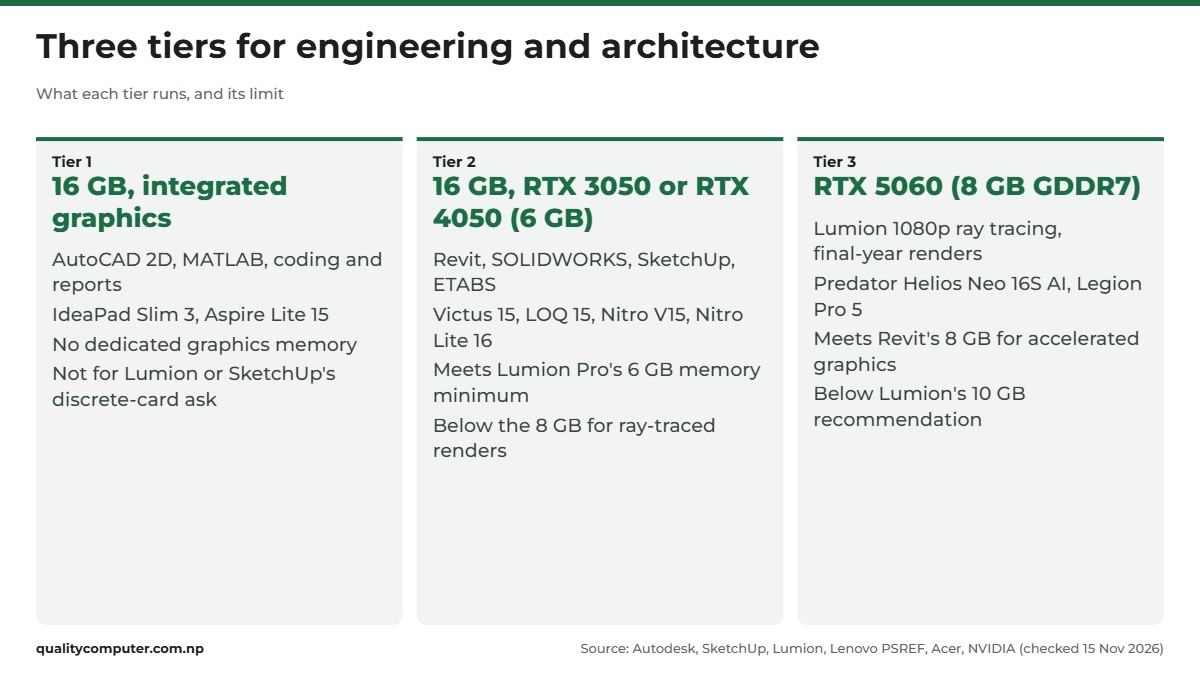
First year and 2D drafting: 16 GB, integrated graphics
For AutoCAD 2D, MATLAB, coding and reports. With no dedicated graphics card, neither suits Lumion, SketchUp or Revit, so choose one only if your first years are mostly 2D.
- Lenovo IdeaPad Slim 3 14IRH10R: Lenovo's PSREF lists its Core 5 210H as an H-series chip with 8 cores and 12 threads, a 14-inch 1920 x 1200 screen, and a weight from 1.39 kg with the IPS panel, the lightest we could confirm. Drawback: 8 GB is soldered, with one slot beside it, so the maximum is 24 GB. Lenovo rates the IPS panel at 300 nits and 45% NTSC colour.
- Acer Aspire Lite 15 (Ryzen 7 7730U): AMD lists 8 cores and 16 threads at a 15 W default TDP; Intel lists 45 W base power for the H-series chips in the HP and Nitro picks. It has a 15.6-inch Full HD IPS screen. Drawback: a 15 W chip rather than an H-series one, and we couldn't confirm its weight or memory slots on Acer's site.
Most engineering students: RTX 3050 or RTX 4050 (6 GB)
For Revit, SOLIDWORKS, SketchUp, ETABS and light rendering: the tier we'd point most civil, mechanical and architecture students to. All five are listed with 16 GB of RAM and have 6 GB of graphics memory, enough for Lumion Pro's memory minimum but not the 8 GB for ray-traced renders. One catch for Archicad users: Graphisoft says Archicad 30's built-in Redshift renderer doesn't support RTX 40 or 50 series cards, and recommends CineRender with them.
- HP Victus 15 (RTX 3050): a Core i5-13420H (8 cores, 12 threads, per Intel) and a 15.6-inch Full HD IPS 144Hz screen. Drawback: we couldn't reach HP's page for this model, so check its weight and memory slots before you buy.
- HP Victus 15 (RTX 4050): the same chip and screen with the newer RTX 4050. Drawback: still 6 GB of graphics memory, the figure the requirements use.
- Lenovo LOQ 15 (RTX 3050) (15ARP10E): PSREF lists the Ryzen 7 7735HS with 8 cores and 16 threads, the RTX 3050 at 65 W, a 15.6-inch Full HD IPS screen at 300 nits, 100% sRGB and 144Hz, a weight from 1.8 kg and a second M.2 slot. Drawback: despite two memory slots, Lenovo lists a 16 GB maximum, short of Revit's 32 GB value level.
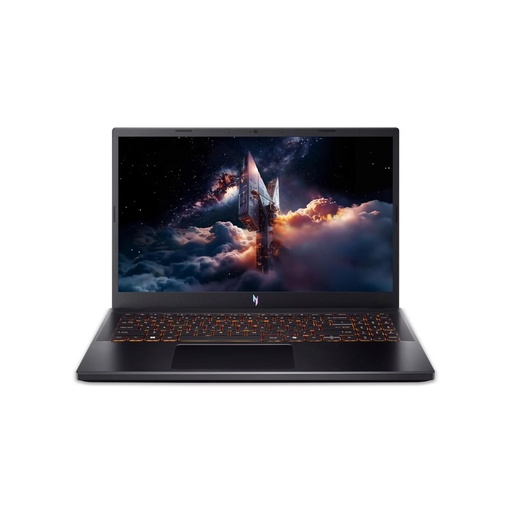
- Acer Nitro V15 (RTX 4050): a Core 7 240H (10 cores, 16 threads, per Intel) and a 15.6-inch Full HD IPS 165Hz screen. Drawback: as with the HP, we couldn't confirm its weight or memory slots.
- Acer Nitro Lite 16 (RTX 4050): a 16-inch 1920 x 1200 IPS 165Hz screen and a Core i7-13620H (10 cores, 16 threads, per Intel). Acer India's store lists 1.95 kg for the white version with the same chip, graphics and screen. Drawback: that version has a 53 Wh battery and a 45% NTSC colour gamut, where Lenovo rates the LOQ's screen at 100% sRGB.
A laptop for Lumion and final-year rendering: RTX 5060 (8 GB)
If you want the best laptop for architecture rendering from this list, start here: these two have the most graphics memory. Their 8 GB of GDDR7 clears Lumion's 8 GB for 1080p ray tracing, though not its recommended 10 GB.
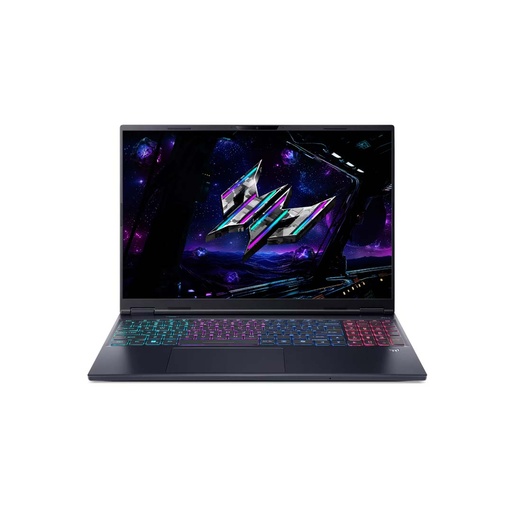
- Acer Predator Helios Neo 16S AI: a Core Ultra 7 255HX (20 cores, per Intel) and a 16-inch OLED WQXGA 240Hz screen. Acer's page for the version with the same chip, graphics and screen lists 2.30 kg and a 76 Wh battery. Drawback: 16 GB is half Lumion's recommended 32 GB, and Lumion alone wants 105 GB of the 512 GB SSD.
- Lenovo Legion Pro 5 16ADR10: 24 GB and 1 TB. PSREF lists the Ryzen 7 8745HX with 8 cores, the RTX 5060 at 115 W, up to 32 GB in two slots, an 80 Wh battery and a 16-inch 2560 x 1600 OLED at 100% DCI-P3 and 165Hz. Drawback: about 2.3 kg, plus a 245 W charger to carry.
Can architecture students use a MacBook?
Check your course list against this before you choose a MacBook as a laptop for architecture students.
Runs on macOS, per the makers:
- AutoCAD for Mac 2027: Apple M series or Intel, 8 GB basic, 16 GB or more recommended. Autodesk lists only macOS 13 to 15, so check your Mac's version before you install, especially on a new Mac.
- SketchUp 2027: needs Apple silicon, and SketchUp says every Mac with an M-series chip meets its minimum RAM and graphics.
- Rhino 8 and Archicad 30: both support Apple silicon Macs.
- MATLAB: native Apple silicon MATLAB has been available since R2023b.
Needs Windows:
- Revit: Autodesk's setup for Apple computers is a Windows 11 virtual machine in Parallels Desktop, where accelerated graphics are "Not Supported".
- SOLIDWORKS: Dassault says Macs "running Windows using Boot Camp are not supported". Its hypervisor table lists Parallels Desktop for Mac for SOLIDWORKS 2026 (2027 is "To be announced"), without saying whether that covers Apple silicon Macs. Its paid, browser-based xDesign for Students works on Macs.
- Lumion Pro: on Macs it "is not officially supported", and Lumion's Mac route relies on Boot Camp. Apple says Boot Camp needs a Mac with an Intel processor, which rules out Apple silicon MacBooks.
- ETABS and SAP2000: CSI lists only Windows 10 or 11.
For Macs with M1, M2 and M3 chips, Microsoft's options are Windows 365 in the cloud or an Arm version of Windows 11 in Parallels Desktop, and it says the Arm version has limitations, naming DirectX 12 as an example. If your course uses Revit, SOLIDWORKS or Lumion, buy a Windows laptop. If it's mostly AutoCAD, SketchUp, Rhino or Archicad, see our MacBook for students guide.
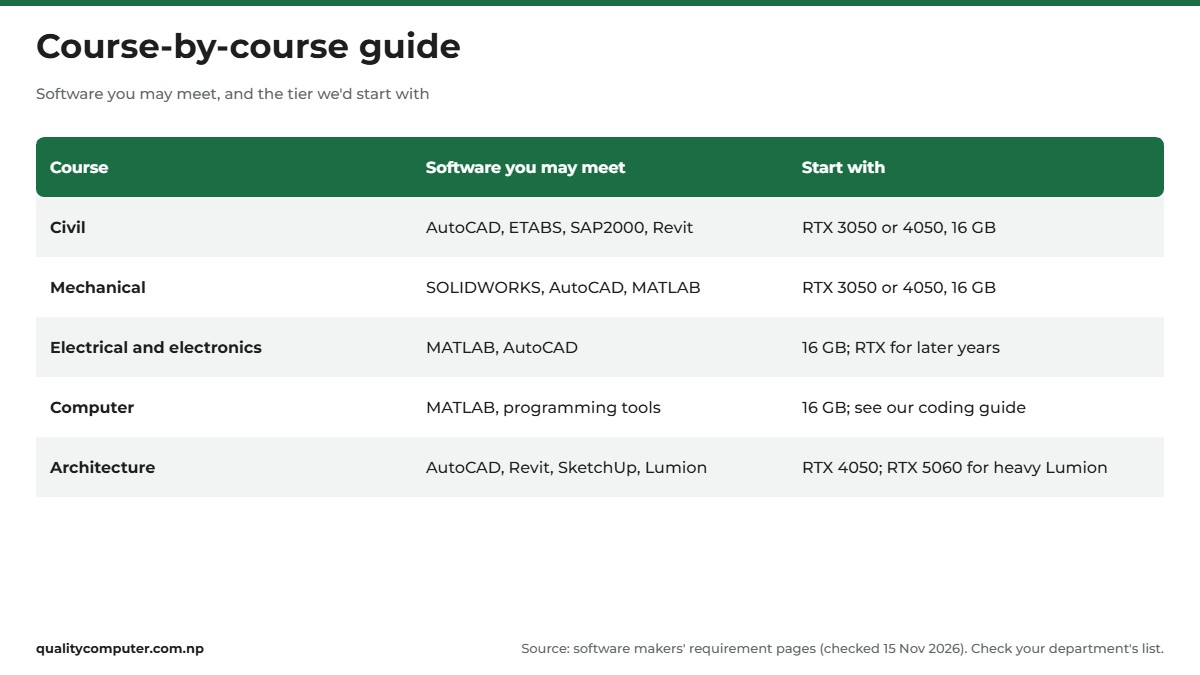
Course-by-course guide: civil, mechanical, electrical, computer, architecture
Software differs between colleges and years, so confirm with your department.
- Civil: AutoCAD, structural software such as ETABS and SAP2000, and Revit, which Autodesk lists for civil and structural engineers. A laptop for civil engineering belongs in the RTX 3050 or 4050 tier.
- Mechanical: a laptop for SOLIDWORKS fits the same 6 GB tier.
- Electrical and electronics: MATLAB and some AutoCAD, so the 16 GB integrated tier can work.
- Computer: MATLAB and coding tools. See our programming laptop guide.
- Architecture: start in the 6 GB tier, and move to the RTX 5060 for heavy Lumion work.
Choosing for school, plus two or a non-engineering degree? Our laptops for students hub covers general study, coding and Mac picks.
Free student software and buying tips
Get the software free or cheaper
- Autodesk: the education plan gives students at qualified institutions "free, one-year, single-user access" to software including AutoCAD and Revit. Autodesk verifies your status, and it isn't for commercial work.
- SOLIDWORKS: Dassault says SOLIDWORKS Design Standard for Students is "free for every student, everywhere". Your college may also have an institution licence you can use on your own laptop.
- SketchUp: Trimble sells a plan for students, billed yearly.
Before you pay
- Upgrades: per Lenovo, the Legion Pro 5 takes up to 32 GB, the IdeaPad Slim 3 24 GB and the LOQ 15 16 GB, and all three have two M.2 slots. For other models, ask to see the maker's spec sheet.
- A mouse: SketchUp lists a three-button mouse with a scroll wheel in its requirements.
- Cooling: for long renders, use a hard, flat surface or a cooling pad.
- The charger: Lenovo lists a 135 W adapter for the LOQ 15 and 245 W for the Legion Pro 5. Plug in for long renders.
- The bill: get the warranty terms written on it, and keep it.
Quick verdict
- Buy 16 GB of RAM at minimum: Revit, SOLIDWORKS, Lumion Pro and ETABS all start there.
- For most engineering courses, a 6 GB RTX 3050 or RTX 4050 laptop covers Revit, SOLIDWORKS and SketchUp coursework.
- For Lumion ray-traced renders, get an 8 GB RTX 5060 such as the Legion Pro 5 or Predator Helios Neo 16S AI.
- First-year 2D work can start on a 16 GB laptop with integrated graphics, but it won't suit Lumion.
- Revit, SOLIDWORKS and Lumion need Windows; AutoCAD, SketchUp, Rhino and Archicad also run on a Mac.
- Get AutoCAD and Revit free through the Autodesk education plan, and SOLIDWORKS free for students.
Laptops for CAD and rendering in our store
If your course runs Revit, SOLIDWORKS or Lumion, look for 16 GB of RAM and an NVIDIA RTX graphics card with 6 GB or more. Check the software list from your department against the specs before you buy.
| Product | What it is | Our price |
|---|---|---|
| Acer Aspire Lite 15 (Ryzen 7 7730U, 16GB) | 16GB, Ryzen 7, integrated graphics (2D drafting) | Rs 109,900 |
| Lenovo IdeaPad Slim 3 14IRH10R (Core 5 210H, 16GB) | 16GB, Core 5 H-series, integrated graphics | Rs 123,900 |
| HP Victus 15 (i5-13420H, RTX 3050 6GB) | 16GB, RTX 3050 6GB | Rs 149,900 |
| Lenovo LOQ 15ARP10E (Ryzen 7 7735HS, RTX 3050 6GB) | 16GB, RTX 3050 6GB | Rs 167,900 |
| HP Victus 15 (i5-13420H, RTX 4050 6GB) | 16GB, RTX 4050 6GB | Rs 169,900 |
| Acer Nitro Lite 16 (i7-13620H, RTX 4050 6GB) | 16GB, RTX 4050 6GB, 16-inch | Rs 185,000 |
| Acer Nitro V15 (Core 7 240H, RTX 4050 6GB) | 16GB, RTX 4050 6GB, 165Hz | Rs 188,900 |
| Acer Predator Helios Neo 16S AI (Ultra 7 255HX, RTX 5060 8GB) | 16GB, RTX 5060 8GB, 16-inch OLED | Rs 289,000 |
| Lenovo Legion Pro 5 16ADR10 (Ryzen 7 8745HX, 24GB, RTX 5060 8GB) | 24GB, RTX 5060 8GB, 1TB, 16-inch OLED | Rs 365,000 |
Prices checked on 15 November 2026 on our website.
In our store
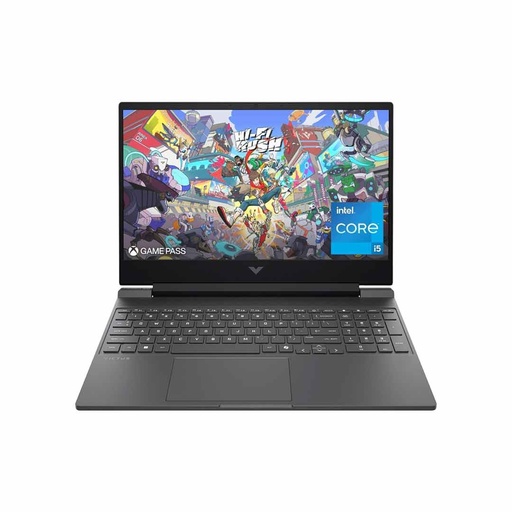
HP Victus 15 (RTX 3050)
Acer Nitro V15 (RTX 4050)
Predator Helios Neo 16S AI
Frequently asked questions
What is the best laptop for engineering students in Nepal?
There isn't one best laptop for every course. For most engineering students, a laptop with 16 GB RAM, an H-series processor and an NVIDIA RTX 3050 or RTX 4050 with 6 GB covers AutoCAD, Revit, SOLIDWORKS and SketchUp coursework. Architecture students who render in Lumion should consider an RTX 5060 with 8 GB.
Which laptop is good for civil engineering?
Civil engineering students usually need AutoCAD plus structural software such as ETABS or SAP2000, which CSI says need at least 16 GB RAM, with a discrete NVIDIA or equivalent graphics card recommended. A 16 GB laptop with an RTX 3050 or RTX 4050 meets those figures and also handles Revit's entry level.
How much RAM do I need for AutoCAD and Revit?
Autodesk lists 8 GB as the basic level for AutoCAD 2027 and 32 GB as recommended. Revit 2027 starts at 16 GB, with 32 GB for its value level and 64 GB for large, complex models. Buy 16 GB and choose a laptop that can take more later.
What laptop do I need for Lumion?
Lumion Pro's minimum is 16 GB RAM and a graphics card with at least 6 GB of memory and a G3DMark score of 8,000, and it recommends 10 GB of graphics memory and 32 GB RAM. Rendering in 1080p with ray tracing needs at least 8 GB of graphics memory, so an RTX 5060 laptop with 8 GB is a sensible choice for heavy rendering.
Is a gaming laptop good for architecture students?
Often, yes, because gaming laptops have the dedicated NVIDIA graphics cards and graphics memory that Revit, SketchUp and Lumion ask for. The trade-offs are weight and a large charger to carry. SOLIDWORKS' certified graphics list names professional workstation cards and no GeForce models, so check whether your department requires certified hardware.
Can I run Revit or SolidWorks on a MacBook?
Not natively. Autodesk's setup for Revit on a Mac is a Windows 11 virtual machine in Parallels Desktop, without accelerated graphics. Dassault does not support SOLIDWORKS through Boot Camp, though its requirements page lists Parallels Desktop for Mac among the hypervisors for SOLIDWORKS 2026. AutoCAD, SketchUp, Rhino and Archicad have Mac versions.
Is AutoCAD free for students?
Yes, for eligible students. Autodesk's education plan gives free, one-year, single-user access to software including AutoCAD and Revit for students at qualified educational institutions. Autodesk verifies your student status, and the licence can't be used for commercial work.
Sources
- AutoCAD product details: system requirements for AutoCAD 2027 and AutoCAD 2027 for Mac, Autodesk, checked 15 Nov 2026
- Revit product details: Revit 2027 system requirements, Autodesk, checked 15 Nov 2026
- Autodesk education plan, Autodesk
- SOLIDWORKS system requirements, Dassault Systemes SOLIDWORKS, checked 15 Nov 2026
- Hardware certification, Dassault Systemes SOLIDWORKS
- SOLIDWORKS for students, Dassault Systemes SOLIDWORKS
- SketchUp hardware and software requirements, SketchUp Help Center (Trimble), last updated 2 Nov 2026
- SketchUp Studio for higher education, Trimble SketchUp
- Lumion system requirements, Lumion, checked 15 Nov 2026
- Which laptop PCs do you recommend for Lumion 2024 and newer?, Lumion Support
- ETABS system requirements, Computers and Structures, Inc., checked 15 Nov 2026
- SAP2000 system requirements, Computers and Structures, Inc., checked 15 Nov 2026
- MATLAB R2026b system requirements for Windows, MathWorks, checked 15 Nov 2026
- MATLAB on Apple silicon Macs, MathWorks
- Rhino 8 system requirements, Robert McNeel & Associates
- Archicad system requirements, Graphisoft, checked 15 Nov 2026
- Install Windows 10 on your Mac with Boot Camp Assistant, Apple Support
- Options for using Windows 11 with Mac computers with Apple M1, M2 and M3 chips, Microsoft Support
- Intel processor names and numbers, Intel
- Intel Core i5-13420H processor, Intel
- Intel Core 7 processor 240H, Intel
- Intel Core i7-13620H processor, Intel
- Intel Core Ultra 7 processor 255HX, Intel
- AMD Ryzen 7 7730U, AMD
- Compare GeForce laptops, NVIDIA
- IdeaPad Slim 3 14IRH10R specifications, Lenovo PSREF
- LOQ 15ARP10E specifications, Lenovo PSREF
- Legion Pro 5 16ADR10 specifications, Lenovo PSREF
- Acer Nitro Lite 16 NL16-71G (i7-13620H, RTX 4050, white), Acer Store India
- Predator Helios Neo 16S AI (PHN16S-71-76UJ), Acer Singapore