
SSF Nepal (2026): How to Check Your SSF ID, Contributions and Claims Online
Short answer: The Social Security Fund (SSF) is Nepal's contribution-based social security scheme. For a private-sector employee, 31% of basic salary goes in each month: 11% from you and 20% from your employer. As an employee you don't register yourself. Your employer enrols you on the SSF system (SOSYS), and once SSF verifies it you get an 11-digit SSID with a username and password by email. Log in to the Contributor Portal at sosys.ssf.gov.np to update your KYC, see your contributions and make claims. The SSF Nepal app also gives access to SSF services, including KYC updates. Help: toll-free 1116.
Shop at Quality Computer
Attendance machines and office equipment View all →
What SSF is and what it pays for
The Social Security Fund runs Nepal's contribution-based social security scheme for workers. Regular contributors can claim under its medical treatment, accident and disability, dependent family and old-age schemes (Khabarhub).
In its policy and programme for fiscal year 2082/83, the government said all industries and businesses must register with SSF, and that proof of enrolment and regular contributions would be needed when they renew their registration (Sharesansar).

How much goes in each month
For employees in the formal sector, the contribution is 31% of basic salary. Your employer deducts 11% from your pay and adds 20% of its own (The Kathmandu Post, Pioneer Law). It's worked out on basic salary, not on allowances.
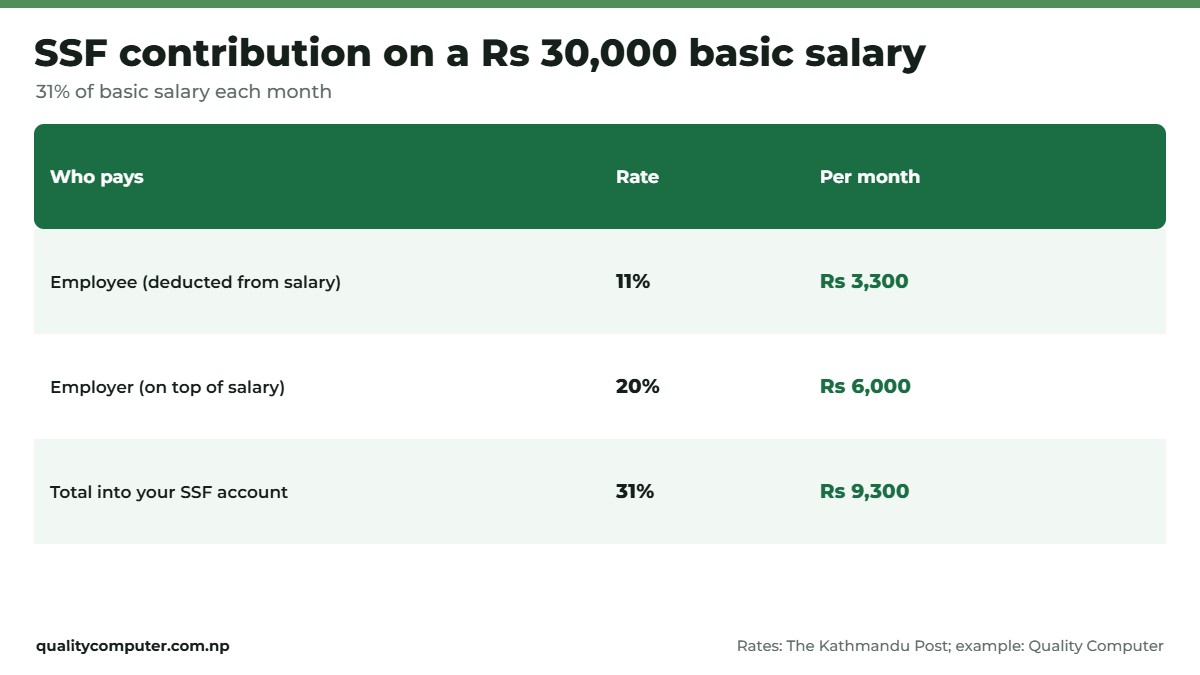
So on a basic salary of Rs 30,000, Rs 3,300 comes from you and Rs 6,000 from your employer: Rs 9,300 a month into your SSF account. Your payslip should show the 11% deduction.
Employees: get your SSID and log in
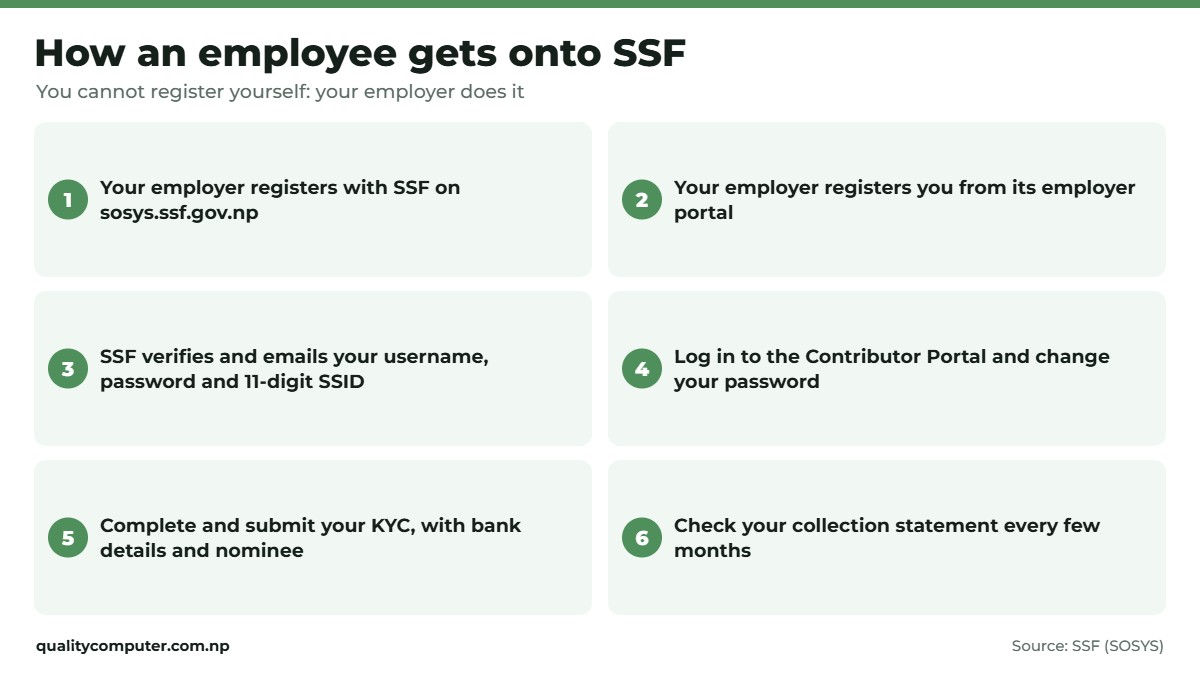
SSF's system (SOSYS) works in a fixed order (SOSYS):
- Your employer registers with SSF and gets its own login once SSF verifies it.
- Your employer registers you, its contributor, from its employer portal. For a job, it's your employer who registers you, not you (SSF Contributor Portal manual).
- Once SSF verifies you, you get a username, password and SSID by email. The SSID is your 11-digit Social Security number (SSF).
- Log in to the Contributor Portal with them. The first time, it asks you to change your password.
No email after weeks? Ask HR whether they've registered you and whether SSF has verified it. Registration problems go to reg@ssf.gov.np (SSF).
Check your contributions and KYC
In the Contributor Portal you can see your profile, update your KYC, make claims and view your collection statement, the record of what has been deposited for you (SSF manual). Check it every few months. If your payslip shows a deduction but the statement shows nothing, raise it with HR first, then with SSF.
Fill in your KYC fully: personal details, address, documents, relatives and nominee, then submit it. It only goes to SSF for verification once you submit (SSF manual). Add your bank details. SSF won't let you file a retirement claim until they're in your KYC and verified (SSF).
On your phone, SSF's official app is on Google Play and the App Store (SSF). It gives access to SSF services, including KYC updates.

Claims: treatment, accidents and retirement
Claims are made from the Contributor Portal, and SSF publishes its claim forms online. In some places, treatment must be at an SSF-affiliated hospital (SSF). SSF publishes the list of affiliated hospitals. Claims payments are handled at claim@ssf.gov.np, retirement claims at retirement@ssf.gov.np (SSF).

For a retirement withdrawal, your employer first has to mark your employment as ended in its employer portal. Then log in to the Contributor Portal with your username, password and SSID, make sure your KYC bank details are verified, and fill the withdrawal application under After Employment (SSF).

Employers: register and deposit
SSF's steps for employers (SOSYS):
- On sosys.ssf.gov.np, open employer registration and choose New Registration (naya darta) to get a submission number.
- Fill in all the employer details. Save as you go. Once you submit, you can't edit it.
- SSF verifies the record and sends the employer's username, password and SSID.
- Log in to the employer portal, change the password, and register each employee.
- After SSF verifies the employees, deposit the monthly contributions from the employer portal.
Accurate attendance makes basic salary and deductions easier to get right. Our attendance machine guide compares fingerprint and face devices.
Working abroad or self-employed
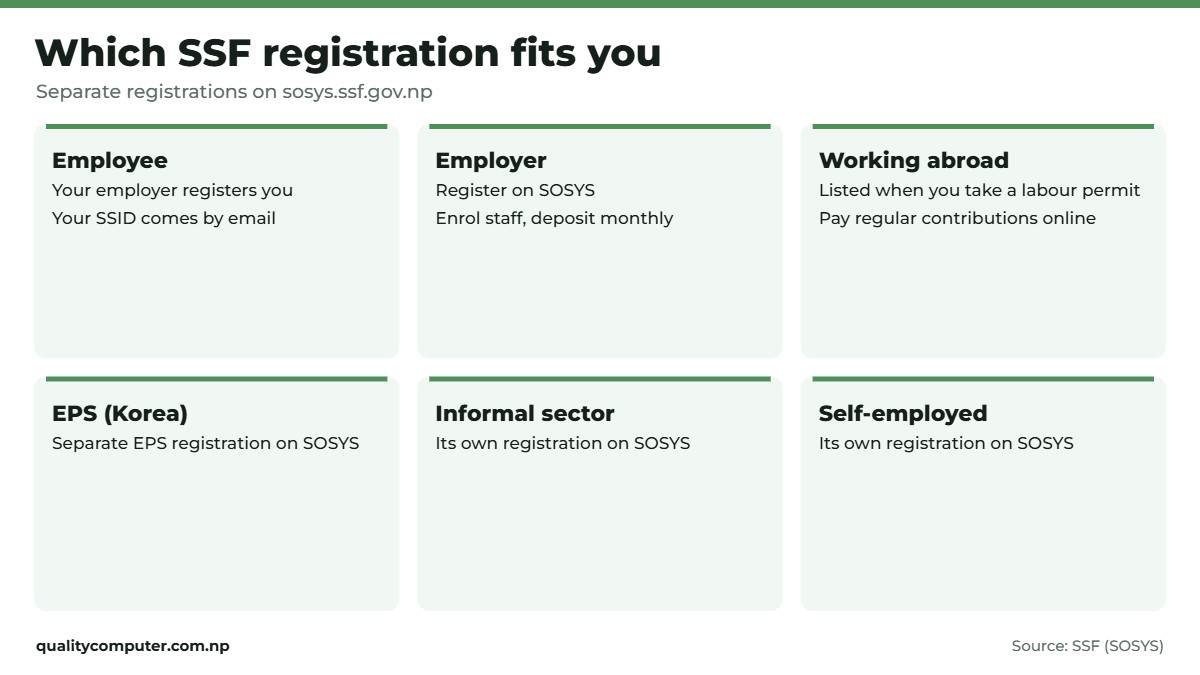
SSF isn't only for office jobs. SOSYS has separate registrations for foreign employment, the EPS Korea scheme, the informal sector and the self-employed (SOSYS).
Since 8 Chaitra 2079, workers taking or renewing a labour permit for foreign employment have had to be listed with SSF. As of Bhadra 2082 (August 2025), more than 18 lakh were listed, but only about 1 lakh were contributing regularly (Onlinekhabar). Listing alone isn't enough: benefits depend on regular contributions. Workers abroad can pay through SOSYS's regular contribution page, and SSF has a WhatsApp and Viber line for them, 9851351754, and the email migrantworker@ssf.gov.np (SSF).
Contacts: toll-free 1116 on NTC and Ncell, call centre 01-5970016, info@ssf.gov.np, KYC help kyc@ssf.gov.np. SSF's head office is in Thapathali, Kathmandu, with branch offices in Biratnagar and Simara (SSF). From Jhapa, Biratnagar is the closest.
Quick verdict
- 31% of basic salary: 11% from you, 20% from your employer.
- Employees are registered by their employer, not themselves.
- SSID, username and password arrive by email after SSF verifies you.
- Check your collection statement and complete KYC with bank details.
- Toll-free help: 1116.
Office equipment in our store
Running payroll and SSF deposits? Attendance machines, a printer for payslips and a laptop for the portals. These are in stock.
| Product | What it is | Our price |
|---|---|---|
| ZKTeco K40 Pro attendance device | Fingerprint and card attendance device | Rs 14,000 |
| ZKTeco MB2000 face and fingerprint attendance device | Face and fingerprint attendance device | Rs 26,500 |
| Brother HL-B2100D laser printer | Fast laser printer for payslips | Rs 22,900 |
| Brother DCP-B7620DW 3-in-1 laser printer | Laser printer, copier and scanner | Rs 36,500 |
| Acer Aspire Lite 14 (Ryzen 3) | 14-inch laptop for HR and accounts | Rs 72,900 |
| Epson EcoTank L3210 ink tank printer | Colour ink tank printer | Rs 26,500 |
Prices checked on 12 November 2026 on our website.
In our store
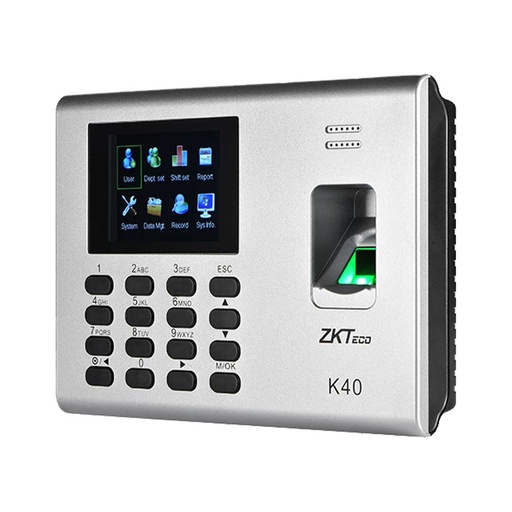
ZKTeco K40 Pro
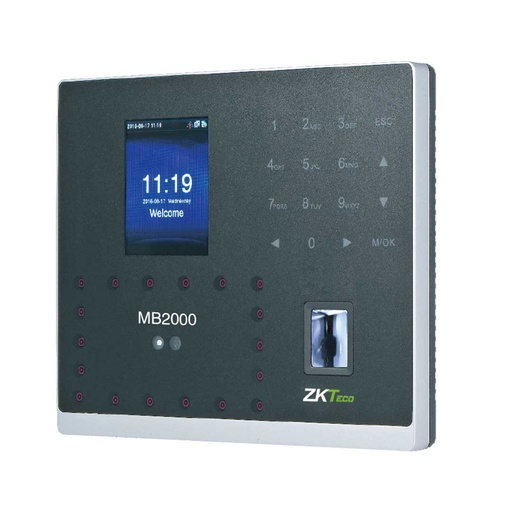
ZKTeco MB2000
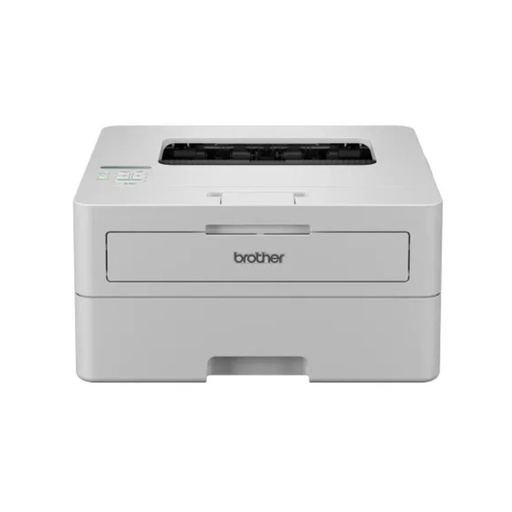
Brother HL-B2100D

Acer Aspire Lite 14
Need a PAN for a new job too? See how to get a personal PAN online.
Frequently asked questions
How do I check my SSF contribution in Nepal?
Log in to the Contributor Portal at sosys.ssf.gov.np with the username, password and SSID SSF emailed you, and open your collection statement.
How do I get my SSF ID?
Your employer registers you on SOSYS. Once SSF verifies the registration, you receive your 11-digit SSID, a username and a password by email.
Can I register for SSF myself?
Not as an employee: for a job, your employer registers you. Workers in foreign employment, EPS, the informal sector and the self-employed have their own registrations on sosys.ssf.gov.np.
How much is the SSF contribution?
For formal-sector employees, 31% of basic salary each month: 11% deducted from the employee and 20% added by the employer.
What is the SSF toll-free number?
1116 on NTC and Ncell. The call centre is 01-5970016. Workers abroad can use WhatsApp or Viber on 9851351754.
Why can't I file a retirement claim?
Usually one of two reasons. Your employer hasn't yet marked your employment as ended in its employer portal, so the Withdraw option under After Employment doesn't appear. Or your bank details aren't in your KYC and verified by SSF. Sort out both, then apply.
Sources
- SOSYS: employer, contributor and other registrations (in Nepali), Social Security Fund
- Contributor Portal user manual (in Nepali), Social Security Fund
- Online retirement claim process (in Nepali), Social Security Fund
- Contacts, branches and services, Social Security Fund, checked 12 November 2026
- Nearly 200 private firms register for social security schemes (31% contribution), The Kathmandu Post, 8 December 2018
- All industries now mandated to register in Social Security Fund, Sharesansar, 4 May 2025
- Social Security Fund contributions near Rs 100 billion, Khabarhub, 24 November 2025
- Social security system in Nepal, Pioneer Law
- Regular contributions from workers abroad (in Nepali), Onlinekhabar, 1 Bhadra 2082
- Product prices: Quality Computer website, 12 November 2026.