
Your computer may be working perfectly one moment and suddenly shut down, restart, or fail to turn on after an unexpected power problem. While we often worry about viruses, overheating, and hardware failure, unstable electricity can also damage computer components and cause data loss. Power surges, voltage fluctuations, sudden blackouts, and frequent power interruptions can affect sensitive components such as the power supply, motherboard, storage drives, and other connected devices.
Fortunately, you can reduce these risks by using the right power protection equipment. In this guide, we will explain what power surges and voltage fluctuations are, how they can affect your computer, and which solutions can help protect your system.
What Is a Power Surge?
A power surge is a sudden and temporary increase in electrical voltage. It can happen when electricity suddenly returns after an outage, when large electrical appliances switch on or off, or because of problems in the electrical supply. Even a short surge can put excessive electrical stress on computer components.
For example, if your desktop computer is connected directly to a wall socket and a sudden voltage spike occurs, the extra electrical energy can potentially damage sensitive components.
What Are Voltage Fluctuations ?
Voltage fluctuations occur when the electrical voltage supplied to your computer repeatedly rises or falls from its normal level. Unlike a single power surge, fluctuations can happen repeatedly over time. You may notice symptoms such as:
Lights becoming unusually bright or dim
Your computer restarting unexpectedly
Monitor flickering
Devices shutting down randomly
UPS alarms or switching frequently
Electronic equipment behaving unusually
Continuous unstable power can place unnecessary stress on electronic components.
How Can Power Problems Damage Your Computer?
Modern computers contain sensitive electronic components that require a relatively stable power supply. Electrical problems like High voltage can affect several parts of your system.
Power Supply Unit: The PSU converts electricity from the wall outlet into the appropriate power required by your computer components. A severe surge can damage the PSU and, in some situations, affect other components connected to it.
Motherboard: The motherboard connects many of the computer's major components. Electrical instability can potentially damage its circuits and power-delivery components.
Storage Devices: Hard drives and SSDs store your operating system, applications, documents, photos, videos, and other important files. Sudden shutdowns may interrupt read/write operations and can contribute to data corruption or, in some cases, hardware problems.
Monitor and Other Peripherals: Your monitor, router, speakers, printers, and other connected devices can also be affected by unstable electricity i.e voltage up-down . This is why protecting only the computer tower may not be enough if other important equipment is connected to the same power source.
Effective Ways to Protect Your Computer from voltage fluctuations
Protecting your computer does not necessarily require an expensive setup. The right solution depends on your computer, workload, location, and the quality of your electrical supply.
Use a UPS: A UPS (Uninterruptible Power Supply) is one of the most practical solutions for protecting a desktop computer. A UPS can provide temporary battery power when electricity fails. Depending on the type and model, it can also help manage certain power irregularities.
The biggest advantage is that a UPS gives you time to:
Save your work
Close applications properly
Shut down your computer safely
Prevent sudden interruptions during important tasks
For a basic desktop setup, a small UPS can be a useful starting point. Best for: Home users, students, office computers, and basic desktop setups.
Consider an Online UPS for Sensitive Equipment: For professional environments where stable power is especially important, an online UPS can provide a higher level of power conditioning.
Online UPS systems continuously supply power through their conversion system rather than simply switching to battery power when an outage occurs.
They are commonly considered for environments where sensitive equipment and uninterrupted operation are important. Best for: Offices, servers, networking equipment, professional workstations, and other sensitive equipment.
Use a Voltage Stabilizer When Voltage Is Unstable: If your area experiences frequent voltage fluctuations, a voltage stabilizer may be useful. A stabilizer is designed to help maintain a more suitable output voltage when the incoming supply varies within its operating range.
However, a stabilizer is not a replacement for a UPS. A UPS provides battery backup during power failure, while a stabilizer primarily addresses voltage regulation.Protect Your Router and Networking Equipment: Your computer may be protected by a UPS, but your internet connection can still disappear during a power outage if the router turns off. This can be especially inconvenient when you are:
Working from home
Attending online classes
Joining video meetings
Uploading files
Working remotely
Important: Always check your router's voltage, current, connector, and compatibility before choosing a DC UPS.
Back Up Your Important Data: Power protection and data backup are two different things, and you should ideally use both. A UPS can help prevent sudden shutdowns, but it cannot protect your files from every possible problem. For important documents, photographs, videos, projects, and business files, consider maintaining backups using:
External HDDs
External SSDs
USB storage
Network-attached storage (NAS)
Cloud storage
A good backup strategy means that even if your computer or storage device fails, you have another copy of your important data.
UPS vs Stabilizer: What's the Difference?
Many people confuse UPS systems with voltage stabilizers, but they serve different purposes.
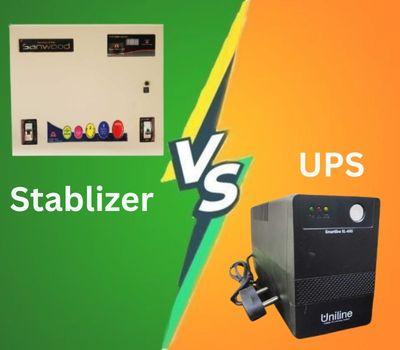
If your main concern is power cuts and sudden shutdowns, a UPS is generally more appropriate. If your main concern is unstable voltage, a stabilizer may be useful. In some situations, a suitable combination of power-protection equipment may provide better protection, but the equipment should be selected according to the actual electrical conditions and connected load.
How to Choose the Right UPS for Your Computer
Don't choose a UPS only by looking at its VA number or price. Consider the following factors before purchasing:
Calculate Your Power Load : Consider the power requirements of your:
Monitor
Router
Speakers
Other essential equipment
The UPS should have sufficient capacity for the equipment you intend to connect.
Consider Runtime: UPS runtime depends on the connected load and battery capacity. If you only need enough time to save your work and shut down your computer, a shorter runtime may be sufficient.
If you need longer backup, you may need a higher-capacity solution.
Check the UPS Type: Common UPS categories include:
Offline/standby UPS
Line-interactive UPS
Online UPS
For ordinary home and office computers, a suitable basic or line-interactive UPS may be enough. More sensitive or critical equipment may require an online UPS.
Check Battery Availability: UPS batteries eventually need replacement. Before buying, consider whether replacement batteries are easily available and whether the manufacturer or seller provides suitable support.
Leave Some Capacity Headroom: Avoid selecting a UPS that is operating at its maximum capacity all the time. Leaving some additional capacity can provide more flexibility if you add another device later.
Common Mistakes to Avoid
Even after purchasing power-protection equipment, users can make mistakes that reduce its effectiveness.
Plugging Too Many Devices Into the UPS: Connecting unnecessary high-power devices can overload the UPS.
Ignoring the UPS Battery: A UPS is only useful during an outage if its battery is functioning properly. Regularly check the battery condition and replace it when necessary.
Buying Only Based on Price: The cheapest option may not always be the most suitable. Consider capacity, UPS type, battery availability, warranty, and after-sales support.
Connecting Incompatible Devices: Always check the specifications of the UPS, stabilizer, or DC backup device before connecting equipment.
Forgetting About Your Router: If your work depends on the internet, protecting your computer but leaving your router without backup may still interrupt your workflow.
Why Power Protection Matters for Work and Business
For casual computer use, a sudden shutdown may simply be annoying. For businesses and professionals, however, power interruptions can have greater consequences. Imagine working on:
A business report
A financial spreadsheet
A graphic design project
A video project
A software development task
An important presentation
A sudden shutdown could interrupt your work, cause unsaved changes to disappear, or potentially contribute to file corruption. For businesses using multiple computers, servers, networking equipment, or other critical hardware, investing in an appropriate power-protection system can help reduce downtime and protect valuable equipment.
Build a Complete Power Protection Setup
For a basic home computer, you may not need an expensive system. A simple setup could include:
Desktop PC + Monitor → UPS → Wall Power
For a home office:
Desktop/Laptop + Monitor + Router → Appropriate UPS/Backup Solution
For a location with frequent voltage fluctuations:
Computer → Suitable Voltage Regulation/UPS Solution → Electrical Supply
For professional environments with critical equipment:
Critical Equipment → Appropriate Online UPS → Electrical Supply
The exact setup should always depend on the total power load and equipment requirements.
Final Thoughts
Power surges and voltage fluctuations are easy to overlook because they are not always visible. However, unstable electricity can affect computers and other electronic equipment over time. Using an appropriate UPS, online UPS, voltage stabilizer, or router backup solution can help reduce the risks associated with power interruptions and unstable voltage.
The best protection depends on your equipment, power conditions, and how important uninterrupted operation is to you. Before purchasing any power-protection device, check the power requirements, capacity, battery backup, compatibility, warranty, and intended use. A small investment in the right power-protection equipment can be much better than dealing with an unexpected computer failure or losing important work later.